Gateway to Research online/computer errors and try to find solutions for the error.
Pages
▼
Pages - Menu
▼
25.2.12
Setup Error Incorrect SideBySide Configuration
After I installed CamStudio 2.6b, when i am trying to open the file i got an error stated with the following error message.
Setup
Unable to execute file:
C:\Program Files\CamStudio 2.6b\Recorder.exe
CreateProcess Filed; code 14001.
The application has failed to start because its side-by-side configuration is incorrect. Please see the application event log or use the command-line sxstrace.exe for more detail.
Event Viewer report about this error logged with event id 33, sidebyside:
Event Description:
Activation context generation failed for C:\Program Files\CamStudio 2.6b\Recorder.exe.
Dependent Assembly
Microsoft.VC90.MFC,processor architecture="x86",publicKeyToken="1fc8b3b9a1e18e3b",type="win32",version="9.0.210228.0", could not be found. Please use sxstrace.exe for detail diagnosis.
Additional data:
log name: application
event id: 33
source: SideBySide
keywords: classic
Proof captured when i try to open the software:
Note: Instead the above error it is also expected, "Unable to execute file.
Create process failed; code 14001
This application has failed to start because the application configuration is incorrect".
Solution: Reinstalling the application may fix this problem.
Setup
Unable to execute file:
C:\Program Files\CamStudio 2.6b\Recorder.exe
CreateProcess Filed; code 14001.
The application has failed to start because its side-by-side configuration is incorrect. Please see the application event log or use the command-line sxstrace.exe for more detail.
Event Viewer report about this error logged with event id 33, sidebyside:
Event Description:
Activation context generation failed for C:\Program Files\CamStudio 2.6b\Recorder.exe.
Dependent Assembly
Microsoft.VC90.MFC,processor architecture="x86",publicKeyToken="1fc8b3b9a1e18e3b",type="win32",version="9.0.210228.0", could not be found. Please use sxstrace.exe for detail diagnosis.
Additional data:
log name: application
event id: 33
source: SideBySide
keywords: classic
Proof captured when i try to open the software:
Note: Instead the above error it is also expected, "Unable to execute file.
Create process failed; code 14001
This application has failed to start because the application configuration is incorrect".
Solution: Reinstalling the application may fix this problem.
Event 1006 Customer Experience Improvement Program
Event Description:
A problem prevented Customer Experience Improvement Program data from being consolidated into files that can be sent to microsoft, (Error 80070005).
Additional details:
log name: application
event id: 1006
event source: Microsoft-Windows-CEIP
OpCode: info
keywords: classic
snapshot proof for the event:
solution:
Refer the following article http://technet.microsoft.com/en-us/library/cc774621(v=ws.10).aspx. from the microsoft technet site.
A problem prevented Customer Experience Improvement Program data from being consolidated into files that can be sent to microsoft, (Error 80070005).
Additional details:
log name: application
event id: 1006
event source: Microsoft-Windows-CEIP
OpCode: info
keywords: classic
snapshot proof for the event:
solution:
Refer the following article http://technet.microsoft.com/en-us/library/cc774621(v=ws.10).aspx. from the microsoft technet site.
20.2.12
Event 12297 Volume Shadow Copy Service
Event Description:
Volume Shadow Copy Service error: The I/O writes cannot be flushed during the shadow copy creation period on volume \\?\Volume{ba206c14-f144-11e0-a0ff-806e6f6e6963}\. The volume index in the shadow copy set is 0. Error details: Open[0x00000000, The operation completed successfully.], Flush[0x80042302, A Volume Shadow Copy Service component encountered an unexpected error. Check the application event log for more information.],Release[0x00000000, The operation completed successfully.], OnRun[0x00000000, The operation completed successfully.].
Operation: Executing Asynchronous Operation.
Context:
Current State: DoSnapshotSet
Additional data:
log name: application
source: vss
event id: 12297
keywords:classic
proof:
Volume Shadow Copy Service error: The I/O writes cannot be flushed during the shadow copy creation period on volume \\?\Volume{ba206c14-f144-11e0-a0ff-806e6f6e6963}\. The volume index in the shadow copy set is 0. Error details: Open[0x00000000, The operation completed successfully.], Flush[0x80042302, A Volume Shadow Copy Service component encountered an unexpected error. Check the application event log for more information.],Release[0x00000000, The operation completed successfully.], OnRun[0x00000000, The operation completed successfully.].
Operation: Executing Asynchronous Operation.
Context:
Current State: DoSnapshotSet
Additional data:
log name: application
source: vss
event id: 12297
keywords:classic
proof:
Event 12297 Volume Shadow Copy Service
Event Description:
Volume Shadow Copy Service error: The I/O writes cannot be flushed during the shadow copy creation period on volume \\?\Volume{ba206c14-f144-11e0-a0ff-806e6f6e6963}\. The volume index in the shadow copy set is 0. Error details: Open[0x00000000, The operation completed successfully.], Flush[0x80042302, A Volume Shadow Copy Service component encountered an unexpected error. Check the application event log for more information.],Release[0x00000000, The operation completed successfully.], OnRun[0x00000000, The operation completed successfully.].
Operation: Executing Asynchronous Operation.
Context:
Current State: DoSnapshotSet
Additional data:
log name: application
source: vss
event id: 12297
keywords:classic
proof:
Volume Shadow Copy Service error: The I/O writes cannot be flushed during the shadow copy creation period on volume \\?\Volume{ba206c14-f144-11e0-a0ff-806e6f6e6963}\. The volume index in the shadow copy set is 0. Error details: Open[0x00000000, The operation completed successfully.], Flush[0x80042302, A Volume Shadow Copy Service component encountered an unexpected error. Check the application event log for more information.],Release[0x00000000, The operation completed successfully.], OnRun[0x00000000, The operation completed successfully.].
Operation: Executing Asynchronous Operation.
Context:
Current State: DoSnapshotSet
Additional data:
log name: application
source: vss
event id: 12297
keywords:classic
proof:
BTHUSB Bluetooth adapter
Event 16, BTHUSB:
Event Description:
The mutual authentication between the local Bluetooth adapter and a device with bluetooth adapter address (a8:5c:ff:8f:e8:97) failed.
log name: system
source: BTHUSB
event id: 16
keywords: classic
product: windows 7 operating system
Image snapshot for the error:
Event 17, BTHUSB:
The local Bluetooth adapter has failed in an undetermined manner and will not be used. The driver has been unloaded.
Event Description:
The mutual authentication between the local Bluetooth adapter and a device with bluetooth adapter address (a8:5c:ff:8f:e8:97) failed.
log name: system
source: BTHUSB
event id: 16
keywords: classic
product: windows 7 operating system
Image snapshot for the error:
Event 17, BTHUSB:
The local Bluetooth adapter has failed in an undetermined manner and will not be used. The driver has been unloaded.
Event 777 Dell - System Update
Event Description:
Update failed
Package: Setup.exe
Previous version: NA, New version:
log file: C:\Dell\UpdatePackage\log\bcmwl.log
Exit code: 0.
log name: application
event id: 777
keywords: classic
event source: dell - system update
product name: windows 7 operating system
product version: 6.1.7600.16385
Update failed
Package: Setup.exe
Previous version: NA, New version:
log file: C:\Dell\UpdatePackage\log\bcmwl.log
Exit code: 0.
log name: application
event id: 777
keywords: classic
event source: dell - system update
product name: windows 7 operating system
product version: 6.1.7600.16385
18.2.12
Event 12289 VSS Window 7
Volume shadow copy service error: Unexpected error DeviceIoControl(\\?\Volume{ba206c14-f144-11e0-a0ff-806e6f6e6963} - 0000000000000490, 0x0053c000, 0000000000382E10,0,0000000000384E30,4096,[0]). hr=0x80070570, The file or directory is corrupted and unreadable.
Operation:
Executing Asynchronous Operation
Context:
Current state: calling flush-and-hold IOCTL.
Current state: flush and hold writes.
Volume name is also logged on the event.
Additional details about the event:
log name: application
source: VSS
event id 12289.
keywords: classic.
product name: microsoft windows operating system.
product version: 6.1.7600.16385
Image snapshot for the error:
Operation:
Executing Asynchronous Operation
Context:
Current state: calling flush-and-hold IOCTL.
Current state: flush and hold writes.
Volume name is also logged on the event.
Additional details about the event:
log name: application
source: VSS
event id 12289.
keywords: classic.
product name: microsoft windows operating system.
product version: 6.1.7600.16385
Image snapshot for the error:
15.2.12
Event 10000 DCOM windows xp
Event Description:
Unable to start a DCOM server: {5C4C8078-24CF-4C71-B05E-8B1D935DB5AC}.The error: "This application has failed to start because the application configuration is incorrect. Reinstalling the application may fix this problem". The error happened while starting the command: "msnmgr.exe -Embedding".
source: DCOM
event id: 10000
file name: netevent.dll
Screenshot image proof for the error:
Recommended solution:
Modify the registry entries accordingly what is given from the page http://support.microsoft.com/kb/914052.
Unable to start a DCOM server: {5C4C8078-24CF-4C71-B05E-8B1D935DB5AC}.The error: "This application has failed to start because the application configuration is incorrect. Reinstalling the application may fix this problem". The error happened while starting the command: "msnmgr.exe -Embedding".
source: DCOM
event id: 10000
file name: netevent.dll
Screenshot image proof for the error:
Recommended solution:
Modify the registry entries accordingly what is given from the page http://support.microsoft.com/kb/914052.
14.2.12
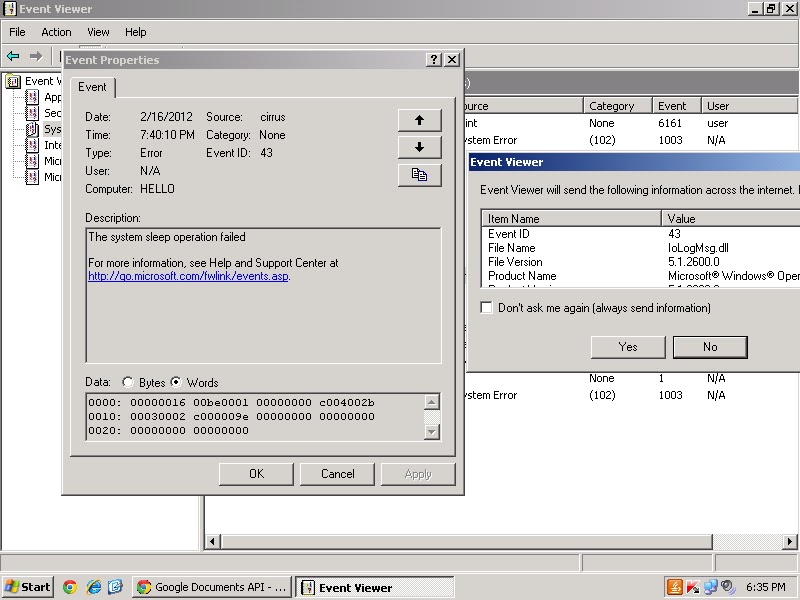
Event id 34 Time-Service Windows 7
The time service has detected that the system time needs to be changed by -54197 seconds. The time service will not change the system time by more than 54000 seconds. Verify that your time and time zone are correct, and that the time source time.windows.com,0x9 (ntp.m|0x9| 0.0.0.0:123-> 207.46.250.85:123) is working properly.
log name: system
source: Time-Service
event id: 34
OpCode: info
proof:
Recommended solution:
Refer and adjust the settings of local time synchronization from the page http://technet.microsoft.com/en-us/library/cc733187%28v=ws.10%29.aspx.
log name: system
source: Time-Service
event id: 34
OpCode: info
proof:
Recommended solution:
Refer and adjust the settings of local time synchronization from the page http://technet.microsoft.com/en-us/library/cc733187%28v=ws.10%29.aspx.
12.2.12
Reliance Netconnect Application error windows 7
Event 1000, Application error:
Faulting application name: Reliance Netconnect.exe, version: 1.0.0.1, time stamp: 0x492a13ea.
Faulting module name: ntdll.dll, version: 6.1.7600.16385, time stamp: 0x4a5bdadb.
Exception code: 0xc0000005
Fault offset: 0x00053067
Faulting process id: 0x52c
Faulting application path: C:\Program files\Reliance Netconnect\Reliance Netconnect.exe
Faulting module path: C:\Windows\System32\ntdll.dll
Report Id: e2f9489e-399e-11e0-83a5-001a4da64029
Log Name: application
source: application error
task category: (100)
keywords: classic
event id 100
Faulting Module SkinMagicU.dll is also logged on the event viewer for the reliance netconnect application.
Faulting application name: Reliance Netconnect.exe, version: 1.0.0.1, time stamp: 0x492a13ea.
Faulting module name: ntdll.dll, version: 6.1.7600.16385, time stamp: 0x4a5bdadb.
Exception code: 0xc0000005
Fault offset: 0x00053067
Faulting process id: 0x52c
Faulting application path: C:\Program files\Reliance Netconnect\Reliance Netconnect.exe
Faulting module path: C:\Windows\System32\ntdll.dll
Report Id: e2f9489e-399e-11e0-83a5-001a4da64029
Log Name: application
source: application error
task category: (100)
keywords: classic
event id 100
Faulting Module SkinMagicU.dll is also logged on the event viewer for the reliance netconnect application.
Classic Event 7001 Service Control Manager
Dependency service or group failure event:
The Network Location Awareness service depends on the Network Store Interface Service service which failed to start because of the following error: The dependency service or group failed to start.
log name: system
event id: 7001
keywords: classic
OpCode: info
The SMB 2.0/ 1.x MiniRedirector service depends on the SMB MiniRedirector wrapper and engine service which failed to start because of the error 'The dependency service or group failed to start'.
Other services includes:
The SMB MiniRedirector wrapper and engine service depends on the Redirected Buffering Sub System service failed to start because of the following error: A device attached to the system is not functioning.
Other services which are failed to start because of the same reason are,
The Network Location Awareness service depends on the Network Store Interface Service service which failed to start because of the following error: The dependency service or group failed to start.
log name: system
event id: 7001
keywords: classic
OpCode: info
The SMB 2.0/ 1.x MiniRedirector service depends on the SMB MiniRedirector wrapper and engine service which failed to start because of the error 'The dependency service or group failed to start'.
Other services includes:
- IP helper service depends on the Network Store Interface Service service failed to start.
The SMB MiniRedirector wrapper and engine service depends on the Redirected Buffering Sub System service failed to start because of the following error: A device attached to the system is not functioning.
Other services which are failed to start because of the same reason are,
- Network Store interface Service service depends on the NSI proxy service driver.
- TCP/IP NetBIOS helper service depends on the Ancillary function driver for winsock service.
- DNS client service depends on the NetIO legacy TDI support driver service.
QTP Setup error Windows 7
QTP, a software testing tool installation or setup encountered an error on windows 7 operating system and as a result stated with an error message,
No background bmp defined in section 'General' entry 'BGBmp'
No Application name defined in section 'General' entry 'AppText'.
Still image proof:
No background bmp defined in section 'General' entry 'BGBmp'
No Application name defined in section 'General' entry 'AppText'.
Still image proof:
11.2.12
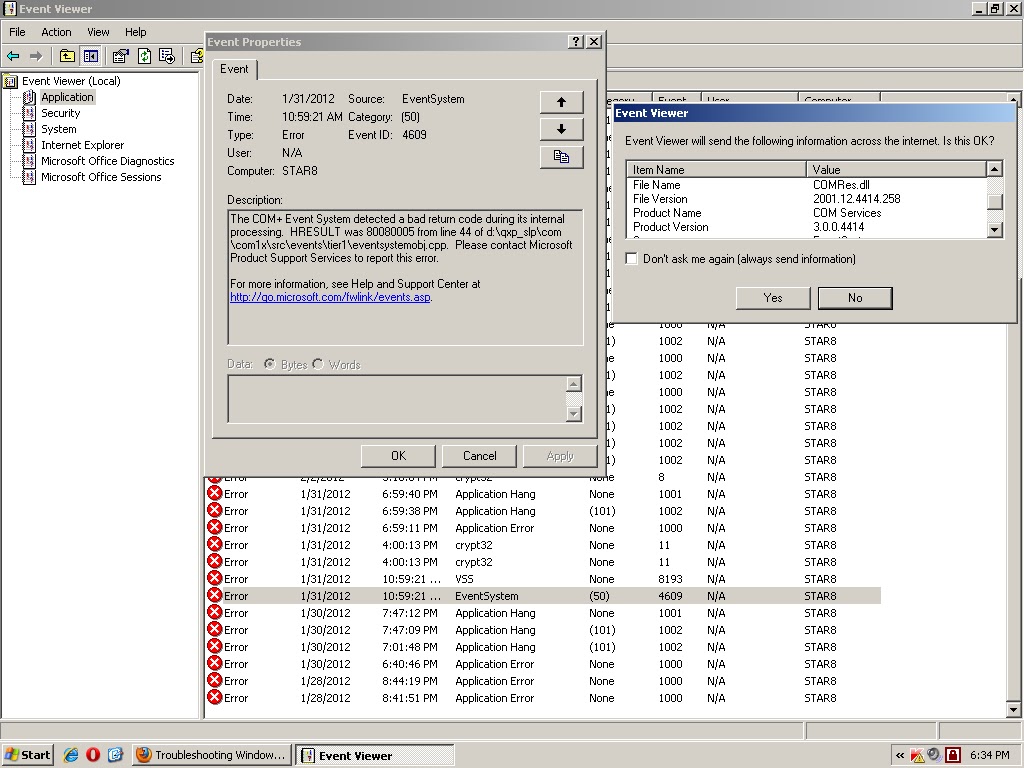
Event id 4609 EventSystem
The COM+ Event System detected a bad return code during its internal processing. HRESULT was 80080005 from line 44 of d:\qxp_slp\com\com1x\src\events\tier1\eventsystemobj.cpp. Please contact microsoft product support services to report this error.
file name: COMRes.dll
file version: 2001.12.4414.258
product name: COM services
product version: 3.0.0.4414
source: EventSystem
event id: 4609
category: (50)
proof:
file name: COMRes.dll
file version: 2001.12.4414.258
product name: COM services
product version: 3.0.0.4414
source: EventSystem
event id: 4609
category: (50)
proof:
Event id 11406 MsiInstaller
Event Description:
Product: ESET Smart Security. Error 1406. Could not write value egui to key \Software\Microsoft\Windows\CurrentVersion\Run.System Error.Verify that you have sufficient access to that key, or contact your support personnel.
Error data:
0000: 3734317b 32373439 46332d44 342d3746
0010: 2d433035 31334342 3443462d 34303446
0020: 46463530 7d44
source: MsiInstaller
event id: 11406
proof:
Product: ESET Smart Security. Error 1406. Could not write value egui to key \Software\Microsoft\Windows\CurrentVersion\Run.System Error.Verify that you have sufficient access to that key, or contact your support personnel.
Error data:
0000: 3734317b 32373439 46332d44 342d3746
0010: 2d433035 31334342 3443462d 34303446
0020: 46463530 7d44
source: MsiInstaller
event id: 11406
proof:
10.2.12
Event 12305, VSS
Volume Shadow Copy Service error: Volume/ disk not connected or not found. Error context: DeviceIoControl(//?\GLOBALROOT\Device\HarddiskVolumeShadowCopy - 0000000000000130,0x00560034,0000000000108FE0,0,0000000000107FD0,4096,[0]).
Operation:
Processing PostFinalCommitSnapshots
Context:
Execution Context: System Provider
log name: application
source: VSS
event id: 12305
keywords: classic
Proof:
Operation:
Processing PostFinalCommitSnapshots
Context:
Execution Context: System Provider
log name: application
source: VSS
event id: 12305
keywords: classic
Proof:
9.2.12
Unhandled Exception MadAppLauncher
Application: MadAppLauncher.exe
Framework Version: v4.0.30319
Description: The process was terminated due to an unhandled exception.
Exception Info:
Microsoft.VisualBasic.ApplicationServices.CantStartSingleInstanceException
Stack
at
Microsoft.VisualBasic.ApplicationServices.WindowsFormsApplicationBase.Run(System.String[])
source: .net runtime
event id: 1026
file name: mscoree.dll
file version: 4.0.31106.0
productname: microsoft .net framework
product version: 4.0.31106.0
proof:
Framework Version: v4.0.30319
Description: The process was terminated due to an unhandled exception.
Exception Info:
Microsoft.VisualBasic.ApplicationServices.CantStartSingleInstanceException
Stack
at
Microsoft.VisualBasic.ApplicationServices.WindowsFormsApplicationBase.Run(System.String[])
source: .net runtime
event id: 1026
file name: mscoree.dll
file version: 4.0.31106.0
productname: microsoft .net framework
product version: 4.0.31106.0
proof:
7.2.12
6.2.12
Software Restriction Policy Processing Event
Event Description:
The installation of VIRTUAL_PC_2007_INSTALL.msi is not permitted due to an error in software restriction policy processing. The object cannot be trusted.
event id: 1008
source: MsiInstaller
file name: msi.dll
file version: 3.1.4001.5512
proof:
Recommended solution:
Refer the following pages http://technet.microsoft.com/en-us/library/cc735563%28v=ws.10%29.aspx, http://support.microsoft.com/kb/324036, http://technet.microsoft.com/en-us/library/697cf804-36ae-4925-a56a-bc91b44dfcd9.
The installation of VIRTUAL_PC_2007_INSTALL.msi is not permitted due to an error in software restriction policy processing. The object cannot be trusted.
event id: 1008
source: MsiInstaller
file name: msi.dll
file version: 3.1.4001.5512
proof:
Recommended solution:
Refer the following pages http://technet.microsoft.com/en-us/library/cc735563%28v=ws.10%29.aspx, http://support.microsoft.com/kb/324036, http://technet.microsoft.com/en-us/library/697cf804-36ae-4925-a56a-bc91b44dfcd9.
Application Popup Event
Event Description:
There was error [DATABASE NOT LOADED] processing the driver database.
There was error [DATABASE OPEN FAILED] processing the driver database.
event id: 877
source: application popup
data:
0000: 00000000 00640002 00000000 c000036d
0010: 00000000 c000036d 00000000 00000000
0020: 00000000 00000000
proof:
There was error [DATABASE NOT LOADED] processing the driver database.
There was error [DATABASE OPEN FAILED] processing the driver database.
event id: 877
source: application popup
data:
0000: 00000000 00640002 00000000 c000036d
0010: 00000000 c000036d 00000000 00000000
0020: 00000000 00000000
proof:
3.2.12
child status 100 permanent error gmail
MAILER-DAEMON@p3plsmtp11-05.prod.phx3.secureserver.net
child status 100..The e-mail message could not be delivered because the user's mailfolder is full.
Content Type: multipart/alternative
Received: (qmail 3592 invoked from network)
X-IronPort-Anti-Spam-Result: AowBAJ69K0/
child status 100..The e-mail message could not be delivered because the user's mailfolder is full.
Content Type: multipart/alternative
Received: (qmail 3592 invoked from network)
X-IronPort-Anti-Spam-Result: AowBAJ69K0/
QoJDQcSBiGBcwEBBBICLAEbHgMMBhA
tAQ0hAQERAQUBDgEHBgYLCCKjAQqLc
DKIM-Signature: v=1; a=rsa-sha256; c=relaxed/relaxed
solution:
Verify the recipient addresses and try again. Otherwise, user can check their mailbox, if it is full then you should delete some messages to free up space or user can add more space to your account. If you are still having difficulty sending mail to the addresses, please contact e-mail customer support at 480-624-2500
![]() |