Showing posts with label event log. Show all posts

19.1.14

Diagnostics Performance Error Windows 8

Event 300, Diagnostics-Performance:
Windows has resumed from standby:
     Standby Duration : 23839ms
     Standby Incident Time (UTC) : ‎2014‎-‎01‎-‎18T20:16:00.566907100Z
     Resume  Duration : 5786ms
     Resume  Incident Time (UTC) : ‎2014‎-‎01‎-‎19T02:01:42.693986400Z
     IsDegradation : false

Task category: Standby Performance Monitoring
event id: 300
source: Diagnostics-Performance
Keywords: event log

Event 101:
This application took longer than usual to start up, resulting in a performance degradation in the system startup process:
     File Name : CamtasiaStudio.exe
     Friendly Name : Camtasia Studio
     Version : 8.0.2.918
     Total Time : 38241ms
     Degradation Time : 33241ms
     Incident Time (UTC) : ‎2014‎-‎01‎-‎08T09:59:56.741249800Z

Task category: Boot Performance Monitoring
Opcode: Boot Degradation

Event 203:
This service caused a delay in the system shutdown process:
     File Name : WlanSvc
     Friendly Name : Windows WLAN AutoConfig Service DLL
     Version : 6.2.9200.16384 (win8_rtm.120725-1247)
     Total Time : 5783ms
     Degradation Time : 1783ms
     Incident Time (UTC) : ‎2013‎-‎12‎-‎31T23:30:19.277122300Z
task category: Shutdown Performance Monitoring
Opcode: shutdown degradation

Event 303: Critical Level
This service caused a delay during hybrid-sleep:
     File Name : SuperfetchPageIn
     Friendly Name : Superfetch Service Host
     Version : 6.2.9200.16384 (win8_rtm.120725-1247)
     Total Time : 10033ms
     Degradation Time : 9985ms
     Incident Time (UTC) : ‎2013‎-‎12‎-‎26T18:32:12.123837000Z
Task category: Standby Performance Monitoring
Opcode: standby degradation
user: local service

21.12.13

IOException windows 8 event log

Event 1026, .NET Runtime:
Application: Seagate.Dashboard.DASWindowsService.exe
Framework Version: v4.0.30319
Description: The process was terminated due to an unhandled exception.
Exception Info: System.IO.IOException
Stack:
   at System.IO.__Error.WinIOError(Int32, System.String)
   at System.IO.FileStream.Init(System.String, System.IO.FileMode, System.IO.FileAccess, Int32, Boolean, System.IO.FileShare, Int32, System.IO.FileOptions, SECURITY_ATTRIBUTES, System.String, Boolean, Boolean, Boolean)
   at System.IO.FileStream..ctor(System.String, System.IO.FileMode, System.IO.FileAccess, System.IO.FileShare, Int32, System.IO.FileOptions, System.String, Boolean, Boolean, Boolean)
   at System.IO.StreamWriter.CreateFile(System.String, Boolean, Boolean)
   at System.IO.StreamWriter..ctor(System.String, Boolean, System.Text.Encoding, Int32, Boolean)
   at System.IO.StreamWriter..ctor(System.String, Boolean)
   at System.IO.File.CreateText(System.String)
   at UserDataCollection.HttpHelper.JsonHelper.WriteToFile(System.Object, System.String)
   at UserDataCollection.UserDataHelper.SaveAll()
   at UserDataCollection.UserDataHelper.UploadThreadFunctionCompleted(System.Object, System.ComponentModel.RunWorkerCompletedEventArgs)
   at System.ComponentModel.BackgroundWorker.OnRunWorkerCompleted(System.ComponentModel.RunWorkerCompletedEventArgs)
   at System.ComponentModel.BackgroundWorker.AsyncOperationCompleted(System.Object)
   at System.Threading.QueueUserWorkItemCallback.WaitCallback_Context(System.Object)
   at System.Threading.ExecutionContext.RunInternal(System.Threading.ExecutionContext, System.Threading.ContextCallback, System.Object, Boolean)
   at System.Threading.ExecutionContext.Run(System.Threading.ExecutionContext, System.Threading.ContextCallback, System.Object, Boolean)
   at System.Threading.QueueUserWorkItemCallback.System.Threading.IThreadPoolWorkItem.ExecuteWorkItem()
   at System.Threading.ThreadPoolWorkQueue.Dispatch()
   at System.Threading._ThreadPoolWaitCallback.PerformWaitCallback()

Additional Details:
log name: application
source: .NET Runtime
product name: microsoft .net framework

Recommended:
System.InvalidOpeerationException

14.12.13

Event 2484 Apps Windows 8

Event  2484, Apps:
Package winstore_1.0.0.0_neutral_neutral_cw5n1h2txyewy was terminated because it took too long to suspend.
log name: application
source: apps
event id: 2484
Task category: (2400)
keywords: 64, process lifetime manager
Event source: microsoft-windows immersive shell
Recommended:
Event Apps Windows 8 Immersive Shell

13.12.13

Event Apps Windows 8 Immersive Shell

Event id 5973, Apps:
Activation of app Microsoft.ZuneMusic_8wekyb3d8bbwe! Microsoft.Zunemusic failed with error: The remote procedure call failed. See the Microsoft windows TWinUI/Operational log for additional information.
Log name: application
source: Apps
event id: 5973
Task category: 5973
Event Source: Microsoft-Windows-Immersive-Shell
Product version: 6.2.9200.16384

Event id: 2486, Apps:
App Microsoft.ZuneMusic_8wekyb3d8bbwe!Microsoft.ZuneMusic did not launch within its allotted time.
Task category: (2414)
Keywords: (64), Process Lifetime Manager

Proof:

Windows 8 Search event 3083

Event 3083, Search:
The protocol handler IEHistory cannot be loaded.
Error Description: The process cannot access the file because it is being used by another process. (HRESULT  : 0X80070020)
Log name: application
source: search
event id: 3083
Task category: Gatherer
Product name: windows search
Product version: 7.0.9200.16384
Locale id: 1033
keywords: classic
Proof:
windows 8 search event log
 

13.9.11

Diagnostics Performance critical events 100 351

Error message :
This driver responded  slower than expected to the resume request while servicing this device:
Driver file name : \Driver\igfx
Driver Friendly Name : Intel Graphics Kernel Mode Driver
Driver version : 8.14.10.1930
Driver Total Time : 4377ms
Driver Degradation Time : 4056ms
Incident Time UTC : 2011-03-03T08:06:26.304300900Z
Device Name : PCI\VEN_8086&DEV_2A02&SUBSYS_30D9103C&REV_03\3&21436425&0&10
Device friendly name : MMobile Intel(R) 965 Express Chipset Family
Device total time : 4387 ms
Device degradation time : 4056ms


Additional details :
Log name : microsoft-windows diagnostics performance/operational
event id : 351
opcode : standby Degradation
Task category : standby performance monitoring
level : critical
source : diagnostics-performance
keywords : event log


Solution :
Windows standby/resume performance diagnostics's setting configure scenario execution level determines the execution level for windows standby/resume performance diagnostics.

If user enable this policy setting,then the user must select an execution level from the dropdown menu.If user select problem detection and troubleshooting only,the diagnostics policy service (DPS) will detect windows standby/ resume performance diagnostics problems and attempt to determine their root causes.These root causes will be logged to the event log when detected,but no corrective action will be taken.If user select detection,troubleshooting and resolution the DPS will detect windows standby/resume performance diagnostics problems and indicate to the user that assisted resolution is available.


Note : To enable or to know more about this service open local group policy editor and navigate to computer configuration->administrative template->system->troubleshooting and diagnostics.


Critical Event 100 Diagnostics-Performance :
Error message /Description :
Windows has started up :
Boot duration : 136574ms
IsDegradation : false
Incident Time (UTC): 2011-09-02T04:19:07.749600500Z
Opcode : Boot Information


Additional log details :
event id : 100
source : diagnostics-performance
user : local service
keywords: event log
task category : boot performance monitoring


Event 106, Diagnostics-Performance:
Background optimizations (prefetching) took longer to complete, resulting in a performance degradation in the system process:
Name: BackgroundPrefetchTime
Total time: 37810ms
Degradation time: 7957ms
level: critical
OpCode: boot degradation
task category: boot performance monitoring
keywords: event log
proof:
boot performance monitoring event log 106 windows 7


14.8.11

Fix NetBT error event id 4321

Error Description :
The name "< computer name >:0" could not be registered on the interface with ip address 192.168.1.4.The machine with the ip address did not allow the name to be claimed by this machine.


Error codes :
0000: 00000000, 00560004, 00000000, c00010e1.
0010: 00000106, c0000001, 00000003, 00000000.
0020: 00000000 00000000


Additional details:
Source: NetBT
Event id : 4321
File name : netevent.dll
Proof:
fix netbt error reported on event viewer window
Solution : 
The computer was failed to contact WINS (windows internet name service server)  to register its name.Here, NetBT is responsible for sending name service related packets such as name queries and name registrations to WINS.

Note : To view/locate WINS settings do the following ,

  • Under Network Connections select the network and view its properties.Then double click the TCP/IPv4.Now,under general tab select advanced TCP/IP settings option,where we can find WINS settings.


For more about NetBt and WINS refer,
http://support.microsoft.com/kb/822659.
http://support.microsoft.com/kb/120642.
note : Use the command 'nbtstat' to view the name table.


Recommended:
event id 4307 NetBT

1.8.11

Event 60055 windows setup installation

Windows setup encountered non-fatal errors during installation.Please check the setuperr.log found in your windows directory for more information.
Event id : 60055.
source : setup.
file name : syssetup.dll
product : microsoft windows operating system.
setuperr.log holds following report:
Error :
Setup detected that the system file named [C:\windows\system32\sfc_os.dll] is not signed properly by microsoft.This file could not be restored to the correct microsoft version.Use SFC( SYSTEM FILE CHECKER) utility to verify the integrity of the file.

Other system files that are not signed properly by the microsoft are,
[c:\windows\system32\drivers\tcpip.sys]
[c:\windows\system32\termsrv.dll]
[c:\windows\system32\uxtheme.dll]
windows setup encountered non-fata errors


5.7.11

EFS Error windows 7 (event viewer)

I found an error log in my pc state as " EFS service failed to start.Error code : 0x80070013.
Additional report:
log name : application.
source : EFS.
event id : 4376.
EFS-refers Encryption file system is a service which can be enabled manually for protecting the files stored on the hard drive.For more refer http://windows.microsoft.com/en-IN/windows7/What-is-Encrypting-File-System-EFS.

critical error (user mode driver problems)

A problem has occurred with one or more user-mode drivers and the hosting process has been terminated.This may temporarily interrupt your ability to access the devices.
log name : system.
source : driver frameworks-user mode.
event id : 10110.
level : critical.
task category : user mode driver problems.
platform : windows 7.

Proof :


There may also an Error from the same source driver framework user mode but with event id 10111 as follows,
The device WPD  file system volume driver (location(unknown)) is offline due to a user mode driver crash.Windows will attempt to restart the device 5more times.Please contact the device manufacturer for more information about this problem.

11.6.11

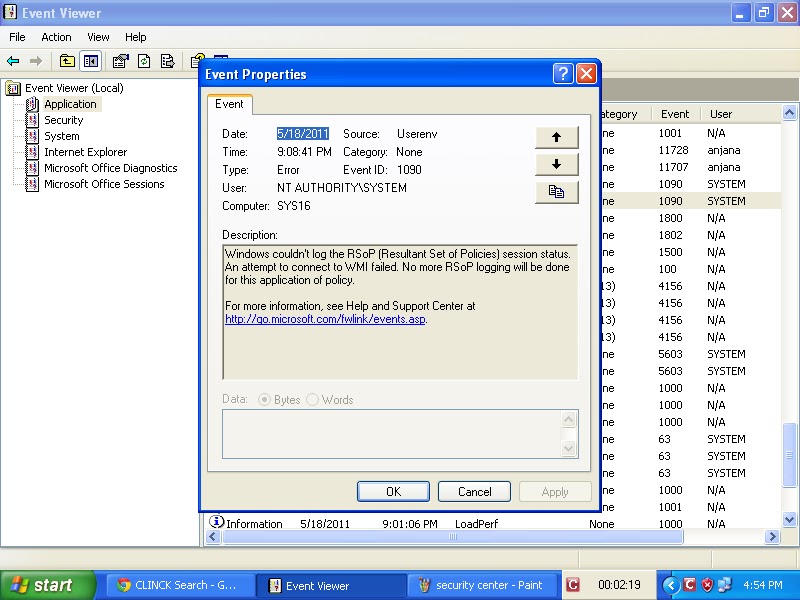
Userenv error xp

Event description : Windows couldn't log the RSoP (Resultant set of policies) session status. An attempt to connect to WMI failed. No more RSoP logging will be done for this application of policy.
Event id : 1090
source : userenv
Proof :


userenv event xp
Userenv error with event id 1515:
Windows has backed up the user's profile.Windows will automatically try to use the backed up profile the next time this user logs on .

Error performing inpage operation:
Event id :1502
Windows cannot load the locally stored profile.Possible causes of this error include insufficient security rights or a corrupt local profile.If this problem persists contact network administrator.

Event id 1508 :
Windows was unable to load the registry.This is often caused by insufficient memory or insufficient security rights.
DETAIL : Error performing inpage operation for c:/documents and settings\welcome\ntuser.dat.

Even id : 1511:
Windows cannot find the local profile and is logging you on with a temporary profile.Changes you make to this profile will be lost when ou log off.

Event id: 1041
Windows cannot query DIIName registry entry for {CF7639F3-ABA2-41DB-97F2-81E2C5DBFC5D} and it will not be loaded. This is most likely caused by a faulty registration.
file name: userenv.dll

1.2.11

Google installer deployment error in windows 7

The following error log is noted from the CAO1E3GH.log file and it is about deploying google installer application file.


Error summary :
Opening the google installer application file from the site http://dl.google.com/update2/1.2.183.39/GoogleInstaller_en.application?appguid%3D%7B8A69D345-D564-463C-AFF1-A69D9E530F96%7D%26iid%3D%7B832EBB47-8E92-3DA7-37EF-502D6C96F606%7D%26lang%3Den%26browser%3D2%26usagestats%3D0%26appname%3DGoogle%2520Chrome%26needsadmin%3Dfalse%26brand%3DCHNG%26installdataindex%3Dhomepagepromo resulted in exception. Following failure messages were detected:
  •  Error creating the Web Proxy specified in the 'system.net/defaultProxy' configuration section.
  • Acess to the path 'global\.net clr networking ' is denied.
Error details :
Following errors were detected during the operation.
    * System.Configuration.ConfigurationErrorsException
        - Error creating the Web Proxy specified in the 'system.net/defaultProxy' configuration section.
        - Source: System
        - Stack trace:
            at System.Net.Configuration.DefaultProxySectionInternal.GetSection()
            at System.Net.WebRequest.get_InternalDefaultWebProxy()
            at System.Net.HttpWebRequest..ctor(Uri uri, ServicePoint servicePoint)
            at System.Net.HttpRequestCreator.Create(Uri Uri)
            at System.Net.WebRequest.Create(Uri requestUri, Boolean useUriBase)
            at System.Net.WebRequest.Create(Uri requestUri)
            at System.Deployment.Application.SystemNetDownloader.DownloadSingleFile(DownloadQueueItem next)
            at System.Deployment.Application.SystemNetDownloader.DownloadAllFiles()
            at System.Deployment.Application.FileDownloader.Download(SubscriptionState subState)
            at System.Deployment.Application.DownloadManager.DownloadManifestAsRawFile(Uri& sourceUri, String targetPath, IDownloadNotification notification, DownloadOptions options, ServerInformation& serverInformation)
            at System.Deployment.Application.DownloadManager.DownloadDeploymentManifestDirectBypass(SubscriptionStore subStore, Uri& sourceUri, TempFile& tempFile, SubscriptionState& subState, IDownloadNotification notification, DownloadOptions options, ServerInformation& serverInformation)
            at System.Deployment.Application.DownloadManager.DownloadDeploymentManifestBypass(SubscriptionStore subStore, Uri& sourceUri, TempFile& tempFile, SubscriptionState& subState, IDownloadNotification notification, DownloadOptions options)
            at System.Deployment.Application.ApplicationActivator.PerformDeploymentActivation(Uri activationUri, Boolean isShortcut, String textualSubId, String deploymentProviderUrlFromExtension, BrowserSettings browserSettings, String& errorPageUrl)
            at System.Deployment.Application.ApplicationActivator.ActivateDeploymentWorker(Object state)
        --- Inner Exception ---
        System.UnauthorizedAccessException
        - Access to the path 'Global\.net clr networking' is denied.
        - Source: mscorlib
        - Stack trace:
            at System.IO.__Error.WinIOError(Int32 errorCode, String maybeFullPath)
            at System.Threading.Mutex.<>c__DisplayClass3.<.ctor>b__0(Object userData)
            at System.Runtime.CompilerServices.RuntimeHelpers.ExecuteCodeWithGuaranteedCleanup(TryCode code, CleanupCode backoutCode, Object userData)
            at System.Threading.Mutex..ctor(Boolean initiallyOwned, String name, Boolean& createdNew, MutexSecurity mutexSecurity)
            at System.Diagnostics.SharedUtils.EnterMutexWithoutGlobal(String mutexName, Mutex& mutex)
            at System.Diagnostics.SharedPerformanceCounter.Verify(CategoryEntry* currentCategoryPointer)
            at System.Diagnostics.SharedPerformanceCounter.FindCategory(CategoryEntry** returnCategoryPointerReference)
            at System.Diagnostics.SharedPerformanceCounter.GetCounter(String counterName, String instanceName, Boolean enableReuse, PerformanceCounterInstanceLifetime lifetime)
            at System.Diagnostics.SharedPerformanceCounter..ctor(String catName, String counterName, String instanceName, PerformanceCounterInstanceLifetime lifetime)
            at System.Diagnostics.PerformanceCounter.Initialize()
            at System.Diagnostics.PerformanceCounter.set_RawValue(Int64 value)
            at System.Net.NetworkingPerfCounters.Initialize()
            at System.Net.Configuration.SettingsSectionInternal..ctor(SettingsSection section)
            at System.Net.Configuration.SettingsSectionInternal.get_Section()
            at System.Net.Sockets.Socket.InitializeSockets()
            at System.Net.NetworkAddressChangePolled..ctor()
            at System.Net.AutoWebProxyScriptEngine.AutoDetector.Initialize()
            at System.Net.AutoWebProxyScriptEngine.AutoDetector.get_CurrentAutoDetector()
            at System.Net.AutoWebProxyScriptEngine..ctor(WebProxy proxy, Boolean useRegistry)
            at System.Net.WebProxy.UnsafeUpdateFromRegistry()
            at System.Net.WebProxy..ctor(Boolean enableAutoproxy)
            at System.Net.Configuration.DefaultProxySectionInternal..ctor(DefaultProxySection section)
            at System.Net.Configuration.DefaultProxySectionInternal.GetSection()

Operation progress status :

The user have chosen to open GoogleInstaller_en.application file (http://dl.google.com/update2/1.2.183.39/GoogleInstaller_en.application?appguid%3D%7B8A69D345-D564-463C-AFF1-A69D9E530F96%7D%26iid%3D%7B832EBB47-8E92-3DA7-37EF-502D6C96F606%7D%26lang%3Den%26browser%3D2%26usagestats%3D0%26appname%3DGoogle%2520Chrome%26needsadmin%3Dfalse%26brand%3DCHNG%26installdataindex%3Dhomepagepromo) from the site dl.google.com.

Event IDs

event id 1000 ( 11 ) event id 1 ( 10 ) event id 1002 ( 7 ) event id 0 ( 6 ) event id 1001 ( 6 ) event id 2 ( 6 ) event id 5 ( 5 ) event id 5000 ( 5 ) event id 100 ( 4 ) event id 1008 ( 4 ) event id 16 ( 4 ) event id 20 ( 4 ) event id 3 ( 4 ) event id 1026 ( 3 ) event id 12 ( 3 ) event id 2001 ( 3 ) event id 4 ( 3 ) event id 7001 ( 3 ) event id 10000 ( 2 ) event id 10005 ( 2 ) event id 1003 ( 2 ) event id 1017 ( 2 ) event id 11 ( 2 ) event id 1101 ( 2 ) event id 12013 ( 2 ) event id 13 ( 2 ) event id 14 ( 2 ) event id 15 ( 2 ) event id 17 ( 2 ) event id 19 ( 2 ) event id 201 ( 2 ) event id 23 ( 2 ) event id 257 ( 2 ) event id 3001 ( 2 ) event id 3002 ( 2 ) event id 3029 ( 2 ) event id 33 ( 2 ) event id 34 ( 2 ) event id 4096 ( 2 ) event id 46 ( 2 ) event id 5008 ( 2 ) event id 54 ( 2 ) event id 59 ( 2 ) event id 6 ( 2 ) event id 6161 ( 2 ) event id 8 ( 2 ) event id 8200 ( 2 ) event id 5000 ( 1 ) event id -1 ( 1 ) event id 10 ( 1 ) event id 10010 ( 1 ) event id 10016 ( 1 ) event id 10020 ( 1 ) event id 1004 ( 1 ) event id 1005 ( 1 ) event id 1006 ( 1 ) event id 10110 ( 1 ) event id 10111 ( 1 ) event id 1012 ( 1 ) event id 1013 ( 1 ) event id 1015 ( 1 ) event id 102 ( 1 ) event id 1024 ( 1 ) event id 104 ( 1 ) event id 1041 ( 1 ) event id 1057 ( 1 ) event id 106 ( 1 ) event id 1068 ( 1 ) event id 108 ( 1 ) event id 1082 ( 1 ) event id 1090 ( 1 ) event id 11006 ( 1 ) event id 1103 ( 1 ) event id 111 ( 1 ) event id 1111 ( 1 ) event id 11305 ( 1 ) event id 11311 ( 1 ) event id 11316 ( 1 ) event id 11330 ( 1 ) event id 11335 ( 1 ) event id 11406 ( 1 ) event id 11500 ( 1 ) event id 11704 ( 1 ) event id 11706 ( 1 ) event id 11935 ( 1 ) event id 12289 ( 1 ) event id 12291 ( 1 ) event id 12293 ( 1 ) event id 12297 ( 1 ) event id 12305 ( 1 ) event id 135 ( 1 ) event id 137 ( 1 ) event id 14103 ( 1 ) event id 142 ( 1 ) event id 14332 ( 1 ) event id 14370 ( 1 ) event id 148 ( 1 ) event id 1502 ( 1 ) event id 1508 ( 1 ) event id 1511 ( 1 ) event id 1515 ( 1 ) event id 15151 ( 1 ) event id 15300 ( 1 ) event id 15301 ( 1 ) event id 167 ( 1 ) event id 17204 ( 1 ) event id 17207 ( 1 ) event id 1797 ( 1 ) event id 1802 ( 1 ) event id 2000 ( 1 ) event id 2007 ( 1 ) event id 2013 ( 1 ) event id 2015 ( 1 ) event id 2020 ( 1 ) event id 20276 ( 1 ) event id 205 ( 1 ) event id 22 ( 1 ) event id 25 ( 1 ) event id 2505 ( 1 ) event id 259 ( 1 ) event id 269 ( 1 ) event id 27 ( 1 ) event id 28 ( 1 ) event id 3000 ( 1 ) event id 3006 ( 1 ) event id 3028 ( 1 ) event id 3058 ( 1 ) event id 3079 ( 1 ) event id 32 ( 1 ) event id 32003 ( 1 ) event id 3299 ( 1 ) event id 3417 ( 1 ) event id 350 ( 1 ) event id 351 ( 1 ) event id 36 ( 1 ) event id 36881 ( 1 ) event id 36882 ( 1 ) event id 36887 ( 1 ) event id 36888 ( 1 ) event id 372 ( 1 ) event id 40 ( 1 ) event id 400 ( 1 ) event id 4005 ( 1 ) event id 4099 ( 1 ) event id 41 ( 1 ) event id 4104 ( 1 ) event id 4107 ( 1 ) event id 4118 ( 1 ) event id 4198 ( 1 ) event id 4199 ( 1 ) event id 4205 ( 1 ) event id 43 ( 1 ) event id 4307 ( 1 ) event id 4321 ( 1 ) event id 4373 ( 1 ) event id 4376 ( 1 ) event id 439 ( 1 ) event id 448 ( 1 ) event id 45 ( 1 ) event id 4609 ( 1 ) event id 4618 ( 1 ) event id 4621 ( 1 ) event id 485 ( 1 ) event id 49 ( 1 ) event id 490 ( 1 ) event id 50 ( 1 ) event id 5003 ( 1 ) event id 50034 ( 1 ) event id 5004 ( 1 ) event id 5005 ( 1 ) event id 50068 ( 1 ) event id 505 ( 1 ) event id 5051 ( 1 ) event id 5053 ( 1 ) event id 51 ( 1 ) event id 513 ( 1 ) event id 5300 ( 1 ) event id 55 ( 1 ) event id 56 ( 1 ) event id 6004 ( 1 ) event id 60055 ( 1 ) event id 63 ( 1 ) event id 7 ( 1 ) event id 7000 ( 1 ) event id 7009 ( 1 ) event id 7010 ( 1 ) event id 7011 ( 1 ) event id 7022 ( 1 ) event id 7023 ( 1 ) event id 7024 ( 1 ) event id 7026 ( 1 ) event id 7030 ( 1 ) event id 7034 ( 1 ) event id 7038 ( 1 ) event id 7040 ( 1 ) event id 7042 ( 1 ) event id 72 ( 1 ) event id 7320 ( 1 ) event id 777 ( 1 ) event id 8000 ( 1 ) event id 8003 ( 1 ) event id 8032 ( 1 ) event id 808 ( 1 ) event id 8193 ( 1 ) event id 8194 ( 1 ) event id 8208 ( 1 ) event id 86 ( 1 ) event id 877 ( 1 ) event id 9 ( 1 ) event id 9002 ( 1 ) event id 9003 ( 1 )