1.8.11

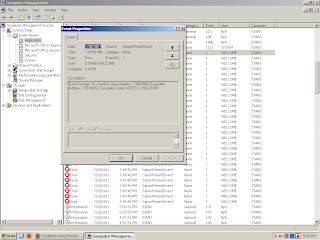
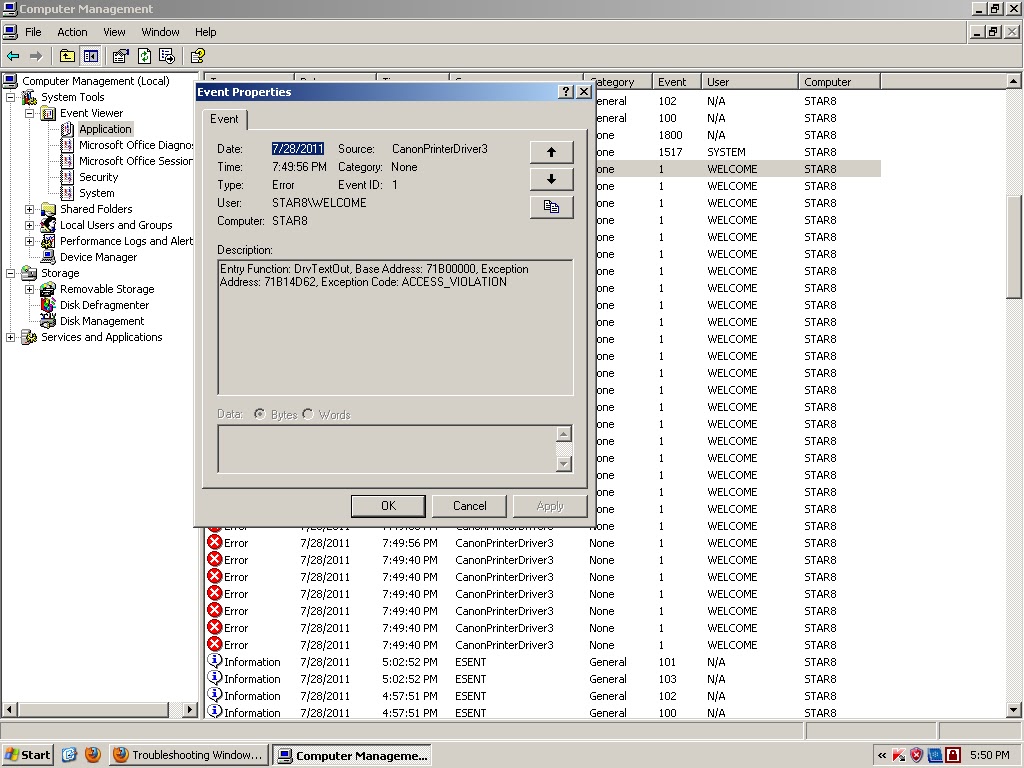
Exception code : ACCESS_VIOLATION Canon Printer

Error description:
Entry Function : Drv TextOut, Base Address :71B00000, Exception Address : 71B14D62,Exception code : ACCESS_VIOLATION.
Event id : 1.
Source : Canon Printer Driver3.
platform : windows xp.

Sharing hp laserjet printer failed event 19

Sharing printer failed + 1722,Printer HP LaserJet P1007 share name HPLaserJ.P1007.
Additional log :
Event id : 19.
Source : Print.
File name : LocalSpl.dll
Platform : windows xp
Solution :
Follow the below instructions to install your hp device after receiving an installation error.
We have detected that you were unable to successfully complete the installation for your HP device. All of the files that we attempted to install have been removed. Follow the procedures in this document to install your HP device after receiving an installation error.

Note
Please make sure you have turned off and restarted your PC before trying the steps outlined below.

Step 1: Run the Disk Cleanup utility
The software installation process uses certain system folders for preparing files for installation. Periodically, these folders need to be cleared. Prior to installing again, run the Disk Cleanup utility, which will help you:
·      Delete temporary Internet files
·      Delete downloaded program files
·      Empty the Recycle Bin
·      Delete files from the temporary folder
·      Delete files created by other Windows tools
·      Remove unused, optional Windows components
To use the Disk Cleanup utility:
1.     Click Start, click All Programs, click Accessories, click System Tools, and then click Disk Cleanup.
2.    After the Disk Cleanup utility analyzes the hard drive, a report with a list of options appears on the computer. Click the appropriate check boxes to remove unwanted files from the computer, and then click OK.
3.    Click Yes on the confirmation screen that appears on the computer. 

Step 2: Reinstall HP Software
Note
Before starting the installation process again, please confirm the following:
·      Unplug the USB cable from the device (if you are connecting to the printer via USB cable).
·      Make sure your PC has been rebooted at least once since the failed installation. 

Reinstall the HP software by re-inserting the CD that came with your device.
Please follow the onscreen instructions, and connect the USB cable only when prompted by the software. The illustration below shows a typical USB connection.

Note
If the USB cable is connected to a USB hub or a docking station for a laptop, it could cause the installation to fail. Try connecting the USB cable directly to the computer during the device installation (when prompted).
If you successfully installed your HP device, please skip to Step 6 and complete the brief feedback survey so that HP may continue to improve our products and processes for our customers.

Step 3: Temporarily Disable Startup Software
If you were again unable to successfully install your HP device, you may need to temporarily disable startup software. Windows allows many programs and processes to run immediately upon startup. These programs may be preventing you from installing the HP Software. These directions explain how to temporarily disable these programs and processes while installing the HP device. (Step 5 below will explain how to re-enable the startup software.)
1.     Open MSConfig as follows:
a.    Click the Start button.
b.    Click Run.
c.     Type msconfig in the run box, and then click OK.
2.    The System Configuration Utility dialog box appears. If the radio button next to Normal startup is currently selected, follow the steps under Normal Startup.  If the startup option is set to Selective, follow the steps under Selective Startup.
 
Normal Startup
Selective Startup
1.     Click the circle next to Selective Startup and uncheck the checkbox next to Load Startup Items.
2.    Click the Services tab. Place a checkmark on Hide All Microsoft Services.
3.    Click the Disable All button.

1. Disable the Startup Items
a.    Click the Startup tab.
b.    Make a list of items that are checked. You will need this list to set your computer startup items back to what it was before.
c.     Click the General tab.
d.    Uncheck the checkbox right next to Load Startup Items.
2. Disable the Services
a.    Click the Services tab.
b.    Place a checkmark on Hide all Microsoft Services.
c.     Make a list of items that are checked. You will need this list to set your computer service items back to what it was before.
d.    Click the Disable All button.

3.    Complete the MSConfig process
a.    Click the Apply button.
b.    Click the OK button and a new window will pop-up. Click the Restart button to continue.
c.     Upon restarting your PC you will get a System Configuration Utility window. Place a checkmark on the “Don’t show this message…” checkbox and click the OK button.
Note
After completing Step 4 below, don't forget to restore the startup software that you temporarily disabled. (Step 5 gives you the instructions for restoring the startup software.)  Without restoring your startup software, your PC may not function the way that you expect.

Step 4: Reinstall HP Software

Note
Before starting the installation process again, please confirm the following:
·      Unplug the USB cable from the device (if you are connecting to the printer via USB cable).
·      Make sure your PC has been rebooted at least once since the most-recent failed installation. 
Reinstall the HP software by re-inserting the CD that came with your device.
Please follow the onscreen instructions, and connect the USB cable only when prompted by the software. The illustration below shows a typical USB connection.
Step 5: Re-enable Startup Software
If you disabled startup software (in Step 3) to install the HP Software, you'll want to restore those applications and services at Startup. Without restoring your startup software, your PC may not function the way that you expect.
1.     Open MSConfig as follows:
a.    Click the Start button.
b.    Click Run.
c.     Type msconfig in the run box, and then click OK. The System Configuration Utility dialog box appears.
2.    If you followed Normal Startup in Step 3: Disable Startup Software above (or if you want to return to a Normal Startup), follow Normal Startup below. If you want to customize the programs that run at startup, follow Selective Startup to proceed.
 
Normal Startup
Selective Startup
Click the circle next to Normal Startup.

1.     Click the Startup tab.
2.    Place a checkmark on every item that is in your list of checked startup items for the startup tab from Step 3.
3.    Click the Services tab.
4.    Place a checkmark on Hide all Microsoft Services.
5.    Place a checkmark on every item that is in your list of checked startup items for the Services tab from Step 3.

3.    Complete the MSConfig process
a.    Click the Apply button.
b.    Click the OK button, and select Restart to restart your computer.

For Further Help
If you are still unable to install the HP software, please contact HP technical support.
Support options and availability vary by product, country/region, and language.

hp laserjet printer sharing failed 1722 with event id 19
Recommended :
fix print spooler failed error
Event 60055 windows setup installation

Windows setup encountered non-fatal errors during installation.Please check the setuperr.log found in your windows directory for more information.
Event id : 60055.
source : setup.
file name : syssetup.dll
product : microsoft windows operating system.
setuperr.log holds following report:
Error :
Setup detected that the system file named [C:\windows\system32\sfc_os.dll] is not signed properly by microsoft.This file could not be restored to the correct microsoft version.Use SFC( SYSTEM FILE CHECKER) utility to verify the integrity of the file.

Other system files that are not signed properly by the microsoft are,
[c:\windows\system32\drivers\tcpip.sys]
[c:\windows\system32\termsrv.dll]
[c:\windows\system32\uxtheme.dll]
windows setup encountered non-fata errors


28.7.11

WGA Error log from windows temp

I found an text file WGAErrLog.txt from the path C:/windows/temp and when i opened it i found a serial numbers.What it refer?.Below are the numbers what i found inside the file.
D446F964-596-80004005_D446F964-495-80004005_D446F964-596-80004005_D446F964-495-80004005_D446F964-596-80004005_D446F964-495-80004005_D446F964-596-80004005_D446F964-495-80004005_D446F964-596-80004005_D446F964-495-80004005_D446F964-596-80004005_D446F964-495-80004005_D446F964-596-80004005_D446F964-563-80004005_D446F964-596-80004005_D446F964-529-80004005_D446F964-596-80004005_D446F964-529-80004005_D446F964-596-80004005_D446F964-529-80004005_D446F964-596-80004005_D446F964-529-80004005

Solution : It represent windows genuine advantage notification and the error may represent the user activity,who is trying to activate the windows genuine service illegally.

Recommended :
windows 7 activation error

Error code 0x80501001 security essentials

While attempting to remove the virus namely TrojanDownloader:Win32/Nistio.A,microsoft security essentials encountered an error.The error was,
Security essentials could'nt apply the action(s) you selected.One or more  actions could not be completed successfully.
Security essentials encountered the following error:Error code 0x800700df.
Category : Trojan downloader.- is dangerous and can download other programs.
Solution :  Refer
http://www.microsoft.com/security/portal/Threat/Encyclopedia/Entry.aspx?name=TrojanDownloader%3aWin32%2fNistio.A&threatid=2147647734.
the file which causes security essential to encounter an error

error 104 connection failed chrome

While attempting to open the yahoo page on chrome browser i got an error message displayed over the white screen of the browser window.

Error 104 (net::ERR_CONNECTION_FAILED): The attempt to connect to the server failed.

Platform : windows xp
Solution : the server may busy so try one more time to request the server by the protocol http.Image proof as caught when the errror message was displayed is shown below.
error connection failed 104 google chrome

RECOMMENDED :
ERR_ADDRESS_UNREACHABLE CHROME

26.7.11

Service pack installer event 8 (0x800f0829)

Service pack installation failed with error code 0x800f0829.
Log name : system.
event id : 8.
source : service pack installer.
Error codes: 0x800fo828
For event id 6 the error message will be 'The service pack cannot be installed when the computer is running on battery power'.
service pack installer error event viewer windows 7


Recommended :
solve service pack installation problems

25.7.11

Microsoft security client event 100 /5000

Event 100, Microsoft Security client setup:
HRESULT: 0x8004FF84
Description: Cannot complete the security essentials upgrade. Security essentials is not currently monitoring and helping to protect your computer. Please restart your computer and try again. Error code: 0x8004FF84.
Additional details:
log name: application
source: Microsoft security client setup
keywords: classic

Proof:
security client setup

HRESULT: 0x8004FF0A
Description : microsoft security essentials installation was canceled.you canceled the security essentials installation on your computer.Error code : 0x8004FF0A

Event id 100.
I found this error from windows xp event log.I also found an another error from the same source but with different event id 5000.
The description for event id(5000) in source microsoft security client cannot be found.The local computer may not have the necessary registry information or message .dll files to display messages from a remote computer.You may be able to use the /AUXSOURCE=flag to retrieve this description.
The following information is part of the event:
mssecurityclient,setup.exe,2.0.657.0,0x80004002,morrobootstraper,c_installflow_internalrun-getenablefirewallaction,morrorobootstraper_cflow_processflowactionresult,0,security essentials,NIL,NIL.

NetBT EVENT ID 4307

Initialization failed because the transport refused to open initial address.
Event id : 4307.
source : NetBT.
file name : netevent.dll
solution:
Here in this situation,the computer cannot able to access the network because its name does not match an ip address.So,it is needed to verify that the computer name is correct and also needed to reset the network adabter.
To check the computer name use the command 'nbtstat -n'.It will display ip and NetBIOS local name table.

Recommended :
Event 2505 server
error code 80040213

PlugPlayManager Event id 12

The device 'TSST corp CDDVDW SH-S222A' (IDE\CdRom TSST corp_CDDVDW_SH-S222A_ID01_\3052353547365a443035323831342020202020) disappeared from the system without first being prepared for removal.
Source : plugplaymanager.
File name : umpnpmgr.dll
File version : 5.1.2600.2180.
Product name : microsoft windows operating system.
This error was logged on my pc's event viewer for windows xp platform.Below the proof.
plugplaymanager


20.7.11

DLL initialization routine failed (RegSvr32)

The module msvcr80.dll failed to load.Make sure the binary is stored at the specified path or debug it to check for problems with the binary or dependent .DLL files.
A Dynamic Link Library (DLL) initialization routine failed.

This might be the runtime library error.It is much needed to check whether the required .dll files are found on the required path (C:\Users\..\desktop).I have a doubt as that the error might also happen while opening the chrome browser.
msvcr80.dll failed to load and encountered an runtime library error

Recommended :
runtime error visual c++
missing .dll getdxver.dll
ipmontr.dll failed to load

net error 109 address unreachable

Google chrome cannot reach the website.This is typically caused by network issues ,but can also be the result of a misconfigured firewall or proxy server.
"Error 109(net::ERR_ADDRESS_UNREACHABLE):Unable to reach the server".

When i try to chat through a ssl secured https page, i received this error.The site may be under maintenance by its owner(i.e reengineering) and so it is unavailable for sometime.
err_address_unreachable
Note : Operating syatem where the error happened was windows xp.
Solution :
  • try reloading the page.
  • set the browser,here it is chrome under permitted program in firewall and antivirus settings.
  • check your proxy settings.

Recommended :
error 200 google chrome

Critical event Kernel Power Windows 7

The system has rebooted without cleanly shutting down first.This error could be caused if the system stopped responding,crashed,or lost power unexpectedly.
Event id : 41.
log name : system.
level : critical error.
OS Platform : windows 7.

19.7.11

MP Sample Submission MICROSOFT SECURITY ESSENTIALS

Event Type mptelemetry,P1 8024402c,P2 endsearch,P3 search,P4 3.0.8107.0,P5 mpsigdwn.dll,P6 3.0.8107.0,P7 microsoft security essentials (edb4fa23-53b8-4afa-8c5d-99752cca7094),P8 NIL,P9 NIL,P10 NIL.

event id 5000.
source : MPSampleSubmission.
product : microsoft application error report.
version :  12.0.6413.0.
file: DW20.EXE.
version :  12.0.6413.1000.

Error Descriptions (event id 5000):
EventType mptelemetry P1 2152759308, P2 unspecified, P3 scanfile, P4 3.0.8107.0, P5 microsoft security essentials  (edb4fa23-53b8-4afa-8c5d-99752cca7094), P6 unspecified, P7 unspecified, P8 NIL, P9 NIL, P10 NIL.
Event Type mptelemetry,  P1 0, P2 moaccapability, P3 3.0.8107.0, P4 3, P5 3,P6 unspecified, P7 unspecified, P8 NIL, P9 NIL, P10 NIL.

EventType telemetry, P1 0x80070003, P2 moac, P3 cachereset, P4 3.0.8107.0, P5 unspecified , P6 unspecified, P7 unspecified, P8 NIL, P9 NIL, P10 NIL.
mpsample submission error reporting service
Recommended :
fix oobe stopped error

16.7.11

ERR_CERT_COMMON_NAME_INVALID

Error 200 (net::ERR_CERT_COMMON_NAME_INVALID): Unknown error.
I got the above error while try to access the gmail login page on the chrome browser.The error message includes 'This webpage is not available.The webpage at https://gmail.com might be temporarily down or it may have moved permanently to a new address'.
Solution :
First open the google home page and then navigate to gmail.
Proof:

visual studio (vb_web.exe) compatibility mode windows 7

When i try to install vb_web.exe i got an setup error as 'Visual studio setup cannot run in compatibility mode'.Solution recommended is to see the 'installing' section in the visual studio readme file VS2010 RTM.htm at http://go.microsoft.com/fwlink/?LinkId=143397.
Platform where i try to install visual studio setup.exe is windows 7.Proof as the error caught is displayed below.
visual studio setup vb_web.exe compatibility mode

(TCPIP) IP and hardware address conflict

The system detected an address conflict for ip address 192.168.1.3 with the system having network hardware address 00-26-5E-82-84-c5.Network operations on this system may be disrupted as a result.
log name : system.
source : tcp/ip.
event id : 4199
file name: netevent.dll
Error code:
0000: 00000000 00500003 00000000 c0001067
0010: 00000000 00000000 00000000 00000000
0020: 00000000 00000000

Note : From windows xp event viewer, i found a event with an id 4198, and there mentioned "The local interface has been disabled".Below are the error code associated with that event.
0000: 00000000 00500003 00000000 c0001066
0010: 00000000 00000000 00000000 00000000
0020: 00000000 00000000
solution : configure properly the ip address with the hardware device.Contact network helpline.
Read Also : 
fix silly window syndrome - (tcp performance).

14.7.11

Connection error Google talk network

While the system start up and automatically try to sign in / connecting to the google talk network , an error message displayed as,
Connection error
Connecting to google talk network has failed due to an expired authentication certificate.The common cause of this expired certificate is due to time differences between your computer and the google talk network.Please verify your computer's clock settings are correct and then press retry.

Solution :
Correct the system's clock settings according to the region and then try again.For detailed solution refer
http://www.google.com/support/talk/bin/answer.py?answer=33612.
Proof :
google talk network error

12.7.11

ssl connection request has failed (schannel)

The certificate received from the remote server has expired. The SSL connection request has failed. The attached data contains the server certificate.
Additional details :
Source : schannel.
event id : 36881.
file name : lsasrv.dll
product name : microsoft windows operating system.

The server's security certificate is expired right.. Ok, we will see how to act when such an error will occurs. Whenever you are trying to connect to a secure website, the server hosting that site presents your browser with something called a "certificate" for the purpose of verifying its identity. The certificate contains identity information such as the address of the website, which is verified by a third party that your computer trusts. By checking that the address in the certificate matches the address of the website, it is possible to verify that you are securely communicating with the website you intended, and not a third party such as an attacker on your network.

Certificate have a validity period, the similar as any identity document such as a passport that you may have. The certificate presented to your browser is expired or not yet valid. When a certificate is outside of its validity period, certain information about the status of the certificate whether it has been revoked and should no longer be trusted is not required to be maintained. As such, it is not possible to verify that the certificate is trustworthy.

Solution recommended is mostly avoid using that site, or ensure that your clock and time zone are set correctly on your computer because certificate is validated by matching the computer time and date settings. Below this content i have embedded a video which describes how to fix the error "the server's security certificate is not valid yet.
Recommended post:
schannel fatal alert 48

COM Surrogate is not responding windows

While i try to open my photo with windows photo viewer i found not responding and at the same time i obtained a windows stated with error message as 'com surrogate is not responding'.Below are the description and problem signature for that error.
Description : A problem caused this program to stop interacting with windows.
Problem signature:
Problem event name : AppHangB1.
Application name : dllhost.exe.
Application version : 6.1.7600.16385.
Application timestamp : 4a5bc6b7.

Proof ,when the error happened is enclosed as a image below.
solution :
Try open the picture once again.

11.7.11

(NS_ERROR_NOT_IMPLEMENTED) ERROR CONSOLE FIREFOX

[Exception..."Component returned failure code: 0x80004001 (NS_ERROR_NOT_IMPLEMENTED) [nsIRequest.name]" nresult: " 0x80004001 (NS_ERROR_NOT_IMPLEMENTED)".
File location : program files > mozilla firefox >components>nsLoginManager.js.

uncaught exception: [Exception... "Component returned failure code: 0x80004002 (NS_NOINTERFACE) [nsIInterfaceRequestor.getInterface]" nsresult: "0x8000402" (NS_NOINTERFACE)" location:"JS Frame:: chrome://speedbitvideodownloader/content/tb.js ::anonymous :: 7426" data:no]

error console firefox

wave in error invalid device handle

While i try to capture my desktop screen through the free version of screen recorder software,i got an error message which is stated as 'wave in error'.The error message includes 'the specified device handle is invalid in stop()'.Below is the image proof for that wave in error.Solution here i recommend is to update the software or check the system settings recording the camera connected to the system.

Platform used : windows 7.This error may also happen in camstudio.

5.7.11

Security-SPP ERROR WINDOWS 7

Event 1017, Security-SPP:
Installation of the Proof of Purchase failed. 0xC004F050
Partial Pkey=BBBBB
ACID=?
Detailed Error [?]
log name: Application, event id: 1017.

Event 12293, Security-SPP :
Publishing the Key Management Service (KMS) to DNS in the " domain failed.
Info:
0x80070057
OpCode : info
keywords : classic
Proof:
Microsoft-Windows-Security-SPP event 12293 windows 7
Event 8200 :
Error from the source security-spp from windows 7 has been encountered and stated with message as "license acquisition failure details.hr=0x80072EE7".
log name : application.
source : security-spp.
event id : 8200.
Sometimes the error may be 'Acquisition of genuine ticket failed (hr=0x80072EE7) for template Id  66c92734-d682-4d71-983e-d6ec3f16059f' but with different event id 8208.

solution : 
Refer http://technet.microsoft.com/en-us/library/ff716103(WS.10).aspx. to get an idea about why the error was.
Error as caught :


EFS Error windows 7 (event viewer)

I found an error log in my pc state as " EFS service failed to start.Error code : 0x80070013.
Additional report:
log name : application.
source : EFS.
event id : 4376.
EFS-refers Encryption file system is a service which can be enabled manually for protecting the files stored on the hard drive.For more refer http://windows.microsoft.com/en-IN/windows7/What-is-Encrypting-File-System-EFS.

critical error (user mode driver problems)

A problem has occurred with one or more user-mode drivers and the hosting process has been terminated.This may temporarily interrupt your ability to access the devices.
log name : system.
source : driver frameworks-user mode.
event id : 10110.
level : critical.
task category : user mode driver problems.
platform : windows 7.

Proof :


There may also an Error from the same source driver framework user mode but with event id 10111 as follows,
The device WPD  file system volume driver (location(unknown)) is offline due to a user mode driver crash.Windows will attempt to restart the device 5more times.Please contact the device manufacturer for more information about this problem.

26.6.11

Oops error - bad iframe

"Oops!
The page you are looking for could not be found.Try searching for it in the address bar above."

url : http://in.mg50.mail.yahoo.com/neo/%7B%7Bad_iframe_src%7D%7D.

This error occurred while i try to view the received mails from the inbox.I also doubted that it may because of 'HTML: iframe-inf' infection.


browser capable of displaying frames

while i try to load the page through my mobile gprs connection,i got an error as "viewing this page requires browser capable displaying frames".so i doubted is there any problem in my mobile browser.
Additional details :
mobile : nokia.
gprs: bsnl internet.
site: nokia.com
solution:
Install full supported mobile browser like opera/mozilla and then try loading the page.

25.6.11

Unknown net error 605

SYNTAX Error:
If an user committed a wrong port forwarding for any applications,then while try to accessing that application like ftp or other services.There may be a chance for getting the error message as follows,
"Error 605(net::ERR_FTP_SYNTAX_ERROR)Unknown error".
syntax error ftp


Recommended :
net error 103/105/106
net error 200 chrome

Net error 324:empty response

EMPTY RESPONSE:No data received :
Unable to load the webpage because the server sent no data.
no data received on chrome


"Error 324(net::ERR_EMPTY_RESPONSE):The server closed the connection without sending any data".


Occasionally it may also happen like,


This webpage is not available.
The webpage at<url> might be temporarily down or it may have moved permanently to a new web address.
"Error 324(net::ERR_EMPTY_RESPONSE):Unknown error".
Recommended :
ERR_CACHE_READ_FAILURE

Unable to find media clip

'Unable to find media clip' is the error message i received while try to streaming the youtube video through rtsp(realtime streaming protocol)from my nokia mobile.At the time of first time gprs connection i accessed the video,but after disconnecting and start reconnecting the gprs connection i obtained the error.So i doubted that it may because of settings problem.

Recommended :
bad response from youtube server

16.6.11

error code 603 on mobile

While i surfing through the gprs connection on my mobile i got this error,it is stated that "Error encountered while processing the last request".This webpage<yahoo mail> is currently unavailable.Try again later.
It may also happen on other mobile phones like blackberry,nokia etc.

solution :
Try reloading the page.

15.6.11

error playing e.m total video player

while i try to play an video file through e.m total video player i got an error message as "cannot init video render".I also got an another window displaying message as "tvp:the file cannot be played."
solution:
  • Try play the file using other video program.
  • update the player.
  • check for corrupted file.

14.6.11

cmos checksum error occured

While booting the system i got an error message as " The firmware has detected that a cmos battery failure occured.Press enter key to continue".Also an message follows as "The firmware has detected that a cmos checksum error occured".

solution:
Replace the cmos battery which is needed for certain functions.But it wont affect the  operating system.

13.6.11

Commonly occuring error while installing Windows updates

installing windows service pack:
your computer is running on battery power.plug in your computer's power cord to ensure that your computer maintains power during the installation.
The above message displayed when i try to install the windows updates.

Read Also :
solve windows update error

Plug-in failed to initialize :Adobe Reader

There was an error while loading the plug-in "Updater.api".
Below is the proof and solution recommended .
Note:Failed to update at regular interval causes the error 'adobe reader is out of date and may be insecure'.Here, the solution is recommended to update the reader.To view the proof of this error refer twitter.com/way2error.
See Also :
foxitr plug-in crashed

browser service failed : Event id 8032

The browser service has failed to retrieve the backup list too many times on Transport\Device\NetBT_Tcpip_{E32B0960-C2BF-44CF-B68F-510254923EA7}.The backup browser is stopping.


11.6.11

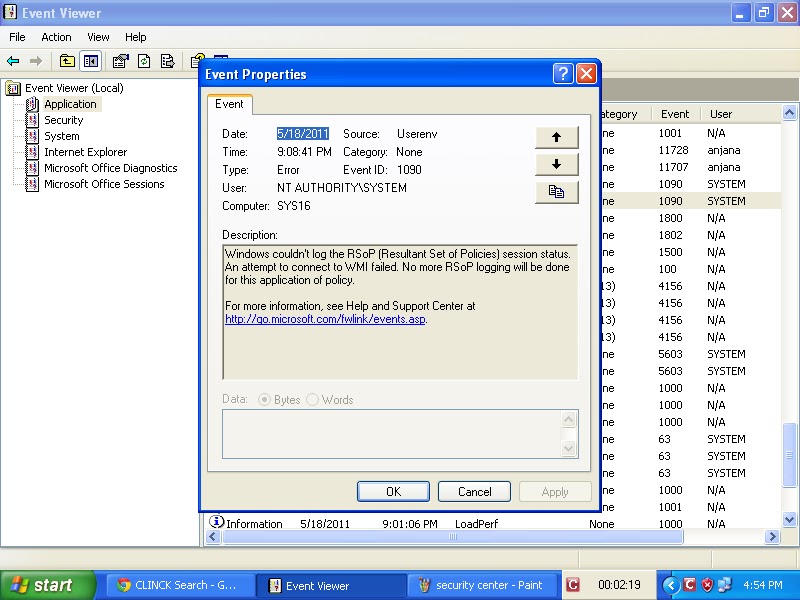
Userenv error xp

Event description : Windows couldn't log the RSoP (Resultant set of policies) session status. An attempt to connect to WMI failed. No more RSoP logging will be done for this application of policy.
Event id : 1090
source : userenv
Proof :


userenv event xp
Userenv error with event id 1515:
Windows has backed up the user's profile.Windows will automatically try to use the backed up profile the next time this user logs on .

Error performing inpage operation:
Event id :1502
Windows cannot load the locally stored profile.Possible causes of this error include insufficient security rights or a corrupt local profile.If this problem persists contact network administrator.

Event id 1508 :
Windows was unable to load the registry.This is often caused by insufficient memory or insufficient security rights.
DETAIL : Error performing inpage operation for c:/documents and settings\welcome\ntuser.dat.

Even id : 1511:
Windows cannot find the local profile and is logging you on with a temporary profile.Changes you make to this profile will be lost when ou log off.

Event id: 1041
Windows cannot query DIIName registry entry for {CF7639F3-ABA2-41DB-97F2-81E2C5DBFC5D} and it will not be loaded. This is most likely caused by a faulty registration.
file name: userenv.dll

10.6.11

Unresponsive script mozilla firefox

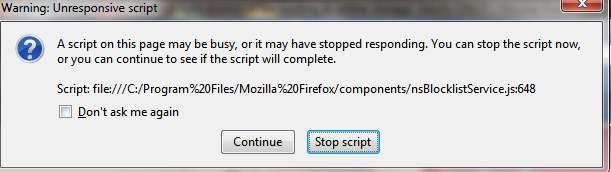
A script on this page may be busy,or it may have stopped responding,you can stop the script now,or you can continue to see if the script will complete.

script : file:///C:/Program%20files/mozilla%20firefox/components/nsPlacesDBFlush.js:267.
script : file :///C:/Program%20files/mozilla%20firefox/components/nsBlocklistService.js:648.
The above warning message displayed while i try to clear the browsing history on firefox browser.Below is the proof and solution.
firefox warning message unresponsive script


solution: try refreshing the page or start new session.


Recommended :
fix ie script error
windows and script host error
action script error

4.6.11

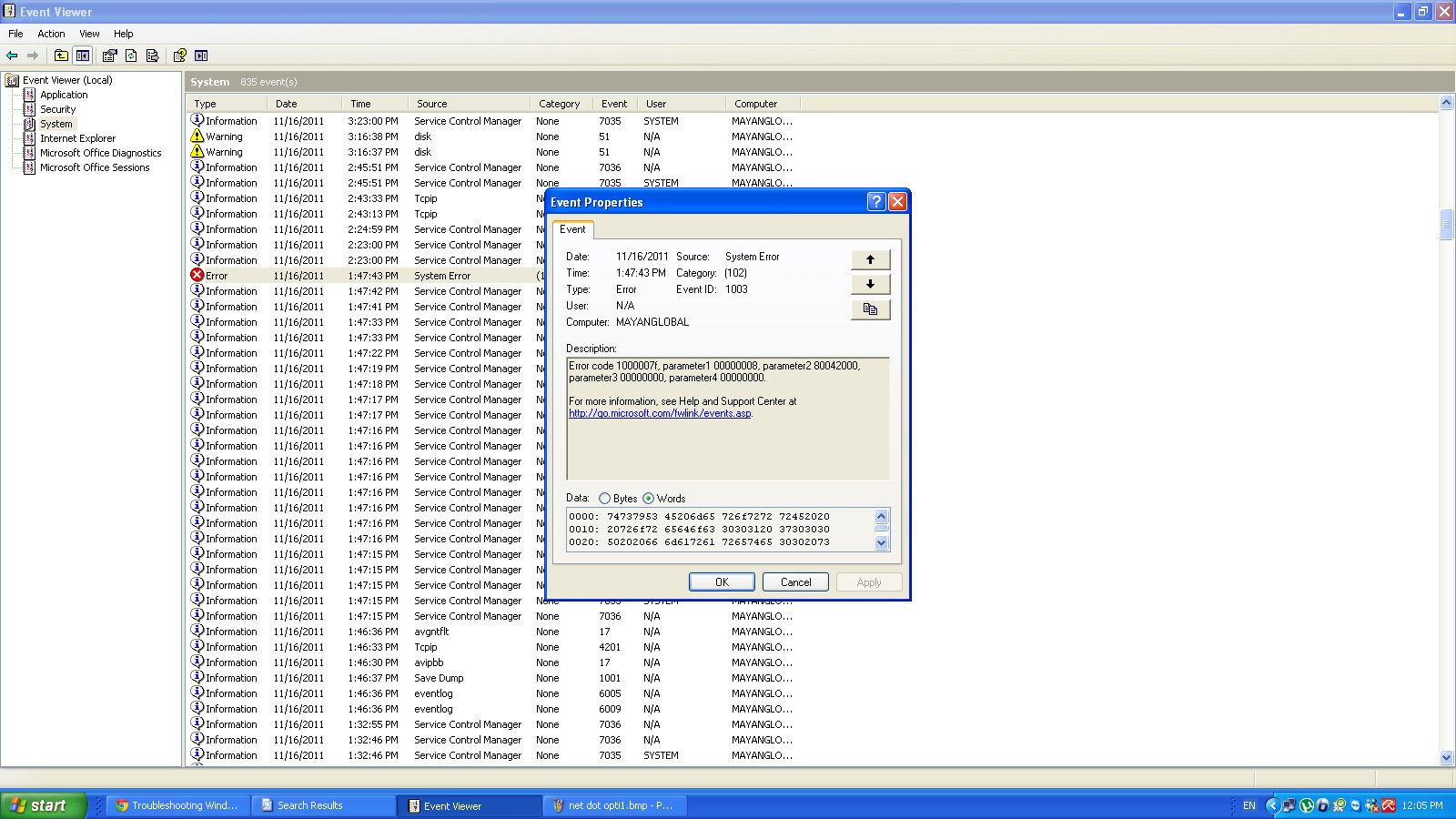
Solution for system error windows xp

Event description:
Error code 10000050, parameter1 e11e7024, parameter2 00000000, parameter3 bf837482, parameter4 00000001.
Data :
0000: 74737953 45206d65 726f7272 72452020
0010: 20726f72 65646f63 30303120 35303030
0020: 50202030 6d617261 72657465 31652073
0030: 30376531 202c3432 30303030 30303030
0040: 6662202c 34373338 202c3238 30303030
0050: 31303030

Error code 000000ca,parameter1 00000001, parameter2 85d2f030, parameter3 85cf14a8, parameter4 00000000.
additional data-s:
event id 1003.
category : 102.
file name: faultrep.dll

Error code 1000007f, parameter1 00000008, parameter2 80042000, parameter3 00000000, parameter4 00000000.
system error windows event viewer

Error codes :

0000: 74737953 45206d65 726f7272 72452020
0010: 20726f72 65646f63 30303120 37303030
0020: 50202066 6d617261 72657465 30302073
0030: 30303030 202c3830 34303038 30303032
0040: 3030202c 30303030 202c3030 30303030
0050: 30303030


Recommended articles:
fix system error 1222
com+event system fault

2.6.11

solve ipnathlp error xp

The network address translator(NAT) was unable to request an operation of the kernel-mode translation module.This may indicate misconfiguration,insufficient resources or an internal error.The data is the error code.

Data in word : 0000: 0000001f.
Event id : 32003.
file name : ipnathlp.dll.
source : ipnathlp.
ip nat help
Recommended post :
event id 32003 SharedAccess_NAT

microsoft office12

Event id 2000:
Accepted safe mode action: Microsoft office outlook.
file name: DW20.EXE

Rejected safe mode action : Microsoft office word.
Additional log :
event id : 2001.
source : ms office 12.


Faulting application excel.exe,version 12.0.4518.1014,stamp 45428263,faulting module unknown,version 0.0.0.0 ,stamp 00000000,debug ?0,fault address 0x00000000.
Additional details :
event id : 1000.
error code : 
0000: 00700041 006c0070 00630069 00740061
0010: 006f0069 0020006e 00610046 006c0069
0020: 00720075 00200065 00650020 00630078
0030: 006c0065 0065002e 00650078 00310020
0040: 002e0032 002e0030 00350034 00380031
0050: 0031002e 00310030 00200034 00350034
0060: 00320034 00320038 00330036 00690020
0070: 0020006e 006e0075 006e006b 0077006f
0080: 0020006e 002e0030 002e0030 002e0030
0090: 00200030 00300030 00300030 00300030
00a0: 00300030 00660020 00650044 00750062
00b0: 00200067 00200030 00740061 006f0020
00c0: 00660066 00650073 00200074 00300030
00d0: 00300030 00300030 00300030 000a000d.

Microsoft office 12 session :
ID:1,application name : micrsoft office excel, application version 12.0.4518.1014, micrsoft office version : 12.0.4518.1014.This session lasted 355 seconds with 0 seconds of active time.This session ended with a crash. 
event id 7001
source: microsoft office 12 session
still image proof:
microsoft office 12 encountered session event on windows xp


Solve Also :
ms word document error
error code 1704
event id 5000 officelifeboathang

29.5.11

Fix ATAPI Error (Windows xp)

Event id 5, atapi:
A parity error was detected on \Device\Ide\IdePort2
source: atapi
version: 5.2
Error code:
0000: 0050000f 00a40001 00000000 c0040005
0010: 80000003 00000000 00000000 00000000
0020: 00000000 00000000 00000006 00000000
0030: 00000000 00000007 8f000040 00000002
0040: 120a2000 40200380 00000000 0000000a
0050: 00000000 88fbd710 00000000 88fbd4e0
0060: 00000002 02463487 4602002a 00008734
0070: 0000006c 00000000

solution:
Parity error occurred during a direct memory access (DMA) transfer. For a detail, the cable used for connecting the drive to the computer is failing. It is suggested to replace the cable with new one without having any fault.

Event 9, atapi:
The device, \Device \Ide \Ideport1 did not respond within the timeout period.
Additional log details :
source : atapi (AT Attachment Packet Interface).
event id : 9
File name: IoLogmsg.dll
File version: 5.1.2600.0
Data :
0000: 0050000f 00a40001 00000000 c0040009
0010: 00000100 00000000 00000000 00000000
0020: 00000000 00000000 00000000 00000000
0030: 00000000 00000007 0e000040 00010000
0040: 120a20ff 10000148 00000000 00000004
0050: 86f94130 86cae1e8 00000000 86c7d6a8
0060: 00000001 00000000 0000014a 0000005a
0070: 00000008 00000000
fix atapi errors
See Also : Event id 11 atap.


23.5.11

Certificate error :Navigation Blocked

Error message :"There is a problem with this website's security certificate.
The security certificate presented  by this website was issued for a different website's address.Security certificate problems may indicate an attempt to fool you or intercept any data you sent to the server".

Solution:
  • Here the browser internet explorer 9 recommends the user to avoid visiting the site.
  • For more information see 'certificate errors' in internet explorer's help menu.
See Also :
secure connection: fatal error


19.5.11

Fix CDN redundancy manager error : null

EMP v.3.0.0.r426652_426614_1 Playlist URL : <playlist url given>.
Error code : CDN Redundancy Manager Error [0]:null.


CDN -'Content delivery network or content distribution network' is a system of computers containing copies of data placed at various nodes of network.CDN can improve access to the data it caches by increasing redundancy.For more refer the page,'http://en.wikipedia.org/wiki/Content_delivery_network'.


While streaming the video,i obtained an message displayed over the player window as "This content doesn't seem to be working.Try again later".But this is not an original error displayed, we can view the real error internally happened by right clicking the window and choosing copy error message,then open notepad and paste it.


Solution here recommended is to try reloading the video(i.e content-data type).Avoid moving the slider since it may be the source for the error.


Event IDs

event id 1000 ( 11 ) event id 1 ( 10 ) event id 1002 ( 7 ) event id 0 ( 6 ) event id 1001 ( 6 ) event id 2 ( 6 ) event id 5 ( 5 ) event id 5000 ( 5 ) event id 100 ( 4 ) event id 1008 ( 4 ) event id 16 ( 4 ) event id 20 ( 4 ) event id 3 ( 4 ) event id 1026 ( 3 ) event id 12 ( 3 ) event id 2001 ( 3 ) event id 4 ( 3 ) event id 7001 ( 3 ) event id 10000 ( 2 ) event id 10005 ( 2 ) event id 1003 ( 2 ) event id 1017 ( 2 ) event id 11 ( 2 ) event id 1101 ( 2 ) event id 12013 ( 2 ) event id 13 ( 2 ) event id 14 ( 2 ) event id 15 ( 2 ) event id 17 ( 2 ) event id 19 ( 2 ) event id 201 ( 2 ) event id 23 ( 2 ) event id 257 ( 2 ) event id 3001 ( 2 ) event id 3002 ( 2 ) event id 3029 ( 2 ) event id 33 ( 2 ) event id 34 ( 2 ) event id 4096 ( 2 ) event id 46 ( 2 ) event id 5008 ( 2 ) event id 54 ( 2 ) event id 59 ( 2 ) event id 6 ( 2 ) event id 6161 ( 2 ) event id 8 ( 2 ) event id 8200 ( 2 ) event id 5000 ( 1 ) event id -1 ( 1 ) event id 10 ( 1 ) event id 10010 ( 1 ) event id 10016 ( 1 ) event id 10020 ( 1 ) event id 1004 ( 1 ) event id 1005 ( 1 ) event id 1006 ( 1 ) event id 10110 ( 1 ) event id 10111 ( 1 ) event id 1012 ( 1 ) event id 1013 ( 1 ) event id 1015 ( 1 ) event id 102 ( 1 ) event id 1024 ( 1 ) event id 104 ( 1 ) event id 1041 ( 1 ) event id 1057 ( 1 ) event id 106 ( 1 ) event id 1068 ( 1 ) event id 108 ( 1 ) event id 1082 ( 1 ) event id 1090 ( 1 ) event id 11006 ( 1 ) event id 1103 ( 1 ) event id 111 ( 1 ) event id 1111 ( 1 ) event id 11305 ( 1 ) event id 11311 ( 1 ) event id 11316 ( 1 ) event id 11330 ( 1 ) event id 11335 ( 1 ) event id 11406 ( 1 ) event id 11500 ( 1 ) event id 11704 ( 1 ) event id 11706 ( 1 ) event id 11935 ( 1 ) event id 12289 ( 1 ) event id 12291 ( 1 ) event id 12293 ( 1 ) event id 12297 ( 1 ) event id 12305 ( 1 ) event id 135 ( 1 ) event id 137 ( 1 ) event id 14103 ( 1 ) event id 142 ( 1 ) event id 14332 ( 1 ) event id 14370 ( 1 ) event id 148 ( 1 ) event id 1502 ( 1 ) event id 1508 ( 1 ) event id 1511 ( 1 ) event id 1515 ( 1 ) event id 15151 ( 1 ) event id 15300 ( 1 ) event id 15301 ( 1 ) event id 167 ( 1 ) event id 17204 ( 1 ) event id 17207 ( 1 ) event id 1797 ( 1 ) event id 1802 ( 1 ) event id 2000 ( 1 ) event id 2007 ( 1 ) event id 2013 ( 1 ) event id 2015 ( 1 ) event id 2020 ( 1 ) event id 20276 ( 1 ) event id 205 ( 1 ) event id 22 ( 1 ) event id 25 ( 1 ) event id 2505 ( 1 ) event id 259 ( 1 ) event id 269 ( 1 ) event id 27 ( 1 ) event id 28 ( 1 ) event id 3000 ( 1 ) event id 3006 ( 1 ) event id 3028 ( 1 ) event id 3058 ( 1 ) event id 3079 ( 1 ) event id 32 ( 1 ) event id 32003 ( 1 ) event id 3299 ( 1 ) event id 3417 ( 1 ) event id 350 ( 1 ) event id 351 ( 1 ) event id 36 ( 1 ) event id 36881 ( 1 ) event id 36882 ( 1 ) event id 36887 ( 1 ) event id 36888 ( 1 ) event id 372 ( 1 ) event id 40 ( 1 ) event id 400 ( 1 ) event id 4005 ( 1 ) event id 4099 ( 1 ) event id 41 ( 1 ) event id 4104 ( 1 ) event id 4107 ( 1 ) event id 4118 ( 1 ) event id 4198 ( 1 ) event id 4199 ( 1 ) event id 4205 ( 1 ) event id 43 ( 1 ) event id 4307 ( 1 ) event id 4321 ( 1 ) event id 4373 ( 1 ) event id 4376 ( 1 ) event id 439 ( 1 ) event id 448 ( 1 ) event id 45 ( 1 ) event id 4609 ( 1 ) event id 4618 ( 1 ) event id 4621 ( 1 ) event id 485 ( 1 ) event id 49 ( 1 ) event id 490 ( 1 ) event id 50 ( 1 ) event id 5003 ( 1 ) event id 50034 ( 1 ) event id 5004 ( 1 ) event id 5005 ( 1 ) event id 50068 ( 1 ) event id 505 ( 1 ) event id 5051 ( 1 ) event id 5053 ( 1 ) event id 51 ( 1 ) event id 513 ( 1 ) event id 5300 ( 1 ) event id 55 ( 1 ) event id 56 ( 1 ) event id 6004 ( 1 ) event id 60055 ( 1 ) event id 63 ( 1 ) event id 7 ( 1 ) event id 7000 ( 1 ) event id 7009 ( 1 ) event id 7010 ( 1 ) event id 7011 ( 1 ) event id 7022 ( 1 ) event id 7023 ( 1 ) event id 7024 ( 1 ) event id 7026 ( 1 ) event id 7030 ( 1 ) event id 7034 ( 1 ) event id 7038 ( 1 ) event id 7040 ( 1 ) event id 7042 ( 1 ) event id 72 ( 1 ) event id 7320 ( 1 ) event id 777 ( 1 ) event id 8000 ( 1 ) event id 8003 ( 1 ) event id 8032 ( 1 ) event id 808 ( 1 ) event id 8193 ( 1 ) event id 8194 ( 1 ) event id 8208 ( 1 ) event id 86 ( 1 ) event id 877 ( 1 ) event id 9 ( 1 ) event id 9002 ( 1 ) event id 9003 ( 1 )