Gateway to Research online/computer errors and try to find solutions for the error.
29.3.12
26.3.12
Error 352 SPDY PING FAILED chrome
Error message:
Error 352 (net::ERR_SPDY_PING_FAILED): Unknown error.
I am obtaining the error 352 while trying to load the attachment on mail. Additionally, the message displayed includes, This webpage is not available. The webpage might be temporarily down or it may have moved permanently to a new web address. What can be the cause?..
solution:
While troubleshooting any error two things are very important, they are the code and the error message. Here for our error we have 352 as the code and spdy ping failed as the message. What can we do with 352, lets try searching for the solution. I suggest to use one of a best web debugger fiddler to find status of the code. We can find it by simply trying the action which causes the error and have a look at fiddler. For better understanding, try requesting the page and get the response on the debugger and then log the status.
Dont you know, what is spdy?.. spdy is the speedy networking protocol developed by google for transporting web content. Just like http, it is mainly used for web security and to reduce web page loading latency. However it will not replace http, but it can modifies the way http requests and responses are sent over the network. If you are the web debugger, then try requesting any of the google product, there you can able to notice the word spdy given with short term of message.
Snapshot proof for the error:
Related article:
error 15 socket not connected chrome
Error 352 (net::ERR_SPDY_PING_FAILED): Unknown error.
I am obtaining the error 352 while trying to load the attachment on mail. Additionally, the message displayed includes, This webpage is not available. The webpage might be temporarily down or it may have moved permanently to a new web address. What can be the cause?..
solution:
While troubleshooting any error two things are very important, they are the code and the error message. Here for our error we have 352 as the code and spdy ping failed as the message. What can we do with 352, lets try searching for the solution. I suggest to use one of a best web debugger fiddler to find status of the code. We can find it by simply trying the action which causes the error and have a look at fiddler. For better understanding, try requesting the page and get the response on the debugger and then log the status.
Dont you know, what is spdy?.. spdy is the speedy networking protocol developed by google for transporting web content. Just like http, it is mainly used for web security and to reduce web page loading latency. However it will not replace http, but it can modifies the way http requests and responses are sent over the network. If you are the web debugger, then try requesting any of the google product, there you can able to notice the word spdy given with short term of message.
Snapshot proof for the error:
Related article:
error 15 socket not connected chrome
24.3.12
Event id 14 Symantec AntiVirus
Event Description:
Symantec Endpoint Protection services failed to start. (2000005F). Application has encountered an error. For more information please go to: symantec.com/techsupp/servlet/ProductMessages?product=SAVCORP&version=11.0.4000.2263&language=english&module=1000&error=0011&build=symantec_ent.
Additional details:
event id: 14
source: symantec antivirus
proof:
Symantec Endpoint Protection services failed to start. (2000005F). Application has encountered an error. For more information please go to: symantec.com/techsupp/servlet/ProductMessages?product=SAVCORP&version=11.0.4000.2263&language=english&module=1000&error=0011&build=symantec_ent.
Additional details:
event id: 14
source: symantec antivirus
proof:
Labels:
antivirus
,
event id 14
,
event viewer
,
Symantec
shared Network address translation
Event Description:
The network address translator (NAT) was unable to request an operation of the kernel-mode translation module. This may indicate misconfiguration, insufficient resource, or an internal error. The data is the error code.
Additional data:
event id: 32003
log name: system
source: SharedAccess_NAT
OpCode: info
keywords: classic
The network address translator (NAT) was unable to request an operation of the kernel-mode translation module. This may indicate misconfiguration, insufficient resource, or an internal error. The data is the error code.
Additional data:
event id: 32003
log name: system
source: SharedAccess_NAT
OpCode: info
keywords: classic
11.3.12
McLogEvent 5051 Windows
Event Description:
A thread in process C:\Program Files\McAfee\VirusScan Enterprise\McShield.exe took longer than 90000 ms to complete a request. The process will be terminated.
Additional details:
Thread id: 2856 (0xb28)
Thread address: 0x12026890
Thread message:
Build VSCORE.14.1.0.567 / 5400.1158
Object being scanned = \Device\HarddiskVolume1\WINDOWS\system32\@x.dllorkerW
by C:\WINDOWS\Explorer.EXE
4(329)(0)
4(329)(0)
7200(329)(0)
7595(329)(0)
7005()(0)
7004(0)(0)
5006(0)(0)
5004(0)(0)
Event snapshot proof:
Related post:
McLogEvent 259 windows event viewer
A thread in process C:\Program Files\McAfee\VirusScan Enterprise\McShield.exe took longer than 90000 ms to complete a request. The process will be terminated.
Additional details:
Thread id: 2856 (0xb28)
Thread address: 0x12026890
Thread message:
Build VSCORE.14.1.0.567 / 5400.1158
Object being scanned = \Device\HarddiskVolume1\WINDOWS\system32\@x.dllorkerW
by C:\WINDOWS\Explorer.EXE
4(329)(0)
4(329)(0)
7200(329)(0)
7595(329)(0)
7005()(0)
7004(0)(0)
5006(0)(0)
5004(0)(0)
Event snapshot proof:
Related post:
McLogEvent 259 windows event viewer
Labels:
event id 5051
,
event viewer
,
McLogEvent
,
windows xp
McLogEvent Event id 1008
Event Description:
The McShield service terminated unexpectedly. Please review event 5051 or 5019 for details. The McShield service will be restarted in 5 seconds;
Additional details:
source: McLogEvent
Event id: 1008
Event snapshot proof:
The McShield service terminated unexpectedly. Please review event 5051 or 5019 for details. The McShield service will be restarted in 5 seconds;
Additional details:
source: McLogEvent
Event id: 1008
Event snapshot proof:
Labels:
event id 1008
,
event viewer
,
McLogEvent
,
windows xp
7.3.12
Error: 26 provider: SQL Network Interfaces
Error message component:
Details:
A network related or instance specific error occurred while establishing a connection to SQL server. The server was not found or was not accessible. Verify that the instance name is correct and that SQL server is configured to allow remote connections. (provider: SQLNetwork Interfaces, error: 26 - Error Locating Server/Instance Specified) (.Net SqlClient Data Provider).
Additional data:
Error Number: -1
Severity: 20
State: 0
solution:
Refer, the page http://go.microsoft.com/fwlink?ProdName=Microsoft+SQL+Server&EvtSrc=MSSQLServer&EvtID=-1&LinkId=20476.
Program Location:
Details:
A network related or instance specific error occurred while establishing a connection to SQL server. The server was not found or was not accessible. Verify that the instance name is correct and that SQL server is configured to allow remote connections. (provider: SQLNetwork Interfaces, error: 26 - Error Locating Server/Instance Specified) (.Net SqlClient Data Provider).
Additional data:
Error Number: -1
Severity: 20
State: 0
solution:
Refer, the page http://go.microsoft.com/fwlink?ProdName=Microsoft+SQL+Server&EvtSrc=MSSQLServer&EvtID=-1&LinkId=20476.
Program Location:
at System.Data.SqlClient.SqlInternalConnection.OnError(SqlException exception, Boolean breakConnection) at System.Data.SqlClient.TdsParser.ThrowExceptionAndWarning(TdsParserStateObject stateObj) at System.Data.SqlClient.TdsParser.Connect(ServerInfo serverInfo, SqlInternalConnectionTds connHandler, Boolean ignoreSniOpenTimeout, Int64 timerExpire, Boolean encrypt, Boolean trustServerCert, Boolean integratedSecurity, SqlConnection owningObject) at System.Data.SqlClient.SqlInternalConnectionTds.AttemptOneLogin(ServerInfo serverInfo, String newPassword, Boolean ignoreSniOpenTimeout, Int64 timerExpire, SqlConnection owningObject) at System.Data.SqlClient.SqlInternalConnectionTds.LoginNoFailover(String host, String newPassword, Boolean redirectedUserInstance, SqlConnection owningObject, SqlConnectionString connectionOptions, Int64 timerStart) at System.Data.SqlClient.SqlInternalConnectionTds.OpenLoginEnlist(SqlConnection owningObject, SqlConnectionString connectionOptions, String newPassword, Boolean redirectedUserInstance) at System.Data.SqlClient.SqlInternalConnectionTds..ctor(DbConnectionPoolIdentity identity, SqlConnectionString connectionOptions, Object providerInfo, String newPassword, SqlConnection owningObject, Boolean redirectedUserInstance) at System.Data.SqlClient.SqlConnectionFactory.CreateConnection(DbConnectionOptions options, Object poolGroupProviderInfo, DbConnectionPool pool, DbConnection owningConnection) at System.Data.ProviderBase.DbConnectionFactory.CreateNonPooledConnection(DbConnection owningConnection, DbConnectionPoolGroup poolGroup) at System.Data.ProviderBase.DbConnectionFactory.GetConnection(DbConnection owningConnection) at System.Data.ProviderBase.DbConnectionClosed.OpenConnection(DbConnection outerConnection, DbConnectionFactory connectionFactory) at System.Data.SqlClient.SqlConnection.Open() at Microsoft.SqlServer.Management.UI.VSIntegration.ObjectExplorer.ObjectExplorer.ValidateConnection(UIConnectionInfo ci, IServerType server) at Microsoft.SqlServer.Management.UI.ConnectionDlg.Connector.ConnectionThreadUser()
Labels:
database
,
error 26
,
event id -1
,
Microsoft SQL Server
,
Server
6.3.12
Event 10000 windows 7 DCOM
Event Description:
Unable to start a DCOM server: {FFF2D28F-E4EE-44D9-8104-8E71556757F6}. The Error "786" happened while starting this command: C:\PROGRA~2\COMMON~1\INSTAL~1\UPDATE~1\agent.exe -Embedding.
Additional data:
log name: system
event id: 10000
event source: DistributedCOM
OpCode: info
keyword: classic
Proof Snapshot:
Recommended post:
Event 10000 DCOM windows xp
Unable to start a DCOM server: {FFF2D28F-E4EE-44D9-8104-8E71556757F6}. The Error "786" happened while starting this command: C:\PROGRA~2\COMMON~1\INSTAL~1\UPDATE~1\agent.exe -Embedding.
Additional data:
log name: system
event id: 10000
event source: DistributedCOM
OpCode: info
keyword: classic
Proof Snapshot:
Recommended post:
Event 10000 DCOM windows xp
Labels:
classic
,
dcom
,
error code 786
,
event id 10000
,
event viewer
,
system
,
windows 7
Event 27 volsnap
Event Description:
The shadow copies of volume C: were aborted during detection because a critical control file could not be opened.
Additional details:
log name: system
event source: volsnap
event id: 27
keywords: classic
locale: 1033
product: windows 7 operating system
Recommended Proof:
Recommendede post:
source volsnap windows event viewer
The shadow copies of volume C: were aborted during detection because a critical control file could not be opened.
Additional details:
log name: system
event source: volsnap
event id: 27
keywords: classic
locale: 1033
product: windows 7 operating system
Recommended Proof:
Recommendede post:
source volsnap windows event viewer
Labels:
classic
,
event id 27
,
event viewer
,
system
,
volsnap
,
windows 7
1.3.12
error 40 connection to SQL server
Server Error in '/' Application.
A network-related or instance-specific error occurred while establishing a connection to SQL Server. The server was not found or was not accessible. Verify that the instance name is correct and that SQL server is configured to allow remote connections. (provider: Named pipes Provider, error: 40 - Could not open a connection to SQL server).
Description:
An unhandled exception occurred during the execution of the current web request. Please review the stack trace for more information about the error and where it originated in the code.
Exception Details:
System.Data.SqlClient.SqlException
Source Error:
An unhandled exception was generated during the execution of the current web request. Information regarding the origin and location of the exception can be identified using the exception trace below.
Stack Trace:
[SqlException (0x80131904): A network-related or instance-specific error occurred while establishing a connection to SQL server. The server was not found or was not accessible. Verify that the instance name is correct and that SQL Server is configured to allow remote connections].
System.Data.ProviderBase.DbConnectionPool.GetConnection(DbConnection owning Object) +428
System.Data.ProviderBase.DbConnectionFactory.GetConnection(DbConnection owningConnection) +65
System.Data.ProviderBase.DbConnectionClosed.OpenConnection(DbConnection outerConnection, DbConnectionFactory connectionFactory) +117
System.Data.SqlClient.SqlConnection.Open() +122
GetIt.Enterprise.DataServices.SqlService.ExecuteNonQuery(String connectionString, CommandType commandType,String commandText, SqlParameter[] commandParameters) +109
GetIt.Web.Catalog.CatalogHelper.IsCatalogExists(String permalink) +264
GetIt.Web.SupportLayer.URLHandler.RedirectKnownPath(HttpApplication oApp, String strRequestUrl) +5914
GetIt.Web.SupportLayer.URLHandler.UrlHandlerBeginRequest(Object sender, EventArgs e) +892
System.Web.SyncEventExecutionStep.System.Web.HttpApplication.IExecutionStep.Execute() +68
System.Web.HttpApplication.ExecuteStep(IExecutionStep step, Boolean& completedSynchronously) +75
Version Information:
Microsoft.Net Framework; Version: 2.0.50727.3053; ASP.NET.
A network-related or instance-specific error occurred while establishing a connection to SQL Server. The server was not found or was not accessible. Verify that the instance name is correct and that SQL server is configured to allow remote connections. (provider: Named pipes Provider, error: 40 - Could not open a connection to SQL server).
Description:
An unhandled exception occurred during the execution of the current web request. Please review the stack trace for more information about the error and where it originated in the code.
Exception Details:
System.Data.SqlClient.SqlException
Source Error:
An unhandled exception was generated during the execution of the current web request. Information regarding the origin and location of the exception can be identified using the exception trace below.
Stack Trace:
[SqlException (0x80131904): A network-related or instance-specific error occurred while establishing a connection to SQL server. The server was not found or was not accessible. Verify that the instance name is correct and that SQL Server is configured to allow remote connections].
System.Data.ProviderBase.DbConnectionPool.GetConnection(DbConnection owning Object) +428
System.Data.ProviderBase.DbConnectionFactory.GetConnection(DbConnection owningConnection) +65
System.Data.ProviderBase.DbConnectionClosed.OpenConnection(DbConnection outerConnection, DbConnectionFactory connectionFactory) +117
System.Data.SqlClient.SqlConnection.Open() +122
GetIt.Enterprise.DataServices.SqlService.ExecuteNonQuery(String connectionString, CommandType commandType,String commandText, SqlParameter[] commandParameters) +109
GetIt.Web.Catalog.CatalogHelper.IsCatalogExists(String permalink) +264
GetIt.Web.SupportLayer.URLHandler.RedirectKnownPath(HttpApplication oApp, String strRequestUrl) +5914
GetIt.Web.SupportLayer.URLHandler.UrlHandlerBeginRequest(Object sender, EventArgs e) +892
System.Web.SyncEventExecutionStep.System.Web.HttpApplication.IExecutionStep.Execute() +68
System.Web.HttpApplication.ExecuteStep(IExecutionStep step, Boolean& completedSynchronously) +75
Version Information:
Microsoft.Net Framework; Version: 2.0.50727.3053; ASP.NET.
Labels:
0x80131904
,
connection error
,
database
,
error 40
,
Microsoft SQL Server
,
Server
,
sql
,
unhandled exception
29.2.12
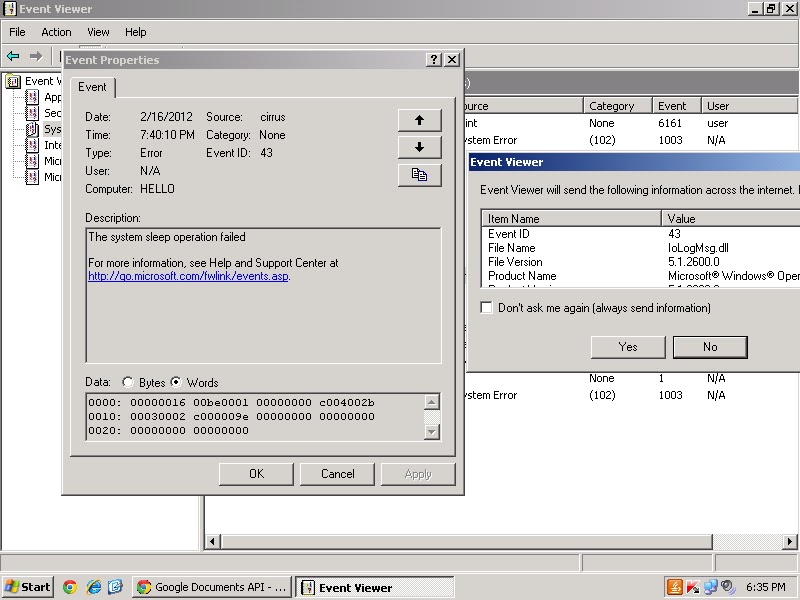
event id 43 cirrus: sleep operation failed
Labels:
00000016
,
c004002b
,
cirrus
,
event id 43
,
event viewer
,
system
,
windows xp
25.2.12
Setup Error Incorrect SideBySide Configuration
After I installed CamStudio 2.6b, when i am trying to open the file i got an error stated with the following error message.
Setup
Unable to execute file:
C:\Program Files\CamStudio 2.6b\Recorder.exe
CreateProcess Filed; code 14001.
The application has failed to start because its side-by-side configuration is incorrect. Please see the application event log or use the command-line sxstrace.exe for more detail.
Event Viewer report about this error logged with event id 33, sidebyside:
Event Description:
Activation context generation failed for C:\Program Files\CamStudio 2.6b\Recorder.exe.
Dependent Assembly
Microsoft.VC90.MFC,processor architecture="x86",publicKeyToken="1fc8b3b9a1e18e3b",type="win32",version="9.0.210228.0", could not be found. Please use sxstrace.exe for detail diagnosis.
Additional data:
log name: application
event id: 33
source: SideBySide
keywords: classic
Proof captured when i try to open the software:
Note: Instead the above error it is also expected, "Unable to execute file.
Create process failed; code 14001
This application has failed to start because the application configuration is incorrect".
Solution: Reinstalling the application may fix this problem.
Setup
Unable to execute file:
C:\Program Files\CamStudio 2.6b\Recorder.exe
CreateProcess Filed; code 14001.
The application has failed to start because its side-by-side configuration is incorrect. Please see the application event log or use the command-line sxstrace.exe for more detail.
Event Viewer report about this error logged with event id 33, sidebyside:
Event Description:
Activation context generation failed for C:\Program Files\CamStudio 2.6b\Recorder.exe.
Dependent Assembly
Microsoft.VC90.MFC,processor architecture="x86",publicKeyToken="1fc8b3b9a1e18e3b",type="win32",version="9.0.210228.0", could not be found. Please use sxstrace.exe for detail diagnosis.
Additional data:
log name: application
event id: 33
source: SideBySide
keywords: classic
Proof captured when i try to open the software:
Note: Instead the above error it is also expected, "Unable to execute file.
Create process failed; code 14001
This application has failed to start because the application configuration is incorrect".
Solution: Reinstalling the application may fix this problem.
Labels:
application
,
classic
,
error code 14001
,
event id 33
,
event viewer
,
setup error
,
SideBySide
,
windows 7
Event 1006 Customer Experience Improvement Program
Event Description:
A problem prevented Customer Experience Improvement Program data from being consolidated into files that can be sent to microsoft, (Error 80070005).
Additional details:
log name: application
event id: 1006
event source: Microsoft-Windows-CEIP
OpCode: info
keywords: classic
snapshot proof for the event:
solution:
Refer the following article http://technet.microsoft.com/en-us/library/cc774621(v=ws.10).aspx. from the microsoft technet site.
A problem prevented Customer Experience Improvement Program data from being consolidated into files that can be sent to microsoft, (Error 80070005).
Additional details:
log name: application
event id: 1006
event source: Microsoft-Windows-CEIP
OpCode: info
keywords: classic
snapshot proof for the event:
solution:
Refer the following article http://technet.microsoft.com/en-us/library/cc774621(v=ws.10).aspx. from the microsoft technet site.
Labels:
application
,
CEIP
,
classic
,
error 80070005
,
event id 1006
,
event viewer
,
windows 7
20.2.12
Event 12297 Volume Shadow Copy Service
Event Description:
Volume Shadow Copy Service error: The I/O writes cannot be flushed during the shadow copy creation period on volume \\?\Volume{ba206c14-f144-11e0-a0ff-806e6f6e6963}\. The volume index in the shadow copy set is 0. Error details: Open[0x00000000, The operation completed successfully.], Flush[0x80042302, A Volume Shadow Copy Service component encountered an unexpected error. Check the application event log for more information.],Release[0x00000000, The operation completed successfully.], OnRun[0x00000000, The operation completed successfully.].
Operation: Executing Asynchronous Operation.
Context:
Current State: DoSnapshotSet
Additional data:
log name: application
source: vss
event id: 12297
keywords:classic
proof:
Volume Shadow Copy Service error: The I/O writes cannot be flushed during the shadow copy creation period on volume \\?\Volume{ba206c14-f144-11e0-a0ff-806e6f6e6963}\. The volume index in the shadow copy set is 0. Error details: Open[0x00000000, The operation completed successfully.], Flush[0x80042302, A Volume Shadow Copy Service component encountered an unexpected error. Check the application event log for more information.],Release[0x00000000, The operation completed successfully.], OnRun[0x00000000, The operation completed successfully.].
Operation: Executing Asynchronous Operation.
Context:
Current State: DoSnapshotSet
Additional data:
log name: application
source: vss
event id: 12297
keywords:classic
proof:
Labels:
application
,
classic
,
event id 12297
,
event viewer
,
vss error
,
windows 7
Event 12297 Volume Shadow Copy Service
Event Description:
Volume Shadow Copy Service error: The I/O writes cannot be flushed during the shadow copy creation period on volume \\?\Volume{ba206c14-f144-11e0-a0ff-806e6f6e6963}\. The volume index in the shadow copy set is 0. Error details: Open[0x00000000, The operation completed successfully.], Flush[0x80042302, A Volume Shadow Copy Service component encountered an unexpected error. Check the application event log for more information.],Release[0x00000000, The operation completed successfully.], OnRun[0x00000000, The operation completed successfully.].
Operation: Executing Asynchronous Operation.
Context:
Current State: DoSnapshotSet
Additional data:
log name: application
source: vss
event id: 12297
keywords:classic
proof:
Volume Shadow Copy Service error: The I/O writes cannot be flushed during the shadow copy creation period on volume \\?\Volume{ba206c14-f144-11e0-a0ff-806e6f6e6963}\. The volume index in the shadow copy set is 0. Error details: Open[0x00000000, The operation completed successfully.], Flush[0x80042302, A Volume Shadow Copy Service component encountered an unexpected error. Check the application event log for more information.],Release[0x00000000, The operation completed successfully.], OnRun[0x00000000, The operation completed successfully.].
Operation: Executing Asynchronous Operation.
Context:
Current State: DoSnapshotSet
Additional data:
log name: application
source: vss
event id: 12297
keywords:classic
proof:
19.2.12
BTHUSB Bluetooth adapter
Event 16, BTHUSB:
Event Description:
The mutual authentication between the local Bluetooth adapter and a device with bluetooth adapter address (a8:5c:ff:8f:e8:97) failed.
log name: system
source: BTHUSB
event id: 16
keywords: classic
product: windows 7 operating system
Image snapshot for the error:
Event 17, BTHUSB:
The local Bluetooth adapter has failed in an undetermined manner and will not be used. The driver has been unloaded.
Event Description:
The mutual authentication between the local Bluetooth adapter and a device with bluetooth adapter address (a8:5c:ff:8f:e8:97) failed.
log name: system
source: BTHUSB
event id: 16
keywords: classic
product: windows 7 operating system
Image snapshot for the error:
Event 17, BTHUSB:
The local Bluetooth adapter has failed in an undetermined manner and will not be used. The driver has been unloaded.
Labels:
Bluetooth
,
BTHUSB
,
classic
,
event id 16
,
event id 17
,
event viewer
,
system
,
windows 7
Event 777 Dell - System Update
Event Description:
Update failed
Package: Setup.exe
Previous version: NA, New version:
log file: C:\Dell\UpdatePackage\log\bcmwl.log
Exit code: 0.
log name: application
event id: 777
keywords: classic
event source: dell - system update
product name: windows 7 operating system
product version: 6.1.7600.16385
Update failed
Package: Setup.exe
Previous version: NA, New version:
log file: C:\Dell\UpdatePackage\log\bcmwl.log
Exit code: 0.
log name: application
event id: 777
keywords: classic
event source: dell - system update
product name: windows 7 operating system
product version: 6.1.7600.16385
Labels:
Dell
,
Dell-System Update
,
event id 777
,
event viewer
,
windows 7
18.2.12
Event 12289 VSS Window 7
Volume shadow copy service error: Unexpected error DeviceIoControl(\\?\Volume{ba206c14-f144-11e0-a0ff-806e6f6e6963} - 0000000000000490, 0x0053c000, 0000000000382E10,0,0000000000384E30,4096,[0]). hr=0x80070570, The file or directory is corrupted and unreadable.
Operation:
Executing Asynchronous Operation
Context:
Current state: calling flush-and-hold IOCTL.
Current state: flush and hold writes.
Volume name is also logged on the event.
Additional details about the event:
log name: application
source: VSS
event id 12289.
keywords: classic.
product name: microsoft windows operating system.
product version: 6.1.7600.16385
Image snapshot for the error:
Operation:
Executing Asynchronous Operation
Context:
Current state: calling flush-and-hold IOCTL.
Current state: flush and hold writes.
Volume name is also logged on the event.
Additional details about the event:
log name: application
source: VSS
event id 12289.
keywords: classic.
product name: microsoft windows operating system.
product version: 6.1.7600.16385
Image snapshot for the error:
Labels:
0x80070570
,
application
,
classic
,
event id 12289
,
event viewer
,
vss error
,
windows 7
15.2.12
Event 10000 DCOM windows xp
Event Description:
Unable to start a DCOM server: {5C4C8078-24CF-4C71-B05E-8B1D935DB5AC}.The error: "This application has failed to start because the application configuration is incorrect. Reinstalling the application may fix this problem". The error happened while starting the command: "msnmgr.exe -Embedding".
source: DCOM
event id: 10000
file name: netevent.dll
Screenshot image proof for the error:
Recommended solution:
Modify the registry entries accordingly what is given from the page http://support.microsoft.com/kb/914052.
Unable to start a DCOM server: {5C4C8078-24CF-4C71-B05E-8B1D935DB5AC}.The error: "This application has failed to start because the application configuration is incorrect. Reinstalling the application may fix this problem". The error happened while starting the command: "msnmgr.exe -Embedding".
source: DCOM
event id: 10000
file name: netevent.dll
Screenshot image proof for the error:
Recommended solution:
Modify the registry entries accordingly what is given from the page http://support.microsoft.com/kb/914052.
Labels:
dcom
,
event id 10000
,
event viewer
,
Server
,
windows xp
14.2.12
Event id 34 Time-Service Windows 7
The time service has detected that the system time needs to be changed by -54197 seconds. The time service will not change the system time by more than 54000 seconds. Verify that your time and time zone are correct, and that the time source time.windows.com,0x9 (ntp.m|0x9| 0.0.0.0:123-> 207.46.250.85:123) is working properly.
log name: system
source: Time-Service
event id: 34
OpCode: info
proof:
Recommended solution:
Refer and adjust the settings of local time synchronization from the page http://technet.microsoft.com/en-us/library/cc733187%28v=ws.10%29.aspx.
log name: system
source: Time-Service
event id: 34
OpCode: info
proof:
Recommended solution:
Refer and adjust the settings of local time synchronization from the page http://technet.microsoft.com/en-us/library/cc733187%28v=ws.10%29.aspx.
Labels:
event id 34
,
event viewer
,
system
,
Time-Service
,
windows 7
12.2.12
Reliance Netconnect Application error windows 7
Event 1000, Application error:
Faulting application name: Reliance Netconnect.exe, version: 1.0.0.1, time stamp: 0x492a13ea.
Faulting module name: ntdll.dll, version: 6.1.7600.16385, time stamp: 0x4a5bdadb.
Exception code: 0xc0000005
Fault offset: 0x00053067
Faulting process id: 0x52c
Faulting application path: C:\Program files\Reliance Netconnect\Reliance Netconnect.exe
Faulting module path: C:\Windows\System32\ntdll.dll
Report Id: e2f9489e-399e-11e0-83a5-001a4da64029
Log Name: application
source: application error
task category: (100)
keywords: classic
event id 100
Faulting Module SkinMagicU.dll is also logged on the event viewer for the reliance netconnect application.
Faulting application name: Reliance Netconnect.exe, version: 1.0.0.1, time stamp: 0x492a13ea.
Faulting module name: ntdll.dll, version: 6.1.7600.16385, time stamp: 0x4a5bdadb.
Exception code: 0xc0000005
Fault offset: 0x00053067
Faulting process id: 0x52c
Faulting application path: C:\Program files\Reliance Netconnect\Reliance Netconnect.exe
Faulting module path: C:\Windows\System32\ntdll.dll
Report Id: e2f9489e-399e-11e0-83a5-001a4da64029
Log Name: application
source: application error
task category: (100)
keywords: classic
event id 100
Faulting Module SkinMagicU.dll is also logged on the event viewer for the reliance netconnect application.
Labels:
application
,
classic
,
event id 1000
,
event viewer
,
Reliance Netconnect.exe
,
windows 7
Classic Event 7001 Service Control Manager
Dependency service or group failure event:
The Network Location Awareness service depends on the Network Store Interface Service service which failed to start because of the following error: The dependency service or group failed to start.
log name: system
event id: 7001
keywords: classic
OpCode: info
The SMB 2.0/ 1.x MiniRedirector service depends on the SMB MiniRedirector wrapper and engine service which failed to start because of the error 'The dependency service or group failed to start'.
Other services includes:
The SMB MiniRedirector wrapper and engine service depends on the Redirected Buffering Sub System service failed to start because of the following error: A device attached to the system is not functioning.
Other services which are failed to start because of the same reason are,
The Network Location Awareness service depends on the Network Store Interface Service service which failed to start because of the following error: The dependency service or group failed to start.
log name: system
event id: 7001
keywords: classic
OpCode: info
The SMB 2.0/ 1.x MiniRedirector service depends on the SMB MiniRedirector wrapper and engine service which failed to start because of the error 'The dependency service or group failed to start'.
Other services includes:
- IP helper service depends on the Network Store Interface Service service failed to start.
The SMB MiniRedirector wrapper and engine service depends on the Redirected Buffering Sub System service failed to start because of the following error: A device attached to the system is not functioning.
Other services which are failed to start because of the same reason are,
- Network Store interface Service service depends on the NSI proxy service driver.
- TCP/IP NetBIOS helper service depends on the Ancillary function driver for winsock service.
- DNS client service depends on the NetIO legacy TDI support driver service.
Labels:
classic
,
event id 7001
,
event viewer
,
service control manager
,
system
,
windows 7
QTP Setup error Windows 7
QTP, a software testing tool installation or setup encountered an error on windows 7 operating system and as a result stated with an error message,
No background bmp defined in section 'General' entry 'BGBmp'
No Application name defined in section 'General' entry 'AppText'.
Still image proof:
No background bmp defined in section 'General' entry 'BGBmp'
No Application name defined in section 'General' entry 'AppText'.
Still image proof:
Labels:
qtp
,
setup error
,
software
,
software testing
,
testing tool
,
windows 7
11.2.12
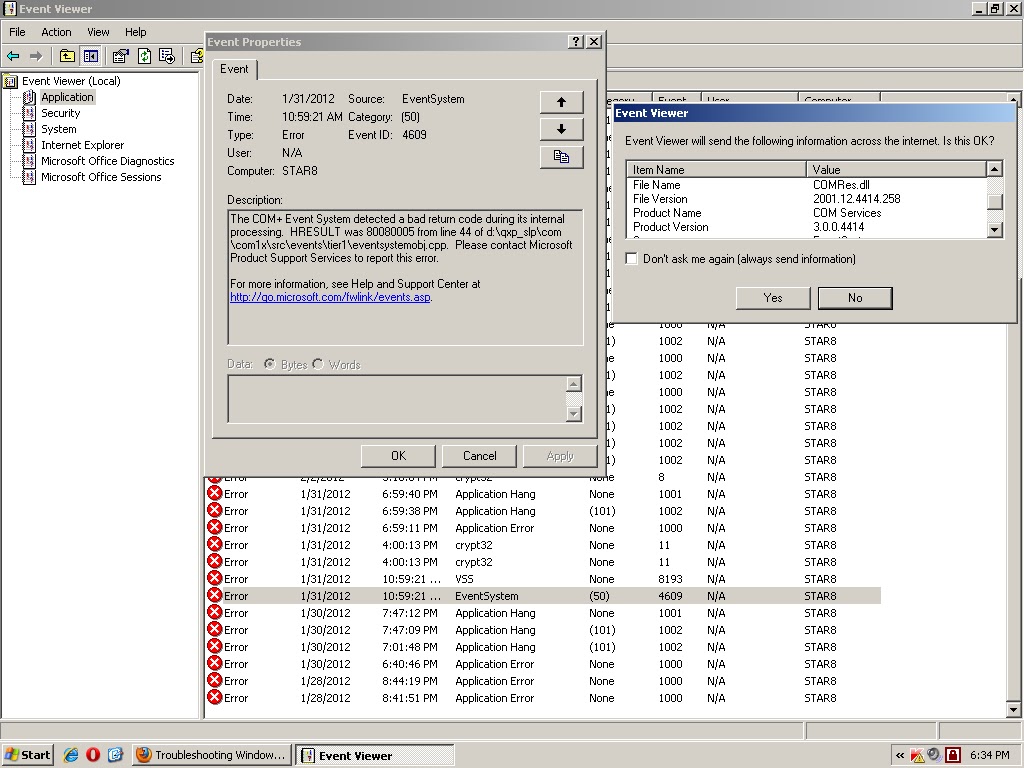
Event id 4609 EventSystem
The COM+ Event System detected a bad return code during its internal processing. HRESULT was 80080005 from line 44 of d:\qxp_slp\com\com1x\src\events\tier1\eventsystemobj.cpp. Please contact microsoft product support services to report this error.
file name: COMRes.dll
file version: 2001.12.4414.258
product name: COM services
product version: 3.0.0.4414
source: EventSystem
event id: 4609
category: (50)
proof:
file name: COMRes.dll
file version: 2001.12.4414.258
product name: COM services
product version: 3.0.0.4414
source: EventSystem
event id: 4609
category: (50)
proof:
Labels:
80080005
,
bad return code
,
category 50
,
com
,
event id 4609
,
event viewer
,
EventSystem
,
windows xp
Event id 11406 MsiInstaller
Event Description:
Product: ESET Smart Security. Error 1406. Could not write value egui to key \Software\Microsoft\Windows\CurrentVersion\Run.System Error.Verify that you have sufficient access to that key, or contact your support personnel.
Error data:
0000: 3734317b 32373439 46332d44 342d3746
0010: 2d433035 31334342 3443462d 34303446
0020: 46463530 7d44
source: MsiInstaller
event id: 11406
proof:
Product: ESET Smart Security. Error 1406. Could not write value egui to key \Software\Microsoft\Windows\CurrentVersion\Run.System Error.Verify that you have sufficient access to that key, or contact your support personnel.
Error data:
0000: 3734317b 32373439 46332d44 342d3746
0010: 2d433035 31334342 3443462d 34303446
0020: 46463530 7d44
source: MsiInstaller
event id: 11406
proof:
Labels:
error 1406
,
ESET smart security
,
event id 11406
,
event viewer
,
msiinstaller
,
windows xp
10.2.12
Event 12305, VSS
Volume Shadow Copy Service error: Volume/ disk not connected or not found. Error context: DeviceIoControl(//?\GLOBALROOT\Device\HarddiskVolumeShadowCopy - 0000000000000130,0x00560034,0000000000108FE0,0,0000000000107FD0,4096,[0]).
Operation:
Processing PostFinalCommitSnapshots
Context:
Execution Context: System Provider
log name: application
source: VSS
event id: 12305
keywords: classic
Proof:
Operation:
Processing PostFinalCommitSnapshots
Context:
Execution Context: System Provider
log name: application
source: VSS
event id: 12305
keywords: classic
Proof:
Labels:
application
,
classic
,
event id 12305
,
event viewer
,
vss error
,
windows 7
9.2.12
Unhandled Exception MadAppLauncher
Application: MadAppLauncher.exe
Framework Version: v4.0.30319
Description: The process was terminated due to an unhandled exception.
Exception Info:
Microsoft.VisualBasic.ApplicationServices.CantStartSingleInstanceException
Stack
at
Microsoft.VisualBasic.ApplicationServices.WindowsFormsApplicationBase.Run(System.String[])
source: .net runtime
event id: 1026
file name: mscoree.dll
file version: 4.0.31106.0
productname: microsoft .net framework
product version: 4.0.31106.0
proof:
Framework Version: v4.0.30319
Description: The process was terminated due to an unhandled exception.
Exception Info:
Microsoft.VisualBasic.ApplicationServices.CantStartSingleInstanceException
Stack
at
Microsoft.VisualBasic.ApplicationServices.WindowsFormsApplicationBase.Run(System.String[])
source: .net runtime
event id: 1026
file name: mscoree.dll
file version: 4.0.31106.0
productname: microsoft .net framework
product version: 4.0.31106.0
proof:
Labels:
.net framework
,
event id 1026
,
event viewer
,
MadAppLauncher.exe
,
unhandled exception
,
windows xp
7.2.12
6.2.12
Software Restriction Policy Processing Event
Event Description:
The installation of VIRTUAL_PC_2007_INSTALL.msi is not permitted due to an error in software restriction policy processing. The object cannot be trusted.
event id: 1008
source: MsiInstaller
file name: msi.dll
file version: 3.1.4001.5512
proof:
Recommended solution:
Refer the following pages http://technet.microsoft.com/en-us/library/cc735563%28v=ws.10%29.aspx, http://support.microsoft.com/kb/324036, http://technet.microsoft.com/en-us/library/697cf804-36ae-4925-a56a-bc91b44dfcd9.
The installation of VIRTUAL_PC_2007_INSTALL.msi is not permitted due to an error in software restriction policy processing. The object cannot be trusted.
event id: 1008
source: MsiInstaller
file name: msi.dll
file version: 3.1.4001.5512
proof:
Recommended solution:
Refer the following pages http://technet.microsoft.com/en-us/library/cc735563%28v=ws.10%29.aspx, http://support.microsoft.com/kb/324036, http://technet.microsoft.com/en-us/library/697cf804-36ae-4925-a56a-bc91b44dfcd9.
Labels:
event id 1008
,
event viewer
,
msiinstaller
,
windows xp
5.2.12
Application Popup Event
Event Description:
There was error [DATABASE NOT LOADED] processing the driver database.
There was error [DATABASE OPEN FAILED] processing the driver database.
event id: 877
source: application popup
data:
0000: 00000000 00640002 00000000 c000036d
0010: 00000000 c000036d 00000000 00000000
0020: 00000000 00000000
proof:
There was error [DATABASE NOT LOADED] processing the driver database.
There was error [DATABASE OPEN FAILED] processing the driver database.
event id: 877
source: application popup
data:
0000: 00000000 00640002 00000000 c000036d
0010: 00000000 c000036d 00000000 00000000
0020: 00000000 00000000
proof:
Labels:
application
,
Application Popup
,
database
,
dri
,
event id 877
,
event viewer
,
windows xp
3.2.12
child status 100 permanent error gmail
MAILER-DAEMON@p3plsmtp11-05.prod.phx3.secureserver.net
child status 100..The e-mail message could not be delivered because the user's mailfolder is full.
Content Type: multipart/alternative
Received: (qmail 3592 invoked from network)
X-IronPort-Anti-Spam-Result: AowBAJ69K0/
child status 100..The e-mail message could not be delivered because the user's mailfolder is full.
Content Type: multipart/alternative
Received: (qmail 3592 invoked from network)
X-IronPort-Anti-Spam-Result: AowBAJ69K0/
QoJDQcSBiGBcwEBBBICLAEbHgMMBhA
tAQ0hAQERAQUBDgEHBgYLCCKjAQqLc
DKIM-Signature: v=1; a=rsa-sha256; c=relaxed/relaxed
solution:
Verify the recipient addresses and try again. Otherwise, user can check their mailbox, if it is full then you should delete some messages to free up space or user can add more space to your account. If you are still having difficulty sending mail to the addresses, please contact e-mail customer support at 480-624-2500
![]() |
1.2.12
31.1.12
Invalid Activation Security Descriptor DCOM
Event 10020, dcom:
The machine wide Default Launch and Activation Security Descriptor is invalid. It contains Access Control Entries with permissions that are invalid. The requested action was therefore not performed. This security permission can be corrected using the component services administrative tool.
source: dcom
event id: 10020
file name: xpsp2res.dll
file version: 5.1.2600.2180
proof:
The machine wide Default Launch and Activation Security Descriptor is invalid. It contains Access Control Entries with permissions that are invalid. The requested action was therefore not performed. This security permission can be corrected using the component services administrative tool.
source: dcom
event id: 10020
file name: xpsp2res.dll
file version: 5.1.2600.2180
proof:
Labels:
dcom
,
event id 10020
,
event viewer
,
windows xp
28.1.12
QuickTime failed to initialize mozilla firefox
When i try to clear all the browsing history including cookies, cache, active logins, site preferences i got an error,
QuickTime Unavailable
Quicktime failed to initialize. Error #0
Please make sure quicktime is properly installed on this computer.
Following the above error it was also stated that, script unresponsive.
As captured image proof :
QuickTime Unavailable
Quicktime failed to initialize. Error #0
Please make sure quicktime is properly installed on this computer.
Following the above error it was also stated that, script unresponsive.
As captured image proof :
Labels:
error 0
,
firefox
,
firefox crash
,
mozilla
,
quicktime
Backup error code 0x80780048 Windows 7
Check your backup disk space
The disk where your backups are being saved doesn't have enough free space
Error code: 0X80780048
Event 4104, Windows Backup:
The backup was not successful. The error is: There is not enough free space on the backup storage location to backup the data. (0x80780048)
product name: microsoft windows operating system
product version: 6.1.7600.16385
log name: application
source: windows backup
event id: 4104
PROOF:
The disk where your backups are being saved doesn't have enough free space
Error code: 0X80780048
Event 4104, Windows Backup:
The backup was not successful. The error is: There is not enough free space on the backup storage location to backup the data. (0x80780048)
product name: microsoft windows operating system
product version: 6.1.7600.16385
log name: application
source: windows backup
event id: 4104
PROOF:
Labels:
backup
,
error code 0x80780048
,
event id 4104
,
event viewer
,
windows 7
,
windows backup
26.1.12
Classic Spooler Event 350 PrintService
Event 350, PrintService:
Document failed to print and was deleted because of corruption in the spooled file. The associated driver is: . Try printing the document again.
log name: microsoft-windows-printservice/admin
source: printservice
event id: 350
OpCode: spooler operation failed
task category: printing a document
keywords: classic spooler event, document print job
user: system
Document failed to print and was deleted because of corruption in the spooled file. The associated driver is: . Try printing the document again.
log name: microsoft-windows-printservice/admin
source: printservice
event id: 350
OpCode: spooler operation failed
task category: printing a document
keywords: classic spooler event, document print job
user: system
Labels:
classic
,
event id 350
,
event viewer
,
print
,
PrintService
25.1.12
24.1.12
Event 2001, Windows Defender
Event 2001, Windows Defender:
Windows Defender has encountered an error trying to update signatures.
Error code: 0x8050a003
Error Description: This package does not contain up-to-date definition files for this program. For more information, see help and support.
New Signature Version:
Previous Signature Version:
Update Source: user
Signature type:
update type:
Current Engine Version:
Previous Engine Version: 1.1.7702.0
log name: microsoft-windows-windows defender/operational
source: windows defender
event id: 2001
OpCode: info
proof:
Windows Defender has encountered an error trying to update signatures.
Error code: 0x8050a003
Error Description: This package does not contain up-to-date definition files for this program. For more information, see help and support.
New Signature Version:
Previous Signature Version:
Update Source: user
Signature type:
update type:
Current Engine Version:
Previous Engine Version: 1.1.7702.0
log name: microsoft-windows-windows defender/operational
source: windows defender
event id: 2001
OpCode: info
proof:
Labels:
0x8050a003
,
event id 2001
,
event viewer
,
update
,
windows defender
Event 108, ialmrnt5 driver
Event 108, ialm:
The driver ialmrnt5 for the display device \Device\Video3 got stuck in an infinite loop. This usually indicates a problem with the device itself or with the device driver programming the hardware incorrectly. Please check with your hardware device vendor for any driver updates.
log name: system
source: ialm
event id: 108
keywords: classic
proof:
The driver ialmrnt5 for the display device \Device\Video3 got stuck in an infinite loop. This usually indicates a problem with the device itself or with the device driver programming the hardware incorrectly. Please check with your hardware device vendor for any driver updates.
log name: system
source: ialm
event id: 108
keywords: classic
proof:
Labels:
classic
,
device driver
,
event id 108
,
event viewer
,
file system
,
ialm
,
ialmrnt5
,
windows 7
Event 135, Diagnosis-DPS Windows 7
Event 135, Diagnosis-DPS:
The diagnostic policy service could not create a diagnostic module host instance for diagnostic module {9c5a40da-b965-4fc3-8781-88dd50a6299d} (%SystemRoot%\system32\perftrack.dll). The error code was 2147943469. The scenario {fd5aa730-b53f-4b39-84e5-cb4303621d74}, instance {c30a21f8-359e-4305-b46f-d713a1c439db}, original activity ID {00000000-0000-0000-0000-000000000000} will be discarded.
log name: microsoft-windows-diagnosis-DPS/operational
event id: 135
source: Diagnosis-DPS
OpCode: The Diagnostic Policy Servic
task category: Scenario Lifecycle
keywords: Scenario Lifecycle Events
Still image proof:
The diagnostic policy service could not create a diagnostic module host instance for diagnostic module {9c5a40da-b965-4fc3-8781-88dd50a6299d} (%SystemRoot%\system32\perftrack.dll). The error code was 2147943469. The scenario {fd5aa730-b53f-4b39-84e5-cb4303621d74}, instance {c30a21f8-359e-4305-b46f-d713a1c439db}, original activity ID {00000000-0000-0000-0000-000000000000} will be discarded.
log name: microsoft-windows-diagnosis-DPS/operational
event id: 135
source: Diagnosis-DPS
OpCode: The Diagnostic Policy Servic
task category: Scenario Lifecycle
keywords: Scenario Lifecycle Events
Still image proof:
Event 4099, Display windows 7
Event 4099, display:
Display driver stopped responding. Save your work and reboot the system to restore full display functionality. The next time you reboot the machine, a dialog will be displayed giving you a chance to upload data about this failure to Microsoft.
log name: system
source: display
event id: 4099
keywords: classic
proof:
Recommended solution:
Refer the following microsoft help page for this error.
http://technet.microsoft.com/en-us/library/dd349375%28v=ws.10%29.aspx.
Display driver stopped responding. Save your work and reboot the system to restore full display functionality. The next time you reboot the machine, a dialog will be displayed giving you a chance to upload data about this failure to Microsoft.
log name: system
source: display
event id: 4099
keywords: classic
proof:
Recommended solution:
Refer the following microsoft help page for this error.
http://technet.microsoft.com/en-us/library/dd349375%28v=ws.10%29.aspx.
Labels:
classic
,
device driver
,
Display
,
event id 4099
,
event viewer
,
system
,
windows 7
BugCheck Event windows 7 (WER SystemErrorReporting)
Event1001, BugCheck :
The computer has rebooted from a bugcheck. The bugcheck was: 0x000000ea (0x842e9648, 0x855dc748, 0x851ce010, 0x00000001). A dump was saved in: C:\Windows\Minidump\021611-24312-01.dmp. Report Id: 021611-24312-01.
log name: system
event source: microsoft-windows-WER-SystemErrorReporting
event id: 1001
OpCode: info
keywords: classic
product name: microsoft windows operating system
Still image proof:
From the source bugcheck, i found an another event stated as, The bugcheck was: 0x0000001a (0x00041287, 0x0000b75e, 0x00000000, 0x00000000). A dump was saved in C:\Windows\MEMORY.DMP.
Event 1005, BugCheck:
Unable to produce a minidump file from the null dump file.
The computer has rebooted from a bugcheck. The bugcheck was: 0x000000ea (0x842e9648, 0x855dc748, 0x851ce010, 0x00000001). A dump was saved in: C:\Windows\Minidump\021611-24312-01.dmp. Report Id: 021611-24312-01.
log name: system
event source: microsoft-windows-WER-SystemErrorReporting
event id: 1001
OpCode: info
keywords: classic
product name: microsoft windows operating system
Still image proof:
From the source bugcheck, i found an another event stated as, The bugcheck was: 0x0000001a (0x00041287, 0x0000b75e, 0x00000000, 0x00000000). A dump was saved in C:\Windows\MEMORY.DMP.
Event 1005, BugCheck:
Unable to produce a minidump file from the null dump file.
Labels:
0x842e9648
,
0x855dc748
,
BugCheck
,
event id 1001
,
event id 1005
,
event viewer
,
system
,
windows 7
23.1.12
crypt32 event failed auto update retrieval of third-party root list sequence number
Event description:
Failed auto update retrieval of third-party root list sequence number from: http:/www.download.windowsupdate.com/msdownload/update/v3/static/trustedr/en/authrootseq.txt with error: This operation returned because the timeout period expired.
file name: crypt32.dll
source: crypt32
event id: 8
Proof:
Failed auto update retrieval of third-party root list sequence number from: http:/www.download.windowsupdate.com/msdownload/update/v3/static/trustedr/en/authrootseq.txt with error: This operation returned because the timeout period expired.
file name: crypt32.dll
source: crypt32
event id: 8
Proof:
Labels:
crypt32
,
event id 8
,
event viewer
,
timeout error
,
update
,
windows xp
19.1.12
18.1.12
14.1.12
Event id 9003 microsoft sql server
Event Description:
The log scan number (213:472:1) passed to log scan in database 'master' is not valid. This error may indicate data corruption or that the log file (.Idf) does not match the data file (.mdf). If this error occurred during replication, re-create the publication. Otherwise, restore from backup if the problem results in a failure during startup.
file name: sqlevn70.rll
file version: 2005.90.1399.0
event id: 9003
source: MSSQL$SQLEXPRESS
product name: microsoft sql server
product version: 9.0.1399.0
category: (2)
Event Data:
0000: 0000232b 00000014 00000015 00450054
0010: 00500053 004f0052 00300031 005c0030
0020: 00510053 0045004c 00500058 00450052
0030: 00530053 00000000 0000
The log scan number (213:472:1) passed to log scan in database 'master' is not valid. This error may indicate data corruption or that the log file (.Idf) does not match the data file (.mdf). If this error occurred during replication, re-create the publication. Otherwise, restore from backup if the problem results in a failure during startup.
file name: sqlevn70.rll
file version: 2005.90.1399.0
event id: 9003
source: MSSQL$SQLEXPRESS
product name: microsoft sql server
product version: 9.0.1399.0
category: (2)
Event Data:
0000: 0000232b 00000014 00000015 00450054
0010: 00500053 004f0052 00300031 005c0030
0020: 00510053 0045004c 00500058 00450052
0030: 00530053 00000000 0000
Labels:
database
,
event id 9003
,
event viewer
,
Microsoft SQL Server
,
Server
Event 3417, Microsoft SQL Server
Event Description:
Cannot recover the master database. SQL Server is unable to run. Restore master from a full backup, repair it, or rebuild it. For more information about how to rebuild the master database, see SQL Server books online.
File Name: sqlevn70.rll
File Version: 2005.90.1399.0
Product Name: Microsoft SQL Server
Product Version: 9.0.1399.0
Event Source: MSSQL$SQLEXPRESS
Category: (2)
Event ID: 3417
still image proof:
Error Data:
0000: 00000d59 0000000a 00000015 00450054
0010: 00500053 004f0052 00300031 005c0030
0020: 00510053 0045004c 00500058 00450052
0030: 00530053 00000000 0000
Cannot recover the master database. SQL Server is unable to run. Restore master from a full backup, repair it, or rebuild it. For more information about how to rebuild the master database, see SQL Server books online.
File Name: sqlevn70.rll
File Version: 2005.90.1399.0
Product Name: Microsoft SQL Server
Product Version: 9.0.1399.0
Event Source: MSSQL$SQLEXPRESS
Category: (2)
Event ID: 3417
still image proof:
Error Data:
0000: 00000d59 0000000a 00000015 00450054
0010: 00500053 004f0052 00300031 005c0030
0020: 00510053 0045004c 00500058 00450052
0030: 00530053 00000000 0000
Labels:
database
,
event id 3417
,
event viewer
,
Microsoft SQL Server
,
Server
event source i8042prt
Event 22, i8042prt:
Could not set the mouse sample rate
event id: 22
source: i8042prt
file name: i8042prt.sys
file version: 5.1.2600.2180
Event data:
0000: 00080000 00620001 00000000 c0050016
0010: 00000532 00000000 00000000 00000000
0020: 00000000 00000000 00000000 00000000
Event 23, i8042prt:
Could not set the mouse resolution.
Data:
0000: 00080000 00620001 00000000 c0050017
0010: 00000532 00000000 00000000 00000000
0020: 00000000 00000000 00000000 00000000
Event 34, i8042prt:
An error occurred while trying to determine the number of mouse buttons.
data:
0000: 00080000 00620001 00000000 c0050022
0010: 00000532 00000000 00000000 00000000
0020: 00000000 00000000 00000000 00000000
Event 40, i8042prt:
An error occurred while trying to acquire the device ID of the mouse.
data:
0000: 00080000 00620001 00000000 c0050028
0010: 00000532 00000000 00000000 00000000
0020: 00000000 00000000 00000000 00000000
still image proof:
Could not set the mouse sample rate
event id: 22
source: i8042prt
file name: i8042prt.sys
file version: 5.1.2600.2180
Event data:
0000: 00080000 00620001 00000000 c0050016
0010: 00000532 00000000 00000000 00000000
0020: 00000000 00000000 00000000 00000000
Event 23, i8042prt:
Could not set the mouse resolution.
Data:
0000: 00080000 00620001 00000000 c0050017
0010: 00000532 00000000 00000000 00000000
0020: 00000000 00000000 00000000 00000000
Event 34, i8042prt:
An error occurred while trying to determine the number of mouse buttons.
data:
0000: 00080000 00620001 00000000 c0050022
0010: 00000532 00000000 00000000 00000000
0020: 00000000 00000000 00000000 00000000
Event 40, i8042prt:
An error occurred while trying to acquire the device ID of the mouse.
data:
0000: 00080000 00620001 00000000 c0050028
0010: 00000532 00000000 00000000 00000000
0020: 00000000 00000000 00000000 00000000
still image proof:
Labels:
event id 22
,
event id 23
,
event id 34
,
event id 40
,
event viewer
,
i8042prt
,
mouse
,
windows xp
CNET TechTracker Event
Event id 2, CNET TechTracker:
Event Description:
The description for event id (2) in source (CNET TechTracker) cannot be found. The local computer may not have the necessary registry information or message DLL files to display messages from a remote computer. You may be able to use the /AUXSOURCE=flag to retrieve this description; See help and support for details.
The following information is part of the event:
result: Scan Failed- general scan failure.
unable to complete request due to error: The server was busy and could not check for updates.
A connection with the server could not be established.
event source: CNET TechTracker
event id: 2
platform: windows xp
proof:
Event Description:
The description for event id (2) in source (CNET TechTracker) cannot be found. The local computer may not have the necessary registry information or message DLL files to display messages from a remote computer. You may be able to use the /AUXSOURCE=flag to retrieve this description; See help and support for details.
The following information is part of the event:
result: Scan Failed- general scan failure.
unable to complete request due to error: The server was busy and could not check for updates.
A connection with the server could not be established.
event source: CNET TechTracker
event id: 2
platform: windows xp
proof:
Labels:
CNET TechTracker
,
event id 2
,
event viewer
,
windows xp
Circular Kernel Context Logger
Event 2, Kernel-EventTracing :
Session "Circular Kernel Context Logger" failed to start with the following error: 0xC0000035
log name: microsoft-windows-kernel-eventtracing/Admin
event id: 2
source: Kernel-EventTracing
OpCode: start
Task Category: Session
Keywords: session
image proof:
Recommended :
kernel event tracing oobe
Session "Circular Kernel Context Logger" failed to start with the following error: 0xC0000035
log name: microsoft-windows-kernel-eventtracing/Admin
event id: 2
source: Kernel-EventTracing
OpCode: start
Task Category: Session
Keywords: session
image proof:
Recommended :
kernel event tracing oobe
Labels:
error 0xc0000035
,
event id 2
,
event viewer
,
kernel
,
Kernel-EventTracing
,
windows 7
Event Source CodeIntegrity windows 7
Event 3002, CodeIntegrity :
Code Integrity is unable to verify the image integrity of the file \Device\HarddiskVolume2\Program Files\CheckPoint\ZAForceField\AK\icsak.dll because the set of per-page image hashes could not be found on the system.
Log Name: Microsoft-Windows-CodeIntegrity/Operational
Source: CodeIntegrity
Event Id: 3002
OpCode: (6684672)
Task Category: (1)
Product Name: Microsoft Windows Operating System
Product Version: 6.1.7600.16385
Locale ID: 1033
Still image proof:
Code Integrity is unable to verify the image integrity of the file \Device\HarddiskVolume2\Program Files\CheckPoint\ZAForceField\AK\icsak.dll because the set of per-page image hashes could not be found on the system.
Log Name: Microsoft-Windows-CodeIntegrity/Operational
Source: CodeIntegrity
Event Id: 3002
OpCode: (6684672)
Task Category: (1)
Product Name: Microsoft Windows Operating System
Product Version: 6.1.7600.16385
Locale ID: 1033
Still image proof:
Labels:
CodeIntegrity
,
event id 3002
,
event viewer
,
windows 7
Subscribe to:
Posts
(
Atom
)
Event IDs
event id 1000
(
11
)
event id 1
(
10
)
event id 1002
(
7
)
event id 0
(
6
)
event id 1001
(
6
)
event id 2
(
6
)
event id 5
(
5
)
event id 5000
(
5
)
event id 100
(
4
)
event id 1008
(
4
)
event id 16
(
4
)
event id 20
(
4
)
event id 3
(
4
)
event id 1026
(
3
)
event id 12
(
3
)
event id 2001
(
3
)
event id 4
(
3
)
event id 7001
(
3
)
event id 10000
(
2
)
event id 10005
(
2
)
event id 1003
(
2
)
event id 1017
(
2
)
event id 11
(
2
)
event id 1101
(
2
)
event id 12013
(
2
)
event id 13
(
2
)
event id 14
(
2
)
event id 15
(
2
)
event id 17
(
2
)
event id 19
(
2
)
event id 201
(
2
)
event id 23
(
2
)
event id 257
(
2
)
event id 3001
(
2
)
event id 3002
(
2
)
event id 3029
(
2
)
event id 33
(
2
)
event id 34
(
2
)
event id 4096
(
2
)
event id 46
(
2
)
event id 5008
(
2
)
event id 54
(
2
)
event id 59
(
2
)
event id 6
(
2
)
event id 6161
(
2
)
event id 8
(
2
)
event id 8200
(
2
)
event id 5000
(
1
)
event id -1
(
1
)
event id 10
(
1
)
event id 10010
(
1
)
event id 10016
(
1
)
event id 10020
(
1
)
event id 1004
(
1
)
event id 1005
(
1
)
event id 1006
(
1
)
event id 10110
(
1
)
event id 10111
(
1
)
event id 1012
(
1
)
event id 1013
(
1
)
event id 1015
(
1
)
event id 102
(
1
)
event id 1024
(
1
)
event id 104
(
1
)
event id 1041
(
1
)
event id 1057
(
1
)
event id 106
(
1
)
event id 1068
(
1
)
event id 108
(
1
)
event id 1082
(
1
)
event id 1090
(
1
)
event id 11006
(
1
)
event id 1103
(
1
)
event id 111
(
1
)
event id 1111
(
1
)
event id 11305
(
1
)
event id 11311
(
1
)
event id 11316
(
1
)
event id 11330
(
1
)
event id 11335
(
1
)
event id 11406
(
1
)
event id 11500
(
1
)
event id 11704
(
1
)
event id 11706
(
1
)
event id 11935
(
1
)
event id 12289
(
1
)
event id 12291
(
1
)
event id 12293
(
1
)
event id 12297
(
1
)
event id 12305
(
1
)
event id 135
(
1
)
event id 137
(
1
)
event id 14103
(
1
)
event id 142
(
1
)
event id 14332
(
1
)
event id 14370
(
1
)
event id 148
(
1
)
event id 1502
(
1
)
event id 1508
(
1
)
event id 1511
(
1
)
event id 1515
(
1
)
event id 15151
(
1
)
event id 15300
(
1
)
event id 15301
(
1
)
event id 167
(
1
)
event id 17204
(
1
)
event id 17207
(
1
)
event id 1797
(
1
)
event id 1802
(
1
)
event id 2000
(
1
)
event id 2007
(
1
)
event id 2013
(
1
)
event id 2015
(
1
)
event id 2020
(
1
)
event id 20276
(
1
)
event id 205
(
1
)
event id 22
(
1
)
event id 25
(
1
)
event id 2505
(
1
)
event id 259
(
1
)
event id 269
(
1
)
event id 27
(
1
)
event id 28
(
1
)
event id 3000
(
1
)
event id 3006
(
1
)
event id 3028
(
1
)
event id 3058
(
1
)
event id 3079
(
1
)
event id 32
(
1
)
event id 32003
(
1
)
event id 3299
(
1
)
event id 3417
(
1
)
event id 350
(
1
)
event id 351
(
1
)
event id 36
(
1
)
event id 36881
(
1
)
event id 36882
(
1
)
event id 36887
(
1
)
event id 36888
(
1
)
event id 372
(
1
)
event id 40
(
1
)
event id 400
(
1
)
event id 4005
(
1
)
event id 4099
(
1
)
event id 41
(
1
)
event id 4104
(
1
)
event id 4107
(
1
)
event id 4118
(
1
)
event id 4198
(
1
)
event id 4199
(
1
)
event id 4205
(
1
)
event id 43
(
1
)
event id 4307
(
1
)
event id 4321
(
1
)
event id 4373
(
1
)
event id 4376
(
1
)
event id 439
(
1
)
event id 448
(
1
)
event id 45
(
1
)
event id 4609
(
1
)
event id 4618
(
1
)
event id 4621
(
1
)
event id 485
(
1
)
event id 49
(
1
)
event id 490
(
1
)
event id 50
(
1
)
event id 5003
(
1
)
event id 50034
(
1
)
event id 5004
(
1
)
event id 5005
(
1
)
event id 50068
(
1
)
event id 505
(
1
)
event id 5051
(
1
)
event id 5053
(
1
)
event id 51
(
1
)
event id 513
(
1
)
event id 5300
(
1
)
event id 55
(
1
)
event id 56
(
1
)
event id 6004
(
1
)
event id 60055
(
1
)
event id 63
(
1
)
event id 7
(
1
)
event id 7000
(
1
)
event id 7009
(
1
)
event id 7010
(
1
)
event id 7011
(
1
)
event id 7022
(
1
)
event id 7023
(
1
)
event id 7024
(
1
)
event id 7026
(
1
)
event id 7030
(
1
)
event id 7034
(
1
)
event id 7038
(
1
)
event id 7040
(
1
)
event id 7042
(
1
)
event id 72
(
1
)
event id 7320
(
1
)
event id 777
(
1
)
event id 8000
(
1
)
event id 8003
(
1
)
event id 8032
(
1
)
event id 808
(
1
)
event id 8193
(
1
)
event id 8194
(
1
)
event id 8208
(
1
)
event id 86
(
1
)
event id 877
(
1
)
event id 9
(
1
)
event id 9002
(
1
)
event id 9003
(
1
)