29.10.13

WPD ClassInstaller Event 25088

Event 25088, WPD-ClassInstaller:
It was not possible to install drivers for the device. Error code 0x8007045b
log name: system
source: WPD-ClassInstaller
event id: 25088
task category: driver installation
keywords: classic

Proof:
WPD-ClassInstaller windows 7

2.10.13

EvntAgnt error windows 7

Event id: 2019, EvntAgnt:
SNMP Event log Extension Agent did not initialize correctly.
log name: application
source: EvntAgnt
keywords: classic

Event id 3005:
Error positioning to end of log file-- seek to end of log failed. Handle specified is 5570580. Return code from ReadEventLog is 87.

Event id 1020:
Error processing registry parameters. Extension agent terminating.

Proof:
evntagnt error windows 7


19.9.13

sql writer initialization error

Event 1, SQLWRITER:
SQL Writer initialization error: the control dispatcher cannot be started [0x80070427]
log name: application
event id: 1
source: sqlwriter
keywords: classic
product name: microsoft sql server

proof:
sql writer event

30.8.13

Android Interface has stopped working

AndroidInterface.exe has stopped working:
Problem event name: APPCRASH
Application name: AndroidInterface.exe
Application timestamp: 50c014b8
Fault module name: WINUSB.dll
Fault module version: 6.1.7600.16385
Exception code: c0000005
Exception offset: 000026c6
os version: 6.1.7601.2.1.0.256.1
Additional information 1: 0a9e
Additional information 2: 0a9e372d3b4ad19135b953a78882e789

Proof:
androiinterface.exe stopped

PnP Driver Not Found ACPI\hpq0006

Scripted Diagnostics Native Host:
Problem: PnPDriverNotFound
Problem signature 01: x86
Problem Signature 02: ACPI\HPQ0006
OS version: 6.1.7601.2.1.0.256.1
locale id: 16393

PROOF:
pnp driver not found windows 7

27.8.13

Unable to repair network problems

Network Diagnostics Framework:
Problem:
Unable to diagnose/repair network problems.
Problem signature:
Event name: NetworkDiagnosticsFrameworkV3
Vendor: microsoft
OwnerHC: WinInetHelperClass [1.0]
Session status: 2
HRESULT: 8008F906
Repair: {07D37F7B-FA5E-4443-BDA7-AB107B29AFB9}
RootCauseHC: WinInetHelperClass [1.0]
RootCause: {645A057F-BEB2-439B-ABCD-B4B0FE5A6929}
Driver file name: N/A
DriverVersion: N/A
os version: 6.1.7601.2.1.0.256.1
locale is: 1033
Proof:
unable-to-repair-network-problems

Windows Update Installation Problem

Host process for Windows Services:
Problem: Windows Update Installation Problem.
Description: A windows update did not install properly.
Problem signature:
Problem Event Name: WindowsUpdateFailure
Client Version: 7.6.7600.256
Win32HResult: 80070070
UpdateId: 456197CA-06FF-4BCF-AEAE-C5183E3AE72F
Scenario: download
source id: 105
os version: 6.1.7600.2.0.0.256.1
locale id: 1033
Proof:

For the Scenario 'install' the details are follows,
Win32HResult: 80070643
Update id: DF410764-5CF9-468F-BD49-C42A27ADA9C7
SOURCE ID: 101

For the Win32HResult '80246001' the update id is D6E72A48-2AC9-4432-8511-1933729946E9

17.8.13

vb.net error source mscorlib

IOException was unhandled: A required privilege is not held by the client
I am creating code for my project, which includes file handling in vb.net and i am running the project in debugging mode. At that time when the breakpoint reaches the code which can save the file(i.e notepad) to the system drive, which is C: in my case. I have encountered with the following error.
System.IO.IOException: A required privilege is not held by the client.
Data:  System.Collections.ListDictionaryInternal
Message: A required privilege is not held by the client
source: mscorlib
Stack trace:  at Syste.IO._Error.WinIOError(Int32 error code, String maybeFullPath) at Systyem.IO.FileStream.init ..
Target site: Void WinIOError(Int32, System.String)
Declaring Type: Name="_Error" Full Name="System.IO._Error"
Module: common language runtime library
Name: WinIOError
Proof:
IOException was unhandled windows 7
Solution:
Try to create new notepad or save file on the Location(i.e system drive- C:). Now,you can view the error code and message. Follow the steps given in the video to solve the error.


RasSstp event windows 7

Event 1, RasSstp:
Cold={0715D8B3-7325-47C8-A5A4-656F27753B37}: The initial secure socket tunneling protocol request could not be successfully sent to the server. This can be due to network connectivity issues or certificate (trust) issues. The detailed error message is provided below. Correct the problem and try again.

No connection could be made because the target machine actively refused it.
log name: system
source: RasSstp
event id: 1
keywords: classic
product version: 6.1.7600.16385
locale id: 16393

Proof:
rassstp event windows 7

9.8.13

Event 59 sidebyside windows 7

Event id: 59, SideBySide:
Activation context generation failed for "D:\wanted softwares\iphone\tinyumbrella-6.14.00.exe". Error in manifest or policy file "D:\WANTED SOFTWARES\IPHONE\TINYUMBRELLA 6.14.00.EXE" on line 0. Invalid xml syntax.
log name: application
source: side by side
event id: 59
keywords: classic
proof:
iphone tinyumbrella event
Recommended:
incorrect sidebyside configuration event

Event 6 Kernel General Windows 7

Event 6, Kernel-General:
An I/O operation initiated by the Registry failed unrecoverably. The registry could not flush hive (file):".
log name: system
event id: 6
source: kernel-general
product version: 6.1.7600.16385

Proof:
kernel general windows 7
Recomended:
kernel-general event 5 windows 7

Event 5 service pack installer windows 7

Event id: 5, service pack installer
There is not enough free disk space to install the service pack. Required =48 MB
log name: system
source: service pack installer
event id: 5
opcode: info

Proof:
service pack installer error
Recommended:
service pack installer event 8

SNMP Event 1500 windows 7

Event id: 1500, SNMP:
The snmp service encountered an error while accessing the registry key SYSTEM\CurrentControlSet\Services\SNMP\Parameters\TrapConfiguration.
log name: system
source: SNMP
keywords: classic
event id: 1500
product version: 6.1.7600.16385
locale id: 16393

Proof:
snmp event 1500 windows 7

Event id 10007 Restart Manager

Event id 10007, RestartManager:
Application or service 'Apple Mobile Device' could not be restarted.
Log Name: application
event id: 10007
Event Source: Microsoft-Windows-RestartManager
opcode: info
product version: 6.1.7600.16385
locale id: 16393

Proof: 
restart manager event 10007 windows 7


28.7.13

Bex Event Internet explorer Windows 7

Speech recognition has stopped working:
Problem signature:
Problem Event Name: BEX
Application Name: sapisvr.exe
Application version: 5.3.11513.0
Application timestamp: 4a5bcdc4
Fault module name: StackHash_0a9e
Exception code: c0000005

Windows Explorer has stopped working:
Windows can check online for a solution to the problem and try to restart the program.
Problem event name: bex
application name: explorer.exe
application version: 6.1.7600.16768
fault module name: wdmaud.drv
fault module version: 6.1.7600.16385
exception data: 00000008

Proof:


Event 1023 Help windows 7

Event id 1023, Help: Event Properties
Online TOC root is not valid.
Log name: Microsoft-Windows-Help/Operational
Source: Help
Task category: (21)
Product version: 6.1.7600.16385
OpCode: info

Proof:
help event id 1023 windows 7

13.7.13

Windows 7 process activation service event

Event 5053, WAS:
The windows process activation service received a change notification, but was unable to process it correctly. The data field contains the error number.
log name: system
event id: 5053
source: WAS
keywords: classic
product name: Internet Information service
product version: 7.5.7600.16385
proof:
Event 5189, WAS:
The windows procees activation service failed to generate an application pool config file for application pool'*. The error type is '0'. To resolve this issue, please ensure that the applicationhost.config file is correct and recommit the last configuration changes made. The data fiel contains the error number.
Event id: 5189
source: microsoft-windows-WAS
product name: internet information service.
Proof:

11.7.13

CLR20r3 event system configuration

Event name: CLR20r3
 Adobe digital editions 1.8.3 stopped working while reading the ebook. Following are the event details. Description: stopped working.
Problem signature 01: digitaleditionspreview.exe
Problem signature 02: 1.8.3.0
Problem signature 03: 4fb9b683
Problem signature 04: system.configuration
Problem signature 05: 2.0.0.0
Problem signature 06: 4a275e0d
Problem signature 07: 1a8
Problem signature 08: 4d
Problem signature 09: IOIBMURHYNRXKW0ZXKYRVFN0BOYYUFOW
OS version: 6.1.7600.2.0.0.256.1
While debugging the error, i got the following details.
ConfigurationErrorsException was unhandled: Configuration system failed to initialize.
Errors: system.configuration.configurationexception
An unhandled exception (System.Configuration.ConfigurationErrorsException') occurred in digitaleditionspreview.exe
An unhandled exception of type 'system.configuration.configurationerrorsexception'  occurred in system.configuration.dll
 Proof:


clr20r3 event windows 7 adobe digital editions

2.7.13

Schedule event 7901

Event id 7901, schedule:
The At1.job command failed to start due to the following error: The system cannot find the path specified.
File name: netevent.dll
File version: 5.1.2600.0
proof:
schedule event

Securitycenter windows xp

The windows security center service was unable to establish event queries withWMI to monitor third party AntiVirus and firewall.
Data : 8004100e
event id : 1802
source: security center
file name: xpsp2res.dll

proof:
security center event

25.6.13

Fatal error chrome

Event id 1, chrome:
The following information is part of the event. Chrome has encountered a fatal error.
ver = 27.0.1453.110; lang=; id=; is_machine=1; upload=1; minidump=C:\Program Files\Google\Crash reports\d737ae59-7a68-4c3c-9586-b4ac6dd5662f.dmp.

Source: chrome
event id: 1
type: error

Proof: 
chrome encountered fatal error

20.6.13

Error 0x80072ee7 RemoteApp and Desktop connections

Event id: 1002, RemoteApp and Desktop connections: Windows cannot find the remote computer that contains the connection.
Make sure that: You typed the correct connection URL and your computer can connect to the internet.
Connection name:
Connection url:http://www.way2error.com
Error code: 0x80072ee7, 0x0

Log name: Microsoft-windows RemoteApp and Desktop connections/Admin
event id: 1002
source: Remoteapp and desktop connections
Task category: setup
Product version: 6.1.7600.16385
Proof:

22.5.13

MSOLAP$LocalCube Event windows 7

Event 1, MSOLAP$LocalCube:
Message-handling subsystem: The message manager for the 16393 locale cannot be found.
log name: application
source: MSOLAP$LocalCube
event id: 1
keywords: classic
product: windows 7

proof:
msolap$localcube event windows 7

10.1.13

VsJITDebugger event windows 7 Debugger

Event 4096, VsJITDebugger:
An unhandled microsoft.net framework exception occurred in camtasiastudio.exe [4908]. Just-In-Time Debugging this exception failed with the following error: The remote procedure call failed.
Check the documentation index for 'Just-In-Time debugging, errors' for more information.
source: VsJITDebugger
event id: 4096
log name: application
keywords: classic

5.1.13

Auto Enrollment Event 15

Automatic Certificate Enrollment for local system failed to contact the active directory. The specified server does not complete the operations. Auto enrollment will not be performed.
event id: 15
source: AutoEnrollment
file name: pautoenr.dll
error code: 0x8007003a

Recommended: Watch the video enclosed below to know how to automate certificate management.

1.1.13

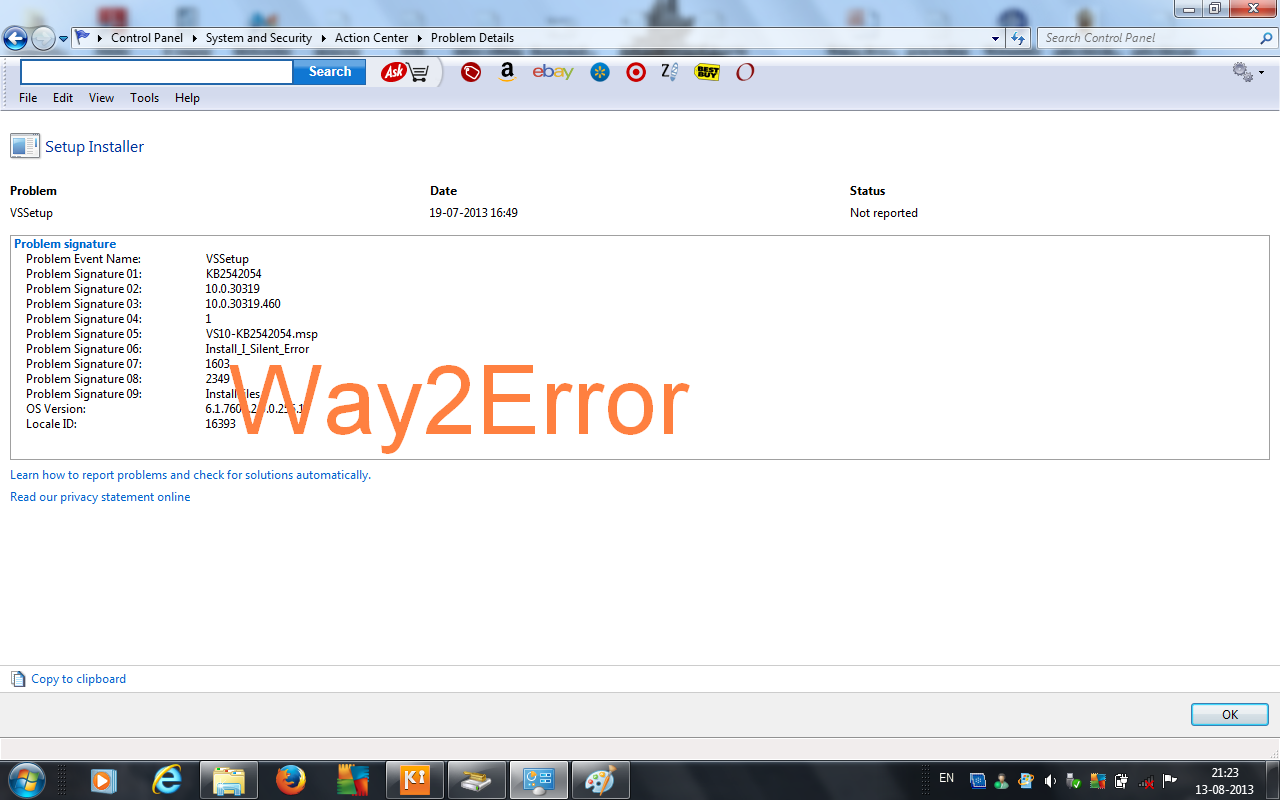
vssetup event INSTALL_I_SILENT_ERROR

vssetup,  microsoft visual c++ 2010 x86 redistributable setup, 10.0.30319, 10.0.30319.415, 1, vc_red.msi, install_i_silent_error, 1603, 1316, publishproduct, NIL
Setup installer:
Problem: VSSetup
Problem Signature 01: KB2542054
Problem Signature 02: 10.0.30319
Problem Signature 03: 10.0.30319.460
Problem Signature 04: 1
Problem Signature 05: VS10-KB2542054.msp
Problem Signature 06: Install_I_Silent_Error
Problem Signature 07: 1603
Problem Signature 08: 2349
Problem Signature 09: InstallFiles
OS version: 6.1.7600.2.0.0.256.1
locale id: 16393

Proof:
install i silent error

26.12.12

WPDMTPDriver event 15300

Description:
MTP WPD Driver has failed to start. Error 0x8007001f.
event id: 15300
source: WPDMTPdriver
file name: wpdmtpdr.dll
file version: 5.2.5721.5145

Snapshot proof:

10.12.12

Communicator event 3

Event id 3, communicator:
Description: Communicator was unable to resolve the DNS hostname of the login server sipinternal.hcl.com.
Resolution: If you are using manual configuration for communicator, please check that the server name is typed correctly and in full. If you are using automatic configuration, the network administrator will need to double check the DNS A record configuration for sipinternal.hcl.com because it could not be resolved.
source: communicator
event id: 3
filename: UCCPRES.dll
file version: 2.0.6362.0
product name: microsoft office communicator 2007

Proof:
communicator event 3 windows xp
 

5.12.12

brother brlog event 1001

source: Bother Brlog
event id: 1001
type: error
windows xp
Description:
STI  BrtSTI: [2012/12/05 11:41:25.375]: [00001996]: CUsbScnDev: DeviceIoControl illegal response [0x0]

Event proof:
brother brlog

24.11.12

hshld error: 0 event viewer

Event id 10120:
Following information is part of the event: hshld error: 0. Error querying configuration string: config\log_append.

Event id 10105:
Open VPNAS. Invalid configuration file.

Additional data:
source: hshld
windows xp


25.10.12

Psched event 14103 OID_GEN_LINK_SPEED

Event Description:
QoS [Adapter {BA4D3A2E-1D24-4E02-8FAB-7E2814F5EB70}: The netcard driver failed the query for OID_GEN_LINK_SPEED.
Event id: 14103
Source: Psched
File name: netevent.dll
Component: system event log
version: 5.0
symbolic name: EVENT_PS_QUERY_OID_GEN_LINK_SPEED
Error codes:
00040000
00560002
c0003717
c0000001
Product: windows xp
Event proof:
Recommended: 
This event record indicates serious problem, so it is recommended to contact technical support group or microsoft product support services.

5.10.12

PrintService event 315 sharing a printer

Event id 315, print service:
The print spooler failed to share printer hp laserjet p1007 with shared resource name HP laserjet P1007. Error 2114. The printer cannot be used by others on the network.
log name: microsoft windows print service
event id: 315
task category: sharing a printer
keywords: classic spooler event, printer
opcode: spooler operation failed
source: print service
locale id: 1033
product name: windows 7
product version: 6.1.7600.16385
Image proof:
event id 315 printer

win32 error code print processor

Description:
The document wallet prints owned by user failed to print on printer Auto HP officejet 5600 series on sys. Data type: NT EMF 1.008. Size of the spool file in bytes: 6356992. Number of bytes printed: 0. Total number of pages in the document: 1. Number of pages printed: 2. Client machine: Win32 error code return by the print processor: 53(0x35)
Event id: 6161
Source: Print
file name: xpsp2res.dll


Java Quick Starter service event

Description:
The following information is part of the event: Could not register service with the service manager. StartServiceCtrlDispatcher failed (error 1063)
Source:  JavaQuickStarterService
Event id: 1
Type: error

Proof:
java quick starter service event

2.10.12

Event id 15151 microsoft sql server

Cannot find the object 'service_queue_usages', because it does not exist or you do not have permission.
Event id: 15151
Event source: MSSQL$SQLEXPRESS
Locale ID: 1033
Product name: microsoft sql server
Product version: 10.0.2531.0
Task category: server
Keywords: classic
Log name: application
Proof:
sql server 2008 event 15151

1.10.12

SQL Server service failed to start

Description:
Product: Microsoft SQL server 2005 express edition. Error 29503. The sql server service failed to start. For more information, see the SQL server books online topics, "how to: view sql server 2005 setup log files" and "starting sql server manually". The error is 3417
Event id: 10005
source: msiinstaller
Error code:
0000: 4641327b 44444646 44452d37 342d3538
0010: 2d303941 32354338 4144352d 44424539
0020: 38423943 7d46
file name: msi.dll
product name: windows installer unicode
Proof:
sql server service failed to start

28.9.12

unexpected parser state xml parsing error

XML Parsing error: unexpected parser state.
Location: jar:file:///C:/program files/mozilla firefox/omni.jar! / chrome/toolkit/content/global/neterror.xhtml
<div id="ed_connectionfailure">&connectionfailure.longdesc;</div>

Proof:
xml parsing state

Recommended post:
xml parsing opera browser

21.9.12

Event id 4618 EventSystem windows xp support

Description:
The COM + Event System raised an unexpected access violation at address 0x7751035E, attempting to access address 0x3A2645BF. Please contact microsoft product support services to report this error.
ole32!CoMarshalInterface+0x1dad
ole32!CoGetClassObject+0x2e0
ole32!CoGetClassObject+0x34c
ole32!CoGetClassObject+0x1e0
ole32!CoGetClassObject+0x99
ole32!CoGetClassObject+0x1b
ES!DIIGetClassObject+0xfe1a
ES!NotifyLogoffUser+0x1a
WINotify!+0x25d9
WINotify!SensLogoffEvent+0x8d
winlogon+0x39f18
kernel32!GetModuleFileNameA+0x1ba

Additional data:
category: (50)
event id: 4618
event source: eventsystem
Type: error

Proof:
windows xp event system support
 Recommended post:
HRESULT 80080005 (4609 event system log)

17.9.12

Event id 1015 HelpLibManager

In silent mode, either one of  / sourceMedia, / sourceWeb switches was missing, or it specified an invalid location (C:\Program Files\SAP Business Objects\Crystal reports for .net framework 4.0\common\crystal reports 2011\HelpFiles\en\HelpContentSetup.msha').
log name: application
event id: 1015
event source: HelpLibManger
task category: (1)
keywords: classic
product ame: microsoft.net framework
product version: 4.0.30319.1
locle id: 1033

proof:
helplibmanager windows 7

Recommended:
event id 1012 helplibmanager windows 7

15.9.12

kernel-general event 5 windows 7

{Registry Hive Recovered} Registry Hive (file): '\??\Volume{ }\System Volume Information\SPP\SppCbsHiveStore\{}{}' was corrupted and it has been recovered. Some data might have been lost.
log name: system
event id: 5
event source: kernel-general
OpCode: info
product version: 6.1.7600.16385
localeid: 1033

proof:
kernel-general event windows 7

11.9.12

event id 15301 wpdmtpdriver

Error description:
MTP USB Driver has detected that the device has failed to respond to the operation 0x100a in 5minutes, which resulted in an attempt to cancel the operation. Error 0x802a0006.
File name: wpdmtpdr.dll
File version: 5.2.5721.5145
Source: WPDMTPDriver
Event id: 15301
Category: (48)

Proof:
wpdmtpdriver event windows xp

9.8.12

mail quota exceeded

Undelivered mail returned to sender:
I'm sorry to inform you that the message below could not be delivered.When delivery was attempted, the following error was returned.
<recipient mail address>: host (ip address given) said: 552
Mailbox Quota exceeded (in reply to RCPT TO command)
Final-recipient: rfc822
Action: failed
Status: 5.0.0
Diagnostic-code: X-Spam-&-virus-firewall host (host ip address)
said: 552 mailbox quota exceeded (in reply to RCPT TO command)

If the mailbox of the receiver reaches its quota, then the emails sent to that address will be remain queued for delivery for utmost four a days. Within that period if the mail is not received yet, then it will bounce back to the sender with the message "mail quota exceeded".

25.6.12

wrong device driver causes bluescreen error

Its about blue screen error,one of the highest commonly encountered error in the world. User subjected to unexpected illegal or wrong action causes some system files(i.e .dll or .sys) not working properly which leads to blue screen written with few lines of error message and technical code in hexadecimal format, what's calling as "stop error" codes. Sometimes the screen may remain blue for a while or it might suddenly disappear and restart the system. It won't occur with prior warnings, so it is very essential to save your data as needed always.

How i was affected by this error. Action followed by the results are given as follows,  i am installing device driver for my transcend pendrive, instantly i received this "page in fault" blue screen error that was stated in the format "PAGE_FAULT_IN_NONPAGED_AREA" Before when this error happens i did installation completely  in the way by manually selecting files from my computer provided with type of device and then finally i have finished my installation. Oh, how dare it was, suddenly after getting installed, my computer screen gets changed to blue in color indicated with few STOP error codes. I was frustrated because i have lost all my unsaved data-s. Following are the technical information about the error : STOP error: 0x00000050 (0x8B518000,0x00000000,0x83271B93,0x00000000).

What's mean by page fault in non paged area, is this a script error?... or is there any problem in  indexing the files. Don't get panic to fix this fault, we will guide you how to resolve it .Dont get bewildered yourself as that of, just note down the technical information(i.e STOP ERROR) and try google it or note it to the service center.

Possibilities:
It might be the wrong driver, which is not compatible and so there might be such an error. However this page in fault will not produce any critical conditions to your system. But it is recommended to check your device for working in its intended way. User can able to use their system as usual, but there might be loss of data if it is unsaved.

Recommended:
It is recommended to check new version for that driver. Normaly we can download it directly from the company site. Recall what you did before the error occurs and try to execute on another system, thus you can figure out what could be the problem.

23.6.12

sql syntax error 1064 MySQL server

Custom message: Something wrong in the query.
Error message: You have an error in your sql syntax; check the manual that correspond to your MySQL server version for the right syntax to use near's value will increase by the end of a determined time.

Error number: 1064
Proof:
sql syntax error MySQL server 1064

15.6.12

Event 28 WMI 0x80041002

Event28, WMI:
Failed to initialize WMICore or Provider SubSystem or Event SubSystem with error number 0x80041002. This could be due to a badly installed version of  WMI,WMI repository upgradec failure,insufficient disk space or insufficient memory.

Additional event data:
log name:  application
source:WMI
event id: 28
OpCode: info
keywords: classic

Image proof captured:
event 28 from the source WMI windows 7
solution:
Download and run WMI diagnosis utility. Then follow the instructions given in the report., Refer the microsoft helplink from the following page http://technet.microsoft.com/en-us/library/cc775015%28v=ws.10%29.aspx. For in practice view this video.

10.6.12

Not Found Error 0x80041002 sql server

While i try to open SQL Server Configuration manager from the installed sql server 2008, i obtained an error stated with the following messages.
SQL Server Configuration Manager:
Cannot connect to WMI provider. You do not have permission or the server is unreachable. Note that you can only manage sql server 2005 and later servers with SQL server configuration manager. Not Found [0x80041002].

Proof as it is captured:
 sql server configuration manager not found error

Event 14332 Windows Media Player Network Sharing Service

Event 14332, Windows Media Player Network Sharing Service:
Service 'WMPNetworkSvc' did not start correctly because CoCreateInstance (CLSID_UPnPDeviceFinder) encountered error '0x80004005'. Verify that the UPnPHost service is running and that the UPnPHost component of windows is installed properly.

Additional event report includes:
log name: system
event id: 14332
source: Windows media player network sharing service (WMPNSS Service)
keywords: classic
OpCode: info
product name: microsoft windows operating system
product version: 12.0.7600.16385

Snapshot Proof  about the event:
event id 14332 windows 7 mdia player network sharing service

8.6.12

Event 1057 TerminalServices-RemoteConnectionManager

Event 1057, TerminalServices-RemoteConnectionManager:
The terminal Server has failed to create a new self signed certificate to be used for Terminal Server authentication on SSL connections. The relevant status code was Key not valid for use in specified state.

log name: system
source: Terminal Services - Remote Connection Manager
event id: 1057
keywords: classic
OpCode: info

Snapshot image proof:
terminal services remote connection manager

Event 36882 schannel

Event 36882, Schannel:
The certificate received from the remote server was issued by an untrusted certificate authority. Because of this, none of the data contained in the certificate can be validated. The SSL connection request has failed. The attached data contains the server certificate.

Additional data:
log name: system
event id: 36882
source: Schannel
OpCode: info
Product name: microsoft windows operating system
Product version: 6.1.7601.17514
Locale ID: 1033

Image proof:
Schannel ssl connection request has failed

15.5.12

Event id 3 Security Center Service windows 7

The windows security center service was unable to establish event queries with WMI to monitor third party AntiVirus, AntiSpyware and Firewall.

Additional log:
log name: application
event id: 3
keywords: classic

Proof captured:
event id 3 security center

Event id 17204 ms sql express

FCB::  Open failed: could not open file E:\HMS-TCR Error\data\LocalConfig.mdf for file number 1. OS Error 3(The system cannot find the path specified).
log name: application
source: mssql$sqlexpress
event id: 17204
task category: server
keywords: classic

Image snapshot proof:
event id 17204 sql express
Recommended post:
event id 17207 mssql express

Event 17207 MSSQL$SQLEXPRESS

FileMgr::StartLogFiles: Operating system error 2(The system cannot find the file specified.) occurred while creating or opening file 'E:\HMS-TCR Error\data\LocalConfig_log.ldf'. Diagnose and correct the operating system error, and retry the operation.
log name: application
source: MSSQL$SQLEXPRESS
event id: 17207
task category: server
keywords: classic

proof:
mssql sql express event 17207 logged on windows 7 event viewer

Event IDs

event id 1000 ( 11 ) event id 1 ( 10 ) event id 1002 ( 7 ) event id 0 ( 6 ) event id 1001 ( 6 ) event id 2 ( 6 ) event id 5 ( 5 ) event id 5000 ( 5 ) event id 100 ( 4 ) event id 1008 ( 4 ) event id 16 ( 4 ) event id 20 ( 4 ) event id 3 ( 4 ) event id 1026 ( 3 ) event id 12 ( 3 ) event id 2001 ( 3 ) event id 4 ( 3 ) event id 7001 ( 3 ) event id 10000 ( 2 ) event id 10005 ( 2 ) event id 1003 ( 2 ) event id 1017 ( 2 ) event id 11 ( 2 ) event id 1101 ( 2 ) event id 12013 ( 2 ) event id 13 ( 2 ) event id 14 ( 2 ) event id 15 ( 2 ) event id 17 ( 2 ) event id 19 ( 2 ) event id 201 ( 2 ) event id 23 ( 2 ) event id 257 ( 2 ) event id 3001 ( 2 ) event id 3002 ( 2 ) event id 3029 ( 2 ) event id 33 ( 2 ) event id 34 ( 2 ) event id 4096 ( 2 ) event id 46 ( 2 ) event id 5008 ( 2 ) event id 54 ( 2 ) event id 59 ( 2 ) event id 6 ( 2 ) event id 6161 ( 2 ) event id 8 ( 2 ) event id 8200 ( 2 ) event id 5000 ( 1 ) event id -1 ( 1 ) event id 10 ( 1 ) event id 10010 ( 1 ) event id 10016 ( 1 ) event id 10020 ( 1 ) event id 1004 ( 1 ) event id 1005 ( 1 ) event id 1006 ( 1 ) event id 10110 ( 1 ) event id 10111 ( 1 ) event id 1012 ( 1 ) event id 1013 ( 1 ) event id 1015 ( 1 ) event id 102 ( 1 ) event id 1024 ( 1 ) event id 104 ( 1 ) event id 1041 ( 1 ) event id 1057 ( 1 ) event id 106 ( 1 ) event id 1068 ( 1 ) event id 108 ( 1 ) event id 1082 ( 1 ) event id 1090 ( 1 ) event id 11006 ( 1 ) event id 1103 ( 1 ) event id 111 ( 1 ) event id 1111 ( 1 ) event id 11305 ( 1 ) event id 11311 ( 1 ) event id 11316 ( 1 ) event id 11330 ( 1 ) event id 11335 ( 1 ) event id 11406 ( 1 ) event id 11500 ( 1 ) event id 11704 ( 1 ) event id 11706 ( 1 ) event id 11935 ( 1 ) event id 12289 ( 1 ) event id 12291 ( 1 ) event id 12293 ( 1 ) event id 12297 ( 1 ) event id 12305 ( 1 ) event id 135 ( 1 ) event id 137 ( 1 ) event id 14103 ( 1 ) event id 142 ( 1 ) event id 14332 ( 1 ) event id 14370 ( 1 ) event id 148 ( 1 ) event id 1502 ( 1 ) event id 1508 ( 1 ) event id 1511 ( 1 ) event id 1515 ( 1 ) event id 15151 ( 1 ) event id 15300 ( 1 ) event id 15301 ( 1 ) event id 167 ( 1 ) event id 17204 ( 1 ) event id 17207 ( 1 ) event id 1797 ( 1 ) event id 1802 ( 1 ) event id 2000 ( 1 ) event id 2007 ( 1 ) event id 2013 ( 1 ) event id 2015 ( 1 ) event id 2020 ( 1 ) event id 20276 ( 1 ) event id 205 ( 1 ) event id 22 ( 1 ) event id 25 ( 1 ) event id 2505 ( 1 ) event id 259 ( 1 ) event id 269 ( 1 ) event id 27 ( 1 ) event id 28 ( 1 ) event id 3000 ( 1 ) event id 3006 ( 1 ) event id 3028 ( 1 ) event id 3058 ( 1 ) event id 3079 ( 1 ) event id 32 ( 1 ) event id 32003 ( 1 ) event id 3299 ( 1 ) event id 3417 ( 1 ) event id 350 ( 1 ) event id 351 ( 1 ) event id 36 ( 1 ) event id 36881 ( 1 ) event id 36882 ( 1 ) event id 36887 ( 1 ) event id 36888 ( 1 ) event id 372 ( 1 ) event id 40 ( 1 ) event id 400 ( 1 ) event id 4005 ( 1 ) event id 4099 ( 1 ) event id 41 ( 1 ) event id 4104 ( 1 ) event id 4107 ( 1 ) event id 4118 ( 1 ) event id 4198 ( 1 ) event id 4199 ( 1 ) event id 4205 ( 1 ) event id 43 ( 1 ) event id 4307 ( 1 ) event id 4321 ( 1 ) event id 4373 ( 1 ) event id 4376 ( 1 ) event id 439 ( 1 ) event id 448 ( 1 ) event id 45 ( 1 ) event id 4609 ( 1 ) event id 4618 ( 1 ) event id 4621 ( 1 ) event id 485 ( 1 ) event id 49 ( 1 ) event id 490 ( 1 ) event id 50 ( 1 ) event id 5003 ( 1 ) event id 50034 ( 1 ) event id 5004 ( 1 ) event id 5005 ( 1 ) event id 50068 ( 1 ) event id 505 ( 1 ) event id 5051 ( 1 ) event id 5053 ( 1 ) event id 51 ( 1 ) event id 513 ( 1 ) event id 5300 ( 1 ) event id 55 ( 1 ) event id 56 ( 1 ) event id 6004 ( 1 ) event id 60055 ( 1 ) event id 63 ( 1 ) event id 7 ( 1 ) event id 7000 ( 1 ) event id 7009 ( 1 ) event id 7010 ( 1 ) event id 7011 ( 1 ) event id 7022 ( 1 ) event id 7023 ( 1 ) event id 7024 ( 1 ) event id 7026 ( 1 ) event id 7030 ( 1 ) event id 7034 ( 1 ) event id 7038 ( 1 ) event id 7040 ( 1 ) event id 7042 ( 1 ) event id 72 ( 1 ) event id 7320 ( 1 ) event id 777 ( 1 ) event id 8000 ( 1 ) event id 8003 ( 1 ) event id 8032 ( 1 ) event id 808 ( 1 ) event id 8193 ( 1 ) event id 8194 ( 1 ) event id 8208 ( 1 ) event id 86 ( 1 ) event id 877 ( 1 ) event id 9 ( 1 ) event id 9002 ( 1 ) event id 9003 ( 1 )