31.10.11

Event 3000 diagnostics networking

An error occurred. The network diagnostics framework failed to complete operation. A windows error report was generated. [2147942487]

Log name: microsoft-windows-diagnostics-networking/operational
event id : 3000
source : diagnostics-networking
OpCode : Te failure occurred in the F
Task cateory : fail
keywords : 70368744177664, core events
diagnostics-networking error windows 7 event viewer

29.10.11

TerminalServices LocalSessionManager

Remote Desktop service start failed. The relevant status code was 0x800706b5
Log Name : Microsoft-windows-TerminalServices-LocalSessionManager/operational
event id : 17
source : TerminalServices-LocalSessionManager
OpCode : info
keywords : 0x1000000000000000
terminalservices-localsessionmanager event

Event 2007 MUI Windows 7

Resource cache cannot be opened in writable mode. New resource cache will not be built.
log name : microsoft-windows-MUI/Operational
event id : 2007
source : MUI
OpCode : start
Task category : MUI resource cache builder
mui event windows 7

HomeGroup Control Panel

Event 5004, HomeGroup Control Panel :
GetSharingFlags failed. Details: ???
Log Name : Microsoft-Windows-HomeGroup Control Panel/Operational
source : HomeGroup Control Panel
Event id : 5004

Event 5008, HomeGroup Control Panel :
Retrieve public folder failed. Details : Unspecified error.
HomeGroup Control Panel Error Windows 7 Event Viewer
Product name: Microsoft windows operating system
Product version: 6.1.7600.16385

Event 3001, Diagnosis-ScriptedDiagnosticsProvider

Failed to connect to the remote server wer.microsoft.com at the URL path Responses/v1.0/8789/1033.1033/6.1.7600.1.0.0.0/1/Hewlett-Packard due to lack of network access.
Log Name : Microsoft-Windows-Diagnosis-ScriptedDiagnosticsProvider/operational
source : Diagnosis-ScriptedDiagnosticsProvider
Event id : 3001
Error Evidence :
diagnosis-ScriptedDiagnosticsProvider event windows 7


AppLocker Event 8000

AppID policy conversion failed. Status Access is denied..
Log name : Microsoft-Windows-AppLocker/EXE and DLL
Source : AppLocker
Event id : 8000
OpCode : info
Proof :
applocker event windows 7

AppID Event Windows 7

AppID certificate store verification failed. Status 0x5.
Log name : microsoft-windows-AppID/Operational
source : AppID
event id : 4005
keywords : 0x8000000000000000
locale id : 1033
Proof :
appid event from windows 7


Wireless security failed WLAN-AutoConfig

Event 11006, WLAN-AutoConfig :
Wireless security failed
Network adapter : Atheror AR5007 802.11b/g WiFi Adapter
Interface GUID : {766c117a-e333-4f3b-b483-47a55fbe9163}
Local MAC Address :
Network SSID : UTStarcom
BSS Type : infrastructure
Peer MAC Address :
Reason: 802.1x indicated there is no authenticator, but the profile requires 802.1x
Error : 0x0


Log name : Microsoft-Windows-WLAN-AutoConfig/operational
source : WLAN autoconfig
event id : 11006
OpCode : failure
keywords : 512
Task category : MsmSecurity

wireless 802.1x authentication failed

Event 12013, WLAN-AutoConfig :
wireless 802.1x authentication failed
Network adapter: Atheros AR5007 802.11b/g WiFi Adapter
Interface GUID: {766c117a-e333-4f3b-b483-47a55fbe9163}
Local MAC Address : <mac address>
Network SSID : UTStarcom
BSS Type : Infrastructure
Peer MAC Address :
Identity:
User:
Domain:
Reason: 802.1x indicated there is no authenticator, but the profile requires 802.1x
Error: 0x0
EAP reason : 0x0
EAP Root cause string :
EAP error : 0x0

Log name : Microsoft-windows-WLAN-AutoConfig/Operational
source : wlan autoconfig
event id : 12013
OpCode : failure
Task category : OneXAuthentication
keywords : (512)

wireless 802.1x authentication failed

Event 12013, WLAN-AutoConfig :
wireless 802.1x authentication failed
Network adapter: Atheros AR5007 802.11b/g WiFi Adapter
Interface GUID: {766c117a-e333-4f3b-b483-47a55fbe9163}
Local MAC Address : <mac address>
Network SSID : UTStarcom
BSS Type : Infrastructure
Peer MAC Address :
Identity:
User:
Domain:
Reason: 802.1x indicated there is no authenticator, but the profile requires 802.1x
Error: 0x0
EAP reason : 0x0
EAP Root cause string :
EAP error : 0x0

Log name : Microsoft-windows-WLAN-AutoConfig/Operational
source : wlan autoconfig
event id : 12013
OpCode : failure
Task category : OneXAuthentication
keywords : (512)

Event 142, WinRM windows 7


WSMan operation Get failed, error code 2150858770
Log name : Microsoft-Windows-Windows Remote Management/Operational
source : Windows Remote Management
Event source : Microsoft-Windows-WinRM
event id : 142
task category : response handling
OpCode : (2)
keywords : client
Proof :
winrm event from windows 7

28.10.11

Source :Virtual PC Windows 7

Event 148, Virtual PC :
The volume 'C:\' only has 18 MB of space left.The virtual hard disk 'C:\Users\saravana\AppData\Local\Microsoft\Windows Virtual PC\Virtual Machines\Windows XP mode.vhd' associated with the virtual machine 'Windows XP mode' has been expanded, and very little space remains.The virtual machine will be paused.
source : virtual pc
event id : 148
log name : Microsoft-Windows-Virtual PC
Product name : Virtual PC host process.

Event 167, Virtual PC :
The virtual machine 'Windows XP mode' could not be started because there is not enough free space remaining to hibernate state on C:\.There is only 133 MB available. Virtual PC needs approximately 288 MB to hibernate this virtual machine.

Event 1000, Source : Virtual PC : 
Virtual machine 'windows xp mode'.Error - The virtual machine could not be started. There is not enough disk space available. (0x80070070)


Solution : Free the disk space by deleting unwanted files and use disk cleanup tool.Now, starts running the virtual PC,the problem is solved.

UAC FileVirtualization Events

Failed to perform delayed virtualization.
Log name : Microsoft-Windows-UAC-FileVirtualization/Operational
Event id : 2013
Source : UAC-FileVirtualization
Event id : 2013
OpCode : info
Error code : 3221225506
File name buffer : Device\HarddiskVolume3\ae9aee8c98a5d6f51b282bbdfd62c2\mpsigstub.exe

Event 2015,UAC-FileVirtualization :
Failed to create the virtual path 

Event id 485 439 490 XP

Event 485,ESENT :
wuauclt (3172) An attempt to delete the file "C:\Windows\SoftwareDistribution\DataStore\Logs\edbtmp.log" failed with system error 32 (0x00000020): "The process cannot access the file because it is being used by another process".The delete file operation will fail with error -1032 (0xfffffbf8).
source : ESENT
event id : 485
computer : VIRTUALXP
category : general
esent error from virtual pc xp


Event 439, ESENT :
wuauclt (1208) Unable to write a shadowed header for file C:\WINDOWS\SoftwareDistribution\DataStore\Logs\tmp.edp.Error - 1022.
Event id : 439
Category : Logging/Recovery
File : ESENT.dll
event 439 esent


Event 490,ESENT :
wuauclt (1208) An attempt to open the file "C:\WINDOWS\SoftwareDistribution\DataStore\Logs\tmp.edp" for read / write access failed with system error 1392 (0x00000570): " The file or directory is corrupted and unreadable".The open file operation will fail with error 1022 (0xfffffc02).
category : general
source : esent
event id : 490

svchost (1152) An attempt to open the file for read / write access failed with system error 32 (0x00000020): "The process cannot access the file because it is being used by another process". The open file operation will fail with error 1032 (0xfffffbf8)
esent error event viewer windows xp

TermServeDevices Virtual XP Event 1111

Driver send to microsoft onenote driver required for printer send to onenote 2007 is unknown.Contact the administrator to install the driver before you log in again.
Source : TermServDevices
Event id : 1111
computer : virtualXP-48358
Data : 00000c87
virtual pc xp mode event viewer error termservedevices

27.10.11

Error 1051 Windows service

Services
Windows could not stop the 'Network Store Interface Service' service on local computer.
Error 1051 : A stop control has been sent to a service that other running services are dependent on it.
error 1051 windows

Solution : Network store interface service delivers network notifications (interface addition/deleting etc) to user mode clients.Stopping this service cause loss of network connectivity.Here,the error occurred while user try to stopthe service.User may prefer once try again to stop the service.

Service Control Manager Events XP

The following boot-start  or system-start driver(s) failed to load :
Aavmker4
AFD
aswRdr
aswSnx
aswSP
aswTdi
Fips
intelppm
IPsec
MRxSmb
NetBIOS
NetBT
RasAcd
Rdbss
Tcpip
i8042prt
Event id : 7026
Source : service control manager
Timeout(30000 milliseconds) waiting for the application layer gateway service or QuestBasic Service to connect" is also an error often found in event log with 'event id 7009' and from the source 'service control manager'.


The application layer gateway Service service failed to start due to the following error:' The service did not respond to the start or control request in a timely fashion'.Event id  is 7000.
error from the source service control manager
Note :For more refer microsoft technet online help from the url http://technet.microsoft.com/en-us/library/dd349371(WS.10).aspx 


Recommended :
event id 7011 service control manager
event id 7038 service control manager

25.10.11

Troubleshooting report Windows network Diagnostics

Website is online but isn't responding to connection attempts :
The remote computer is not responding to connections on port 80, possibly due to firewall or security policy settings, or because it might be temporarily unavailable.Windows couldn't find any problems with the firewall on your computer.
Solution : Contact the service provider or owner of the remote system for further assistance, or try again later.It is also needed to view network diagnostics log for more details.

The DNS server isn't responding :
Your computer is trying to use a DNS server that is incorrect or doesn't exist. This type of report indicates that you are trying to use a DNS server having wrong ip. If you dont know the exact ip of the DNS server, then contact your isp or else you can find some open dns server.


Windows can't communicate with the device or resource (Primary DNS server) :
The device or resource is not responding to requests. Here, you need to check the device for its connection. To do this you can use some networking commands like 'ping', 'tracert' etc.

The connection between your access point, router, or cable modem and the Internet is broken :
The network gateway is accessible , but windows couldn't receive network traffic from the internet. For this circumstances, first unplug all your devices and cables, then wait for a minute and then try to connect it.

An error occurred while troubleshooting :
A problem is preventing the troubleshooter from starting.
Package id : unknown
Path : C:\Windows\diagnostics\system\networking
Error code : 0x800705B4
Source : Engine
Context : Restricted

Microsoft Antimalware real-Time Protection 0x80004005

Event 3002, Microsoft Antimalware
Microsoft Antimalware Real-Time protection feature has encountered an error and failed.
Feature : Behavior Monitoring
Error code : 0x80004005
Error description : Unspecified error
Reason : The filter driver requires an up-to-date engine in order to function.So,the solution is to install the latest definition updates in order to enable real-time protection.

Log name : system
Source : microsoft antimalware
event id : 3002
keywords : classic
Product name : microsoft malware protection
product version : 3.0.8402.0
symbolic name: MALWAREPROTECTION_RTP_AGENT_FAILURE


Solution :
The forefront Endpoint protection client's real time protection feature encountered an error because one of the services failed to start.For troubleshooting this error user have to restart the services namely Antimalware engine and NIS engine.
Restarting Antimalware engine :
Open cmd.exe as a administrator and type net stop msmpsvc and then type net start msmpsvc.
Restarting NIS engine by using NiSSRV.exe :
At commamd prompt type net stop nissrv and then type net start nissrv.
antimalware real time protection way2error

24.10.11

DISM error log mounting windows image

Deployment image servicing and management tool (dism.exe) :
While try to mounting image of the WIM file, i faced an error which are listed below with error code,description and proof. Here to mount the image the command i used was,
dism.exe /mount-wim /WimFile:<path_to_wim_file> {/Index:<image_index> | /Name:<image_name>} /mountdir:<target_mount_directory> [/readonly].
Error : 0xc1510113
The specified image does not exist in the WIM. Check the WIM first for existing images.
solution : Ensure that you have mentioned the image name correctly and also check the path of the WIM file.

Error : 5
Access is denied.

Error 0xc1510111-
you do not have permissions to mount and modify this image. Verify that you have Read/Write permissions or mount the image using the /ReadOnly option. Note that you cannot commit changes to an image with read-only permissions.
solution : Prefer administrator account to perform the operation.
Error 0xc1420127
The specified image in the specified WIM is already mount for read/write access.


Error 0xc1420113
The user attempted to mount to a directory that already contained a mounted image. This is not supported.
So, the solution recommended is that you may already have done the mounting process on the same location, so just create new directory to mount.
Error 87
A required option is missing from the command-line. Ensure that /index or /name is specified.
Solution for this error code is to ensure that you have use the command correctly without any syntax mistake.

Error 0xc1420115
The user attempted to mount to a directory that does not exist.This is not supported.
For fixing the problem first check whether the directory where to mount the image was already created and if it is, then mention its appropriate location path.

Note :For more proof for these error refer youtube.com/computerwurld

23.10.11

Windows update

Windows update
Update for windows 7 (KB2529073)
Installation status : failed
Error details : 800705B4
Update type : recommended
Install this update to resolve issues in windows.For a complete listing of the issues that are included in this update, see the associated microsoft knowledge base article for more information.
Solution :
To solve this error user need to first solve 'binary files in USB drivers are not updated' problem and then need to download certain update packages corresponding to the system requirement.For more refer http://support.microsoft.com/kb/2529073.

Proof:
update installation failed windoes 7 error code 800705b4

Error code 800705B4 KB2529073

Windows update

security update dot net framework 4

Windows UpdateSecurity Update for microsoft .Net Framework 4 on Windows xp,Windows server 2003,windows vista,windows 7,windows server 2008 x86 (KB2487367)
Installation status : failed
Error details : code 644
update type : important
A security issue has been identified that could allow an attacker to compromise your windows-based system that is running the microsoft .net framework and gain access to information.You can help protect your computer by installing this update.After installation you may have to restart the computer for the update to take effect.
solution :
Refer go.microsoft.com/fwlink/?linkid=242826 to download and know how to apply security updates for .net framework 4.
Proof :
Event 20, WindowsUpdateClient:
Installation Failure : Windows failed to install the following update with error 0x80070643: Security update for microsoft .NET framework 4 on windows xp, windows server 2003, windows vista, windows 7, windows server 2008 x86 (KB2487367)

log name : system
source : windows update client
task category : windows update agent
event id : 20
keywords : failure,installation
OpCode : installation

Error code 80244019 Internet Explorer 9 update Installation Failed

Windows Update
Windows Internet Explorer 9 for Windows 7
Installation status : failed
Error details: code 80244019
Update Type : important
Windows internet explorer delivers website and applications that look and perform like native PC applications through the power of windows.
It is fast,clean,trusted and interoperable support for HTML 5 and modern web standards architected to take advantage of the GPU means that the same mark-up not only works across the web,but runs faster and delivers a richer experience through windows and internet explorer 9.
Proof :
solution :For help and support to troubleshoot the error refer go.microsoft.com/fwlink/?linkid=71727 and go.microsoft.com/fwlink/?linkid=71719

16.10.11

Recursive feed redirection error 400

Feedburner had trouble retrieving your source feed : <feed url>
Error message :
Error getting url :400- Recursive Feed Redirection Error: Are requests for your 'Original Feed' address &mdash;  the feed that FeedBurner is checking for updates &mdash; being redirected to your FeedBurner feed? Make sure your original feed is provided from a web address that isn't redirected to feedburner.

I found the above error by FeedMedic Alert,a facility provided by feedburner for the user to monitor their feed about its error.
Solution:
Validate the source feed with feed validator.This service provides more details regarding the problem and helps repairing it.Once the source feed was repaired then Resync it.

15.10.11

Update Installation failure 0x80070103 intel corporation

Installation failure : Windows failed to install the following update with error 0x80070103: Intel corporation - Display - Mobile Intel(R) 965 Express Chipset Family
log name : system
source :Windows Update Client
event id : 20
OpCode : installation
Task category : windows update agent
keywords : failure,installation

Solution : try manually installing the update.

System process terminated booting safe mode

While i try to run the PC boot from safe mode i obtained an error displayed on the blue screen.The error includes following messages and codes.
STOP : C000021a {Fatal System Error}
The initial session process or system process terminated unexpectedly with a status of 0x00000000 (0xC0000001 0x00100490)
The system has been shutdown.

Collecting data for crash dump ..
Initializing disk for crash dump ..
Begining dump of physical memory
Dumping physical memory of disk : 100
physical memory dump completed

Contact your system admin or technical support for further assistance.


System recovery :
After facing this error i tried system recovery but it also failed and return the same fatal system error but with different error code.
STOP : C000021a {Fatal System Error}
The initial session process or system process terminated unexpectedly with a status of 0x00000000 (0xC0000001 0X001003a8).
The system has been shut down.

At the time of System Repair :
System repair too unsuccessful to troubleshoot the error and displayed the following error message and problem signature.
Startup repair cannot repair the computer automatically.
Problem signature :
Problem event name : Startup repair offline
Problem signature 01 : 6.1.7600.16385
Problem signature 02 : 6.1.7600.16385
Problem signature 03 : unknown
Problem signature 04 : 38
Problem signature 05 : AutoFailover
Problem signature 06 : 1
Problem signature 07 : No RootCause
OS VERSION : 6.1.7600.2.0.0.256.1
Loccale id : 1033
Note : After the error occurred,i found very difficult to start booting the system and finally after continuous attempt of booting and startup repair action i get back starting normally into the system.

14.10.11

Kernel-Power event 86

The system was shutdown due to a critical thermal event.
Shutdown Time = 2011-10-13T14:42:15.887637600Z
ACPT Thermal Zone = ACPI\ThermalZone\TZ01
_CRT = 373K
Log name : system
source : kernel power
OpCode :info
task category : 83
keywords : (32) / 0x8000000000000020
event id : 86
Additional datas :
ThermalZoneDeviceInstanceLength21
ThermalZoneDeviceInstanceACPI\ThermalZone\TZ01
kernel power event id 86 windows 7
solution : This error may because of overheat ex[perienced by the battery or by the processor.Check whether the built-in fan is working properly to cool the system.
Recommended :

10.10.11

Application Error : Unhandled Exception

Unhandled Exception has occured in your application.
Method not found : 'Void W7MPCL.ParseFilePath.CheckFixEnvironmentVariablesPathAndEXT ()'.

Exception Text :
System.MissingMethodException: Method not found: 'Void W7MPCL.ParseFilePath.CheckFixEnvironmentVariablesPathAndEXT ()'.
  at h.m(Object A_0, EventArgs A_1)
  at system.windows.forms.ToolStripItem.RaiseEvent(Object key,EventArgs e)
  at System.Windows.Forms.ToolStripButton.OnClick(EventArgs e)
  at System.Windows.Forms.ToolStripItem.HandleClick(EventArgs e)
  at System.Windows.Forms.ToolStripItem.HandleMouseUp(MouseEventArgs e)
  at System.Windows.Forms.ToolStripItem.FireEventInteractive(EventArgs e,ToolStripItemEvent Type met)
  at System.Windows.Forms.ToolStripItem.FireEvent(EventArgs e,ToolStripItemEvent Type met)
  at System.Windows.Forms.ToolStripItem.OnMouseUp(MouseEventArgs mea)
  at Syste.Windows.Forms.Control.WmMouseUp(Message& m, MouseButtons button, Int32 clicks)
  at System.Windows.Forms.Control.WndProc(Message& m)
  at System.Windows.Forms.ScrollableControl.WndProc(Message& m)
  at System.Windows.Forms.ToolStrip.WndProc(Message& m)
  at System.Windows.Forms.Control.ControlNativeWindow.OnMessage(Message& m)
  at System.Windows.Forms.Control.ControlNativeWindow.WndProc(Message& m)
  at System.Windows.Forms.NativeWindow.Callback(IntPtr hWnd, Int32msg, IntPtr wparam, IntPtr lparam)

Assemblies :
W7MPCL
Assembly version : 1.1.4.0
win2 version : 1.1.4.0
CodeBase : C:/program files/yamicsoft/windows 7/manager/W7MPCL.dll

Solution :
When i try to run the Registry cleaner,which is from the windows 7 manager i obtained this error.It is suggested to enable 'JIT Debugging'.To enable just-in time debugging(JIT),the config file for this application or computer (machine.config) must have the jit Debugging value set in the System.Windows.Forms section.The application must also be compiled with debugging enabled.
For Example,
<configuration>
    <system.windows.forms jitDebugging= "true" />
</configuration>

Note : When JIT Debugging is enabled,any Unhandled Exception will be sent to the JIT debugger registered on the computer.

9.10.11

missing x-cloudprint-proxy header

While i try to enable chrome connector for the google cloud print service,i obtained this 'missing x cloud print proxy header' error.The error message also included an error code 400,which might be to indicate an bad request error.

The url which is found to be the main source of an error is, https://www.google.com/cloudprint/enable_chrome_connector.

Proof :
chrome connector cloud print error missing x cloudprint proxy header

22.9.11

Allocating ip address

SharedAccess_NAT:
The DHCP allocator has disabled itself on ip address 192.168.1.2,since the IP address is outside the 192.168.137.0/255.255.255.0 scope from which addresses are being allocated to DHCP clients.To enable the DHCP allocator on this IP address,change the scope to include the ip address,or change the ip address to fall within the scope.
Log name : system
source : SharedAccess_NAT
Event id : 30013
Low virtual memory :
The DNS proxy agent was unable to allocate 0 bytes of memory.This may indicate that the system is low on virtual memory,or that the memory manager has encountered an internal error.


Configuring ipv6 stack :
The ICS_IPV6 failed to configure IPv6 stack.

13.9.11

Diagnostics Performance critical events 100 351

Error message :
This driver responded  slower than expected to the resume request while servicing this device:
Driver file name : \Driver\igfx
Driver Friendly Name : Intel Graphics Kernel Mode Driver
Driver version : 8.14.10.1930
Driver Total Time : 4377ms
Driver Degradation Time : 4056ms
Incident Time UTC : 2011-03-03T08:06:26.304300900Z
Device Name : PCI\VEN_8086&DEV_2A02&SUBSYS_30D9103C&REV_03\3&21436425&0&10
Device friendly name : MMobile Intel(R) 965 Express Chipset Family
Device total time : 4387 ms
Device degradation time : 4056ms


Additional details :
Log name : microsoft-windows diagnostics performance/operational
event id : 351
opcode : standby Degradation
Task category : standby performance monitoring
level : critical
source : diagnostics-performance
keywords : event log


Solution :
Windows standby/resume performance diagnostics's setting configure scenario execution level determines the execution level for windows standby/resume performance diagnostics.

If user enable this policy setting,then the user must select an execution level from the dropdown menu.If user select problem detection and troubleshooting only,the diagnostics policy service (DPS) will detect windows standby/ resume performance diagnostics problems and attempt to determine their root causes.These root causes will be logged to the event log when detected,but no corrective action will be taken.If user select detection,troubleshooting and resolution the DPS will detect windows standby/resume performance diagnostics problems and indicate to the user that assisted resolution is available.


Note : To enable or to know more about this service open local group policy editor and navigate to computer configuration->administrative template->system->troubleshooting and diagnostics.


Critical Event 100 Diagnostics-Performance :
Error message /Description :
Windows has started up :
Boot duration : 136574ms
IsDegradation : false
Incident Time (UTC): 2011-09-02T04:19:07.749600500Z
Opcode : Boot Information


Additional log details :
event id : 100
source : diagnostics-performance
user : local service
keywords: event log
task category : boot performance monitoring


Event 106, Diagnostics-Performance:
Background optimizations (prefetching) took longer to complete, resulting in a performance degradation in the system process:
Name: BackgroundPrefetchTime
Total time: 37810ms
Degradation time: 7957ms
level: critical
OpCode: boot degradation
task category: boot performance monitoring
keywords: event log
proof:
boot performance monitoring event log 106 windows 7


diagnostics performance event 351


Event 201 Scripted Diagnostic Engine

Error message and code:
'Scripted Diagnostic Engine has encountered an error 0x803c0101'.
Error code may also sometimes be 0x803c0100
Event id : 201
keywords : lifecycle keyword
source : Diagnosis-Scripted
Solution :
Scripted Diagnostic includes following important functions,
  • Troubleshooting : Allow users to access online troubleshooting content on Microsoft servers from the Troubleshooting control panel (via the windows online troubleshooting service-WOTS).
  • Troubleshooting : Allow users to access and run troubleshooting wizards. 
  • Configure security policy for scripted diagnostics.
To enable or disable the above services do the following steps,
  • Run -> gpedit.msc
  • In Local group policy editor under computer configuration select Administrative Templates->system->Troubleshooting And Diagnostics->Scripted Diagnostics.
diagnosis-scripted event viewer windows 7

Note : The error may because of problems in troubleshooting wizards.So try re-enabling the service.

    11.9.11

    Fix error code 0x8002801c windows 7

    Setup :
    C:\system32\stdole2.tlb
    Unable to register the DLL /OCX :Register Type Lib failed; code 0x8002801c.
    Error accessing the OLE registry.


    Solution :
    'RegSvr32' is responsible for registering .dll files.RegSvr32 may encountered an error while trying to register the DLL file or ActiveX Control having extension .ocx.It is also important to ensure that,for registering a module,is user failed to provide a binary name?.

    Note : if any dll or ActiveX Control gets failed to registered,then while running the disk cleanup utility,surely there will be a error as unregistering the file.

    6.9.11

    System restore event 8193 windows7

    Windows logs /Event 8193,System restore:
    Failed to create restore point (Process = C:\Windows\system32\svchost.exe -k netsvcs; Description= Windows Update ; Error code = 0x81000101).

    Failed to create restore point (process=C:\Windows\system32\msiexec.exe /V; Description= Removed microsoft games for windows-live redistributable; Error=0x8004231f

    Process = C:\windows\system32\msiexec.exe/V; Description = Removed Apple Mobile Device Support; Error = 0x80070070
    Additional log details :
    log name : application.
    source : system restore.
    event id : 8193
    keywords : classic
    system restor error with event id 8193 windows 7

    15.8.11

    LoadPerf Event Windows 7

    The performance counter name string value in the registry is incorrectly formatted.The bogus string is 11766,the bogus index value is the first DWORD in Data section while the last valid index values are the second and third DWORD in data section.

    Source : LoadPerf
    Event id : 3001
    Platform : windows xp
    file name : loadperf.dll
    Error codes : 0000: 00002df6 00002df4 00002df5 00000297
    Note: For the bogus string 1848, the event data codes are 0000: 00000738 00000736 00000737 00000297.
    Solution :
    All performance counter names and explain text are maintained in string tables managed by the performance counter subsystem (PerfLib).The current contents of tre performance counter string tables are corrupted and cannot be displayed.To fix the problem rebuild the string tables.

    Rebuilding string tables :
    To rebuild the string table use the command Lodctr /r.As a result the contents of the string tables are automatically rebuilt.
    Note : The error may also represented as 'LDPRFMSG_REGISTRY_COUNTER_STRINGS_CORRUPT'

    Event 3006, LoadPerf :
    Unable to read the performance counter strings defined for the 009 language ID. The first DWORD in the data section contains the win32 error code

    LOG NAME : application
    event id : 3006
    OpCode : info
    symbolic name : LDPRFMSG_UNABLE_READ_COUNTER STRINGS

    Solution :
    Rebuild the list of available counters by using the command 'lodctr /r'.For more refer http://technet.microsoft.com/en-us/library/dd315735(WS.10).aspx...

    14.8.11

    Fix NetBT error event id 4321

    Error Description :
    The name "< computer name >:0" could not be registered on the interface with ip address 192.168.1.4.The machine with the ip address did not allow the name to be claimed by this machine.


    Error codes :
    0000: 00000000, 00560004, 00000000, c00010e1.
    0010: 00000106, c0000001, 00000003, 00000000.
    0020: 00000000 00000000


    Additional details:
    Source: NetBT
    Event id : 4321
    File name : netevent.dll
    Proof:
    fix netbt error reported on event viewer window
    Solution : 
    The computer was failed to contact WINS (windows internet name service server)  to register its name.Here, NetBT is responsible for sending name service related packets such as name queries and name registrations to WINS.

    Note : To view/locate WINS settings do the following ,

    • Under Network Connections select the network and view its properties.Then double click the TCP/IPv4.Now,under general tab select advanced TCP/IP settings option,where we can find WINS settings.


    For more about NetBt and WINS refer,
    http://support.microsoft.com/kb/822659.
    http://support.microsoft.com/kb/120642.
    note : Use the command 'nbtstat' to view the name table.


    Recommended:
    event id 4307 NetBT

    13.8.11

    Fix Error code 2048 quicktime player

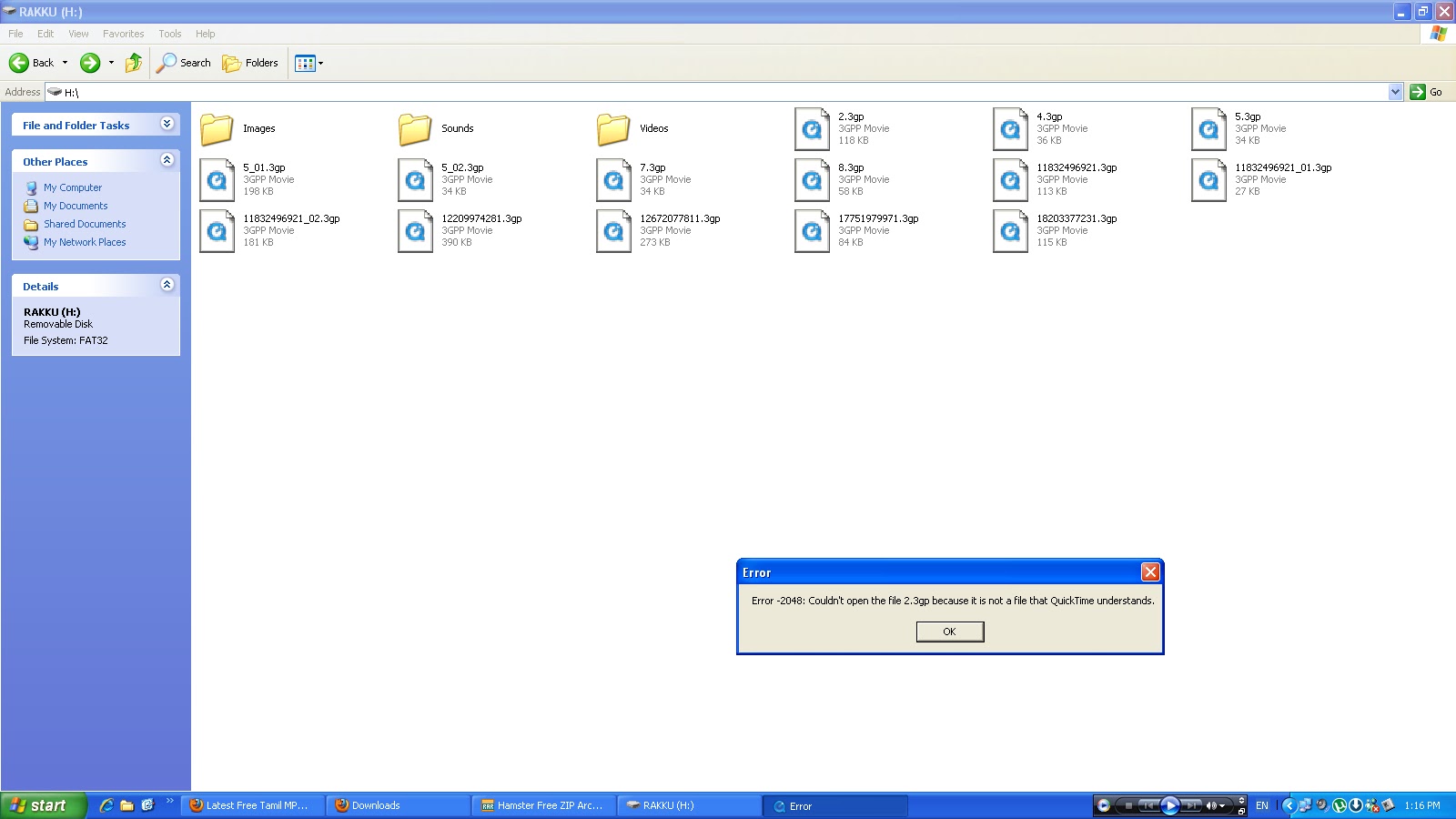
    When i try to open the file having .3gp extension with quicktime player i received an error as,:Error -2048: Couldn't open the file <file name><file format(.3gp)> because it is not a file that quick time understands".
    Note : This error can appear on windows 7/ xp..
    Error proof :
    how to fix couldn't open file error quicktime -error code 2048
    solution :
    • ensure whether the file is corrupted or not,if it is corrupted then just replace the file.
    • try open the file with other programs which are supporting the file extension.
    • if it is a quick time player issue then check for codecs and install it.

    12.8.11

    How memory affects usb device

    Sometimes when you plug in the usb pendrive into the computer's port and keep searching for its drive location, you may not able to view the device from the 'mycomputer'.And at the time a notification icon stated with error message like your 'device is malfunctioned' or 'device is not working' may appear just over the windows notification area.This is the problem which can be sometimes recoverable.Here i show you how to recover your valuable datas from such type of problems.

    The error of 'unknown device' may appear,if the device has no memory or there is no free space available to store any more datas (user have used full memory of the pendrive).So for resolving this situation the user have to restart the system and search your usb drive onceagain,it is visible.

    Recommended :
    support for media ejection lock

    10.8.11

    solve hamster errors

    While i try to open one of a free tool namely hamster video converter i received an error messages as listed below.
    An error has occurred during program execution.
    Exception Type : EInvalidXML / EAssertion Failed
    Message : Cannot find filter description./ Options not found.
    Module name : HamsterVideoConverter.exe
    platform : windows.
    Recommended :
    Access Violation Read of address error

    BootClean error log (Error 0xc0000034)

    Boot time removal tool started.

    Error 0xc0000034 deleting regvalue \Registry\Machine\SOFTWARE\MICROSOFT\WINDOWS NT\CURRENTVERSION\WINLOGON.

    Error 0xc0000034 opening (\??\C:\Documents and Settings\USER\fswagz.exe) for reparse check.

    Unable to strip attributes from \??\C:\Documents and Settings\USER\fswagz.exe with error 0xc0000034.

    Error 0xc0000034 removing: \??\C:\Documents and Settings\USER\fswagz.exe
    BTR Completed Successfully.


    Recommended :
    solve compressed Boot manager problem

    7.8.11

    Event 14 /36 Volsnap

    Error Description : The shadow copy of volume C: was aborted because of an IO failure.
    Event id : 14.
    Source : VolSnap
    file name : volsnap.sys
    Error codes :

    0000: 00000000 00580002 00000000 c006000e
    0010: 00000002 c000009c 00000001 00000000
    0020: 00000000 00000000


    Volsnap Error With Event id : 36
    The shadow copies of volume C: were aborted because the shadow copy storage could not grow due to a user imposed limit.
    Log name : system
    source : volsnap
    keywords : classic
    Solution : Increase the maximum amount of storage space that is available for shadow copies of the volume.For troubleshooting refer the post Diff Area Integrity from http://technet.microsoft.com/en-us/library/dd364636(WS.10).aspx.

    Event 16, volsnap:
    The shadow copies of volume were aborted because volume, which contains shadow copy storage for this shadow copy, was force dismounted.
    proof:
    volsnap event 16 windows 7

    Recommended : 
    solve volume shadow copy problems

    5.8.11

    windows sdk installation failed for windows xp and .net framework 4

    Windows SDK (Software development kit) enables developer to create application and other essential IT supported features like windows troubleshooting platform (WTP) that can run on microsoft windows operating systems of different versions like windows 7/xp/vista etc.
    To install windows sdk the system should need to have .net framework previously installed.Lets see what are error reports received while the windows sdk installation takes place on windows xp/ 7 operating systems.


    Commonly occuring errors windows sdk installation:
    Installation failed 
    A problem occurred while installing selected windows SDK components.
    • 'Installation of the "Microsoft .Net framework Reference Assemblies" product has reported the following error: Signature of the file netfx_dtp.cap could not be obtained.Possible unsigned file'.
    •  Setup could not find the file WinSDKTools\WinSDKTools_x86.msi at any of the specified source locations.
    SDKSetup_7.0.6918.0.log holds following error report :
    • SchedNetFx:  Error 0x80070003: failed to call FindFirstFileW with string C:\WINDOWS\Microsoft.NET\Framework64\*
    • SchedNetFx:  Error 0x80070003: failed to search for ngen under path C:\WINDOWS\Microsoft.NET\Framework64\
    • SchedNetFx:  Failed to find 64bit ngen. No actions will be scheduled to create native images for 64bit.
    •  Failed to download the file http://download.microsoft.com/download/A/6/A/A6AC035D-DA3F-4F0C-ADA4-37C8E5D34E3D/setup\MTPack\netfx_dtp.cab. Error - An exception occurred during a WebClient request.
    • [SDKSetup:Error] Config_Products_Install: Installation of Product Microsoft .Net Framework Reference Assemblies (failed): Signature of the file netfx_dtp.cab could not be obtained. Possible unsigned file. Stack:    at SDKSetup.Utility.VerifyFileSignature(String LocalFile, Boolean QuietNoUI)   at SDKSetup.Product.CheckCABSignatures() at SDKSetup.Product.ProcessDownloadedFiles() at SDKSetup.Product.WaitForDownloadToComplete(ManualResetEvent cancelEvent) at SDKSetup.Product.ConfigureNewProduct(ManualResetEvent CancelEvent)
    •  [SDKSetup:Error] Config_Products_Install: Windows SDK Setup (failed): Installation of the "Microsoft .Net Framework Reference Assemblies" product has reported the following error: Signature of the file netfx_dtp.cab could not be obtained. Possible unsigned file. Stack:    at SDKSetup.Product.ConfigureNewProduct(ManualResetEvent CancelEvent) at SDKSetup.Product.SetupProduct(TaskMode taskMode, ManualResetEvent CancelEvent) at SDKSetup.ProductCollection.SetupProducts(TaskMode taskMode, DownloadManager downloadManager, ManualResetEvent cancelEvent) at SDKSetup.ConfigProducts.DoCurrentTask(TaskMode Task).
    windows sdk installation failed for windows xp and .net framework 4

    Windows Delayed Write Failed

    While attempting to save files from windows xp installed computer to memory card,i  received an error message and also at that time system was hanged for a while.

    Error message :
    Windows - Delayed Write Failed
    'Windows was unable to save all the data for the file <drive location-Here external drive>.The data has been lost.This error may be caused by a failure of your computer hardware or network connection.Please try to save this file elsewhere'.

    Note : After short a while i received taskbar error ' Unable to create task bar icon after 5seconds'.Is it related to delayed write error.
    Solution recommended is to reinsert the external drive<here its memory card> and try saving the files.
    delayed write failed windows xp
    Platform : windows xp operating system service pack 3(SP3).

    Settings/configuration for UDMA(ultra direct memory access) and 'Enable write caching on disk' should be carefully viewed to overcome this error.
    By increasing the number of page table entries we can avoid this error.To increase the number of page table entries open regedit and assign following settings for the key.
    HKEY_LOCAL_MACHINE/System/CurrentControlSet/control/session manager/memory management
    •  In the details pane,right click the system pages value and then click modify.Note: default value is 0(hex).
    • In the value data box,type 7FFF and click ok.we can try following alternate values 7FFF=32,000;PTEs BFFF=50,000;PTEs 24FFF=150,000 PTEs.Note: The FFFFFFFF value should not be used.If you set it too high,you might run out of paged pool memory. 
    • Exit registry
    • restart
    • monitor the memory /free system page table entries in perfmon.
    Note:For xp installed systems this error can be solved
    from the following page,
    http://support.microsoft.com/kb/330174.


    Note: This error occurs, if user have removed the device before the process (write) takes place.
    Recommended :
    error copying files incorrect parameter

    4.8.11

    net error 6 file not found chrome

    While i try to access windows SDK from chrome browser i received an error message as 'Error 6 (net::ERR_FILE_NOT_FOUND) The file or directory could not found'.

    The above error indicate that the file is not found or moved to another location.Such net errors are only displayed on chrome browser. When i try to access the same file with mozilla i got just an error message without displaying the code.
    Platform : windows operating system.
    net error 6 chrome file not found

    The parameter is incorrect

    While installing update or at the time of copying files,the user may face an error like 'incorrect parameter'.Here i posted an error,what i faced wile copying files from system to 8gb memory card with help of card reader.
    Error copying file or folder
    Cannot copy <file name>:The parameter is incorrect.
    error while copying file: 'the parameter is incorrect'
    Platform: windows xp.

    Recommended:
    windows update 'the parameter is incorrect'
    Error 0x80070057 - The parameter is incorrect

    2.8.11

    Fix internet explorer script error

    While i try to view the page which is mentioned below displayed an error message as,
    An error has occured in the script on this page.
    line: 185
    char:52
    error : object doesn't support this property or method.
    code :0
    The window also show the message 'do you want to continue running script on this page?'.
    how to solve script errors on page viewed through internet explorer
    The page where i found this error is http://www2.avira.com/assets120a72ef2630aa8ecc423205bb102a76.js

    Sometimes the same error may happens in a web page as,
    Message from web page
    TypeError: 'Object doesn't support this  property or method'.
    type error from the web page
    Error may also like 'object expected'/ syntax error like expected')'/undefined error.


    Recommended articles :
    fix script errors

    1.8.11

    Error 310 Too many redirects

    Error 310 (net::ERR_TOO_MANY_REDIRECTS): There were too many redirects.
    This webpage has a redirect loop.
    The web page at <page address> has resulted in too many redirects.
    This net error 310 occurred when i try to send email more than once at a time.Solution i recommended is to clear the cookies for the site or just allow third party cookies. If not, it is possibly a server configuration issue and not a problem with the computer. It is also suggested to the user who have very slow internet connection is  to avoid opening multiple tabs and just sending email more than once at a time.

    Cookies, are files created by website's you have visited that store browsing information, such as your site preferences or profile information. There are two types of cookies first and third party cookies. First one is set by the site domain listed in the address bar of your browser. Next one is set by ads, pictures coming from other domain sources.

    To avoid this error check your browser's cookie settings properly. Lets see how to adjust cookie permission on browser. First navigate to wrench menu then choose settings and then to show advanced settings under, from there privacy section select content settings. Finally you can block, delete, allow cookie settings from the cookies section.

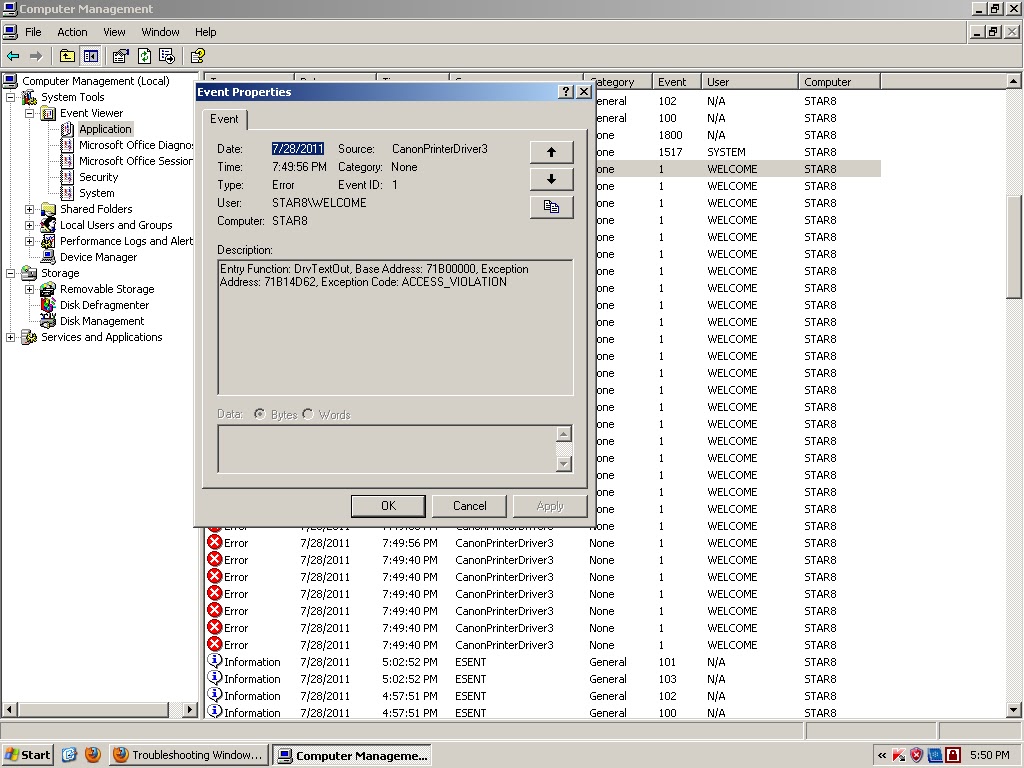
    Exception code : ACCESS_VIOLATION Canon Printer

    Error description:
    Entry Function : Drv TextOut, Base Address :71B00000, Exception Address : 71B14D62,Exception code : ACCESS_VIOLATION.
    Event id : 1.
    Source : Canon Printer Driver3.
    platform : windows xp.

    Sharing hp laserjet printer failed event 19

    Sharing printer failed + 1722,Printer HP LaserJet P1007 share name HPLaserJ.P1007.
    Additional log :
    Event id : 19.
    Source : Print.
    File name : LocalSpl.dll
    Platform : windows xp
    Solution :
    Follow the below instructions to install your hp device after receiving an installation error.
    We have detected that you were unable to successfully complete the installation for your HP device. All of the files that we attempted to install have been removed. Follow the procedures in this document to install your HP device after receiving an installation error.

    Note
    Please make sure you have turned off and restarted your PC before trying the steps outlined below.

    Step 1: Run the Disk Cleanup utility
    The software installation process uses certain system folders for preparing files for installation. Periodically, these folders need to be cleared. Prior to installing again, run the Disk Cleanup utility, which will help you:
    ·      Delete temporary Internet files
    ·      Delete downloaded program files
    ·      Empty the Recycle Bin
    ·      Delete files from the temporary folder
    ·      Delete files created by other Windows tools
    ·      Remove unused, optional Windows components
    To use the Disk Cleanup utility:
    1.     Click Start, click All Programs, click Accessories, click System Tools, and then click Disk Cleanup.
    2.    After the Disk Cleanup utility analyzes the hard drive, a report with a list of options appears on the computer. Click the appropriate check boxes to remove unwanted files from the computer, and then click OK.
    3.    Click Yes on the confirmation screen that appears on the computer. 

    Step 2: Reinstall HP Software
    Note
    Before starting the installation process again, please confirm the following:
    ·      Unplug the USB cable from the device (if you are connecting to the printer via USB cable).
    ·      Make sure your PC has been rebooted at least once since the failed installation. 

    Reinstall the HP software by re-inserting the CD that came with your device.
    Please follow the onscreen instructions, and connect the USB cable only when prompted by the software. The illustration below shows a typical USB connection.

    Note
    If the USB cable is connected to a USB hub or a docking station for a laptop, it could cause the installation to fail. Try connecting the USB cable directly to the computer during the device installation (when prompted).
    If you successfully installed your HP device, please skip to Step 6 and complete the brief feedback survey so that HP may continue to improve our products and processes for our customers.

    Step 3: Temporarily Disable Startup Software
    If you were again unable to successfully install your HP device, you may need to temporarily disable startup software. Windows allows many programs and processes to run immediately upon startup. These programs may be preventing you from installing the HP Software. These directions explain how to temporarily disable these programs and processes while installing the HP device. (Step 5 below will explain how to re-enable the startup software.)
    1.     Open MSConfig as follows:
    a.    Click the Start button.
    b.    Click Run.
    c.     Type msconfig in the run box, and then click OK.
    2.    The System Configuration Utility dialog box appears. If the radio button next to Normal startup is currently selected, follow the steps under Normal Startup.  If the startup option is set to Selective, follow the steps under Selective Startup.
     
    Normal Startup
    Selective Startup
    1.     Click the circle next to Selective Startup and uncheck the checkbox next to Load Startup Items.
    2.    Click the Services tab. Place a checkmark on Hide All Microsoft Services.
    3.    Click the Disable All button.

    1. Disable the Startup Items
    a.    Click the Startup tab.
    b.    Make a list of items that are checked. You will need this list to set your computer startup items back to what it was before.
    c.     Click the General tab.
    d.    Uncheck the checkbox right next to Load Startup Items.
    2. Disable the Services
    a.    Click the Services tab.
    b.    Place a checkmark on Hide all Microsoft Services.
    c.     Make a list of items that are checked. You will need this list to set your computer service items back to what it was before.
    d.    Click the Disable All button.

    3.    Complete the MSConfig process
    a.    Click the Apply button.
    b.    Click the OK button and a new window will pop-up. Click the Restart button to continue.
    c.     Upon restarting your PC you will get a System Configuration Utility window. Place a checkmark on the “Don’t show this message…” checkbox and click the OK button.
    Note
    After completing Step 4 below, don't forget to restore the startup software that you temporarily disabled. (Step 5 gives you the instructions for restoring the startup software.)  Without restoring your startup software, your PC may not function the way that you expect.

    Step 4: Reinstall HP Software

    Note
    Before starting the installation process again, please confirm the following:
    ·      Unplug the USB cable from the device (if you are connecting to the printer via USB cable).
    ·      Make sure your PC has been rebooted at least once since the most-recent failed installation. 
    Reinstall the HP software by re-inserting the CD that came with your device.
    Please follow the onscreen instructions, and connect the USB cable only when prompted by the software. The illustration below shows a typical USB connection.
    Step 5: Re-enable Startup Software
    If you disabled startup software (in Step 3) to install the HP Software, you'll want to restore those applications and services at Startup. Without restoring your startup software, your PC may not function the way that you expect.
    1.     Open MSConfig as follows:
    a.    Click the Start button.
    b.    Click Run.
    c.     Type msconfig in the run box, and then click OK. The System Configuration Utility dialog box appears.
    2.    If you followed Normal Startup in Step 3: Disable Startup Software above (or if you want to return to a Normal Startup), follow Normal Startup below. If you want to customize the programs that run at startup, follow Selective Startup to proceed.
     
    Normal Startup
    Selective Startup
    Click the circle next to Normal Startup.

    1.     Click the Startup tab.
    2.    Place a checkmark on every item that is in your list of checked startup items for the startup tab from Step 3.
    3.    Click the Services tab.
    4.    Place a checkmark on Hide all Microsoft Services.
    5.    Place a checkmark on every item that is in your list of checked startup items for the Services tab from Step 3.

    3.    Complete the MSConfig process
    a.    Click the Apply button.
    b.    Click the OK button, and select Restart to restart your computer.

    For Further Help
    If you are still unable to install the HP software, please contact HP technical support.
    Support options and availability vary by product, country/region, and language.

    hp laserjet printer sharing failed 1722 with event id 19
    Recommended :
    fix print spooler failed error

    Event IDs

    event id 1000 ( 11 ) event id 1 ( 10 ) event id 1002 ( 7 ) event id 0 ( 6 ) event id 1001 ( 6 ) event id 2 ( 6 ) event id 5 ( 5 ) event id 5000 ( 5 ) event id 100 ( 4 ) event id 1008 ( 4 ) event id 16 ( 4 ) event id 20 ( 4 ) event id 3 ( 4 ) event id 1026 ( 3 ) event id 12 ( 3 ) event id 2001 ( 3 ) event id 4 ( 3 ) event id 7001 ( 3 ) event id 10000 ( 2 ) event id 10005 ( 2 ) event id 1003 ( 2 ) event id 1017 ( 2 ) event id 11 ( 2 ) event id 1101 ( 2 ) event id 12013 ( 2 ) event id 13 ( 2 ) event id 14 ( 2 ) event id 15 ( 2 ) event id 17 ( 2 ) event id 19 ( 2 ) event id 201 ( 2 ) event id 23 ( 2 ) event id 257 ( 2 ) event id 3001 ( 2 ) event id 3002 ( 2 ) event id 3029 ( 2 ) event id 33 ( 2 ) event id 34 ( 2 ) event id 4096 ( 2 ) event id 46 ( 2 ) event id 5008 ( 2 ) event id 54 ( 2 ) event id 59 ( 2 ) event id 6 ( 2 ) event id 6161 ( 2 ) event id 8 ( 2 ) event id 8200 ( 2 ) event id 5000 ( 1 ) event id -1 ( 1 ) event id 10 ( 1 ) event id 10010 ( 1 ) event id 10016 ( 1 ) event id 10020 ( 1 ) event id 1004 ( 1 ) event id 1005 ( 1 ) event id 1006 ( 1 ) event id 10110 ( 1 ) event id 10111 ( 1 ) event id 1012 ( 1 ) event id 1013 ( 1 ) event id 1015 ( 1 ) event id 102 ( 1 ) event id 1024 ( 1 ) event id 104 ( 1 ) event id 1041 ( 1 ) event id 1057 ( 1 ) event id 106 ( 1 ) event id 1068 ( 1 ) event id 108 ( 1 ) event id 1082 ( 1 ) event id 1090 ( 1 ) event id 11006 ( 1 ) event id 1103 ( 1 ) event id 111 ( 1 ) event id 1111 ( 1 ) event id 11305 ( 1 ) event id 11311 ( 1 ) event id 11316 ( 1 ) event id 11330 ( 1 ) event id 11335 ( 1 ) event id 11406 ( 1 ) event id 11500 ( 1 ) event id 11704 ( 1 ) event id 11706 ( 1 ) event id 11935 ( 1 ) event id 12289 ( 1 ) event id 12291 ( 1 ) event id 12293 ( 1 ) event id 12297 ( 1 ) event id 12305 ( 1 ) event id 135 ( 1 ) event id 137 ( 1 ) event id 14103 ( 1 ) event id 142 ( 1 ) event id 14332 ( 1 ) event id 14370 ( 1 ) event id 148 ( 1 ) event id 1502 ( 1 ) event id 1508 ( 1 ) event id 1511 ( 1 ) event id 1515 ( 1 ) event id 15151 ( 1 ) event id 15300 ( 1 ) event id 15301 ( 1 ) event id 167 ( 1 ) event id 17204 ( 1 ) event id 17207 ( 1 ) event id 1797 ( 1 ) event id 1802 ( 1 ) event id 2000 ( 1 ) event id 2007 ( 1 ) event id 2013 ( 1 ) event id 2015 ( 1 ) event id 2020 ( 1 ) event id 20276 ( 1 ) event id 205 ( 1 ) event id 22 ( 1 ) event id 25 ( 1 ) event id 2505 ( 1 ) event id 259 ( 1 ) event id 269 ( 1 ) event id 27 ( 1 ) event id 28 ( 1 ) event id 3000 ( 1 ) event id 3006 ( 1 ) event id 3028 ( 1 ) event id 3058 ( 1 ) event id 3079 ( 1 ) event id 32 ( 1 ) event id 32003 ( 1 ) event id 3299 ( 1 ) event id 3417 ( 1 ) event id 350 ( 1 ) event id 351 ( 1 ) event id 36 ( 1 ) event id 36881 ( 1 ) event id 36882 ( 1 ) event id 36887 ( 1 ) event id 36888 ( 1 ) event id 372 ( 1 ) event id 40 ( 1 ) event id 400 ( 1 ) event id 4005 ( 1 ) event id 4099 ( 1 ) event id 41 ( 1 ) event id 4104 ( 1 ) event id 4107 ( 1 ) event id 4118 ( 1 ) event id 4198 ( 1 ) event id 4199 ( 1 ) event id 4205 ( 1 ) event id 43 ( 1 ) event id 4307 ( 1 ) event id 4321 ( 1 ) event id 4373 ( 1 ) event id 4376 ( 1 ) event id 439 ( 1 ) event id 448 ( 1 ) event id 45 ( 1 ) event id 4609 ( 1 ) event id 4618 ( 1 ) event id 4621 ( 1 ) event id 485 ( 1 ) event id 49 ( 1 ) event id 490 ( 1 ) event id 50 ( 1 ) event id 5003 ( 1 ) event id 50034 ( 1 ) event id 5004 ( 1 ) event id 5005 ( 1 ) event id 50068 ( 1 ) event id 505 ( 1 ) event id 5051 ( 1 ) event id 5053 ( 1 ) event id 51 ( 1 ) event id 513 ( 1 ) event id 5300 ( 1 ) event id 55 ( 1 ) event id 56 ( 1 ) event id 6004 ( 1 ) event id 60055 ( 1 ) event id 63 ( 1 ) event id 7 ( 1 ) event id 7000 ( 1 ) event id 7009 ( 1 ) event id 7010 ( 1 ) event id 7011 ( 1 ) event id 7022 ( 1 ) event id 7023 ( 1 ) event id 7024 ( 1 ) event id 7026 ( 1 ) event id 7030 ( 1 ) event id 7034 ( 1 ) event id 7038 ( 1 ) event id 7040 ( 1 ) event id 7042 ( 1 ) event id 72 ( 1 ) event id 7320 ( 1 ) event id 777 ( 1 ) event id 8000 ( 1 ) event id 8003 ( 1 ) event id 8032 ( 1 ) event id 808 ( 1 ) event id 8193 ( 1 ) event id 8194 ( 1 ) event id 8208 ( 1 ) event id 86 ( 1 ) event id 877 ( 1 ) event id 9 ( 1 ) event id 9002 ( 1 ) event id 9003 ( 1 )